If your scan archive will usually stay at a fixed workstation, a desktop HDD may be suitable. If you need to move it between computers, a USB-powered portable HDD could be more practical. An SSD may be a good fit if you often copy or work on large folders while on the move – but the ports on your computers matter too. Measure your existing data and allow for planned growth, then set up a separate backup that you can check. A single drive on its own is not a resilient archive.
Which solution is right for you?
People managing growing scan archives
If you store scans and project versions at a fixed workstation, start by measuring how much storage you currently need. Allow extra space for new files and backup copies. Germany’s Federal Office for Information Security points out that the lifespan of storage media cannot be predicted precisely; Seagate describes its Expansion Desktop range as a desktop storage solution.
Mobile project team members
If you take scan folders between workstations, check the power supply, computer ports and file system for the specific model. Toshiba and Western Digital offer portable HDD ranges. Apple explains that macOS can read NTFS drives, but cannot write to them without additional steps.
People who transfer files frequently
If you regularly copy or work on large folders, consider the ports on your computers as well as the type of drive. F.A.Z. Kaufkompass distinguishes between compact, portable external hard drives and larger drives with their own power supply; Samsung lists its external T7 Shield SSD in a 4-TB version.
What should you look for when buying?
Desktop external HDD
A good fit if: your archive will mainly stay with one computer and large folders account for most of your storage needs.
Consider: Desktop drives often need their own power supply and are less convenient to carry around. Seagate lists a power adapter and USB cable for the Expansion Desktop.
Portable external HDD
A good fit if: you want to take scan folders between workstations and can find a model with enough rated capacity.
Consider: USB power means you do not need a separate power adapter, but the connection, cable and file system must be compatible with your computers.
External SSD
A good fit if: copying or working on large folders while on the move is a priority for you.
Consider: Your computer’s port affects transfer speeds, and an SSD is no substitute for a separate backup. Samsung lists the T7 Shield in a 4-TB version and specifies IP65 protection, tested under controlled conditions.
| Priority |
What to check before buying |
Who is it important to? |
| Room for growing folders |
Measure folder sizes and allow for planned growth; include enough rated capacity for any backup copies you plan to make. |
If I want to keep scans, edited versions and new batches of scanned files together, I need enough room based on the amount I have measured; around 33% of consumers put sufficient capacity first. |
| A backup you can restore |
Decide where to keep a second copy and how to test restoring a folder. |
If I need to access my archive even after a drive failure, I will plan a separate copy and test that I can restore it; around 27% of consumers prioritise recoverability. |
| Compatibility between computers |
Check the operating systems, ports, cables and file system for the exact model; back up your files before formatting. |
If I need to read and edit scan folders on several computers, I want to check the file system and connections in advance; around 20% of consumers prioritise device compatibility. |
| Access protection for confidential scans |
If needed, look for a solution that specifically offers encryption, and plan how to keep the key secure. |
If project files contain confidential or potentially personal information, I want to plan how to manage access and store the key securely; around 20% of consumers prioritise access protection. |
Avoid common buying mistakes
-
Moving your only archive to the new drive
A new drive can still fail or be damaged where it is stored. Germany’s Federal Office for Information Security also points out that the lifespan of storage media cannot be predicted precisely.
Keep a separate copy and test whether you can restore the files from a sample folder.
-
Assuming a USB-C connector means fast transfers
The connector type alone does not tell you how quickly the full transfer will run with your drive, cable and computer.
Check the ports on the specific device. Give SSD speeds particular weight if you often move large folders.
-
Using a Windows-formatted drive with a Mac without checking it
According to the manufacturer, the standard 4 TB Verbatim Store 'n' Go is formatted as NTFS. Apple explains that macOS can read NTFS, but cannot write to it without additional steps.
Check the file system before adding your files. Back up any existing files elsewhere before reformatting a drive, as this will delete the files stored on it.
-
Assuming password protection always means encryption
An access lock does not automatically mean that the stored data is encrypted. Germany’s Federal Office for Information Security distinguishes between different data encryption methods.
If you need to protect confidential scans, check the encryption features of the specific model and plan how to keep the key secure.
Brands to consider
Seagate
The Expansion Desktop is a desktop HDD range for adding storage at a fixed workstation.
- Seagate says the setup includes a power adapter and USB cable.
- The power adapter makes the drive less convenient to carry around frequently. The Rescue services mentioned in the data sheet do not automatically apply to every German version.
Toshiba
Canvio Basics is a USB-powered portable HDD range. Toshiba lists versions with 1, 2 and 4 TB of storage.
- Toshiba says the documented versions are ready to use with Windows, with no additional installation required.
- Check the file system if you plan to use the drive with a Mac. The specifications do not guarantee a longer lifespan for archiving.
Western Digital
According to its data sheet, the My Passport range includes portable HDD versions with capacities up to 6 TB, plus password protection and hardware encryption.
- The data sheet lists a USB-A cable and Windows compatibility for the documented range.
- For macOS, Western Digital describes a downloadable NTFS driver or reformatting. These specifications do not automatically apply to all WD drives.
Verbatim
The Store 'n' Go range includes a portable 4-TB HDD and a separate 2-TB Secure version with a keypad and hardware encryption.
- Verbatim says the standard 4-TB version is powered via USB.
- According to the manufacturer, the 4-TB version comes formatted as NTFS. Keypad encryption is a feature of the separate Secure version, not the standard 4-TB model.
Samsung
The external T7 Shield SSD is documented in a German 4-TB version, model MU-PE4T0S/EU.
- Samsung specifies USB 3.2 Gen 2 and IP65 protection tested under controlled conditions.
- Samsung excludes liquid and dust damage from its warranty. The protection rating is no substitute for careful handling or separate backups.
Joybuy products for scan archives
The selection below includes portable external HDDs for carrying between workstations, as well as desktop HDDs for a dedicated archive location.
 No image available
WD Elements Portable 5TB USB-C
For large scan and project folders that you need to carry between workstations.
5 TB rated capacity; USB-C; portable 2.5-inch design.
View at Joybuy
No image available
WD Elements Portable 4TB USB-C
For scan folders that you want to take between different workstations.
4 TB rated capacity; USB-C, USB 3.2 Gen 1 and 2.5-inch design.
View at Joybuy
 No image available
WD Elements 2TB Portable External Hard Drive
For mobile use when the capacity is right for the files and backups you have in mind.
2 TB rated capacity; USB-C, USB 3.2 Gen 1, 2.5-inch design and exFAT. Not intended as the only storage location for important files.
View at Joybuy
 No image available
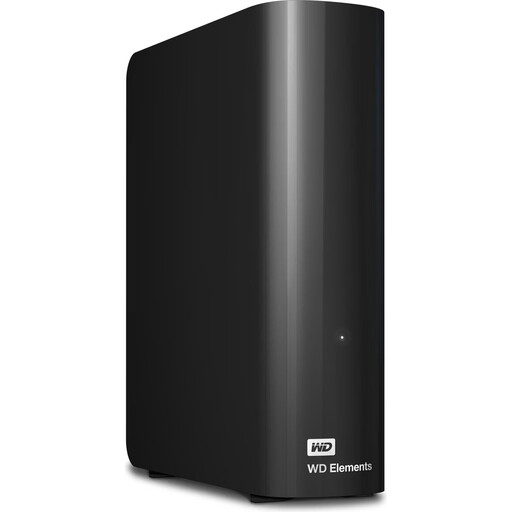
WD Elements 24TB Desktop External Hard Drive
For large scan archives that will mainly stay at a fixed workstation.
24 TB rated capacity; USB 3.2 Gen 1, 3.5-inch design and external power adapter. Important data should not be stored on this drive alone.
View at Joybuy
 No image available
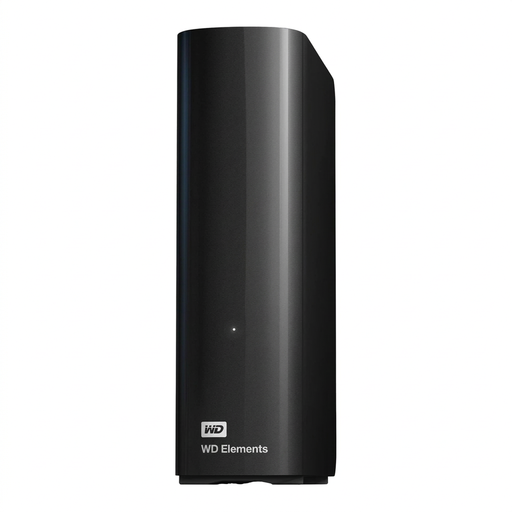
WD Elements 14TB Desktop External Hard Drive
For large project folders at a fixed workstation, provided the file system is compatible with your computers.
14 TB rated capacity; USB 3.0, 3.5-inch design, external power adapter and NTFS. According to the product description, reformatting may be required for use with a Mac. Back up any existing files elsewhere first.
View at Joybuy
Frequently asked questions
Can a single external hard drive keep a village archive safe permanently?
No. One drive is not enough for a separate backup. Germany’s Federal Office for Information Security points out that the lifespan of storage media cannot be predicted precisely. Keep a separate copy and test whether you can restore it using a sample folder.
What can I do if my Mac cannot write to a Windows hard drive?
First, check the file system: according to Apple, macOS can read NTFS but cannot write to it without additional steps. If you want to reformat the drive, back up the existing files elsewhere first, as formatting will delete them.
Is the advertised USB interface enough to judge transfer speeds?
No. The interface specification alone does not tell you how quickly the complete transfer will run on your computer. Check the capacity and connections first. If frequent copying is important, compare suitable HDD and SSD models using tests carried out under comparable conditions.
What should I consider when planning backups and warranty cover?
As well as your first drive, plan for a separate storage device and time to test restoring files. Germany’s consumer advice centre distinguishes between the seller’s statutory liability for defects and a voluntary guarantee; any specific guarantee is subject to its own terms and conditions.
Can I share scans showing identifiable people with everyone involved in a project?
There is no blanket answer. Germany’s Federal Commissioner for Data Protection and Freedom of Information lists consent or a legal basis as possible requirements for processing personal data. Check the specific scans and how they will be used to establish the basis for access and sharing.


