Flatshare with console basketball
For an existing PS5, Xbox or Switch 2, you’ll need extra input devices that work with your platform and game. For multiplayer in NBA 2K27 on Switch 2, Nintendo requires one compatible controller per player.


First, choose a controller that works with your existing console or PC and the specific version of the game. Then count how many suitable input devices your local gaming session is short of. A supported wireless connection may be more practical for seats further from the screen, while a wired connection needs a safe route through your shared living space. Nintendo requires each player to have a compatible controller for multiplayer in NBA 2K27 on Switch 2.
For an existing PS5, Xbox or Switch 2, you’ll need extra input devices that work with your platform and game. For multiplayer in NBA 2K27 on Switch 2, Nintendo requires one compatible controller per player.
If you’re playing together on a Windows PC, check what the specific game supports, as well as the available USB and wireless connections. Steam and 2K list split-screen play and some controller support for NBA 2K27.
If not everyone is sitting right in front of the screen, weigh up running a cable against using a wireless connection listed as compatible with your platform. Microsoft, 8BitDo and Turtle Beach offer different connection options depending on the controller and platform.
| Buying priority | What to check | Who is it most important to? |
|---|---|---|
| Platform and game | Check that the controller works with the same console or a compatible PC, and with the specific version of the game. Steam and 2K list some controller support for NBA 2K27, but you should still check that it works with the local game mode. | I want to be sure my device and the game version are compatible before paying for extra features. Around 36% of consumers put platform and game compatibility first. |
| Enough controllers | Count the players and the suitable devices you already have. Nintendo requires one compatible controller per player for multiplayer in NBA 2K27 on Switch 2. | If several flatmates want to play at the same time, I want to know how many suitable input devices are actually available. Around 29% of consumers focus on having extra player positions available. |
| Connection from your seat | The 8BitDo Ultimate 2C Wireless supports 2.4 GHz or a wired connection on Windows. Turtle Beach lists the Stealth Pivot as wireless on PC but wired on Xbox. | I want to play from my own seat without running a cable across the room or relying on a wireless connection that my platform doesn’t support. Around 21% of consumers prioritise freedom of movement and a suitable connection. |
| Power and extra features | Check what cables or receivers are included, charging requirements and whether special game features are supported. Sony says haptic feedback on PC requires USB and support from the game. | For regular gaming sessions, I want my controller to be ready to use and any extras to make a real difference in the game. Around 14% of consumers pay particular attention to power and ongoing maintenance. |
The listed connection can vary by device: Turtle Beach lists the Stealth Pivot as wireless on PC and wired on Xbox. According to 8BitDo, Bluetooth on the 8BitDo Ultimate 2C Wireless is for Android, while Windows uses 2.4 GHz or a wired connection.
Before counting on wireless play, check the connection table for your exact platform and model variant.
Having enough suitable input devices doesn’t, by itself, confirm that the local game mode you want is supported. Nintendo requires one compatible controller per player for multiplayer in NBA 2K27 on Switch 2.
Count the compatible controllers you already have, then check the local game mode and player limit for the version you actually use.
Sony notes that some DualSense features depend on the game; haptic feedback on PC requires USB. Extra features alone don’t prove that the controller will give you an advantage in your game.
Consider extra features only once you’ve confirmed they’re supported by the specific game and meet your needs.
One option for Xbox and Windows, once you’ve confirmed which connection works with your device.
The DualSense is worth considering for an existing PS5 or for supported PC games.
A compatible controller may suit Switch 2, as long as it works with the game mode and the devices you already have.
The Ultimate 2C Wireless is one option for Windows PC, with a 2.4 GHz receiver or a wired connection.
The Stealth Pivot may appeal to buyers who are also interested in its adjustable controls.
The wired Advantage Warrior’s Nirvana is a documented option for Xbox and Windows if a cable suits your setup.
This Joybuy selection includes controllers for local gaming sessions on Windows PC, PS4/Pro, PS5, Xbox and Nintendo Switch 2. Before you buy, check that the specific game, platform and connection you want to use are compatible.
 No image available
Designed for Windows PC gaming with a wireless connection from your seat; you’ll need the USB receiver.
Features listed in the product title: wireless 2.4 GHz connection and two rear buttons.
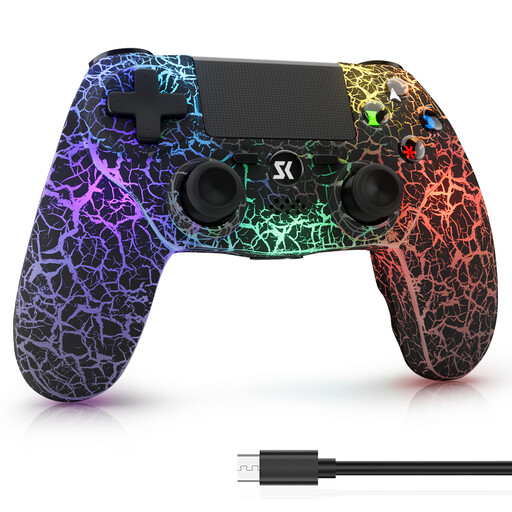 No image available
Designed for gaming on PS4/Pro or a Windows PC. Before buying, check the details against the specific version of your game.
Features listed in the product title: RGB lighting, 1000-mAh battery, dual vibration and 6-axis motion control.
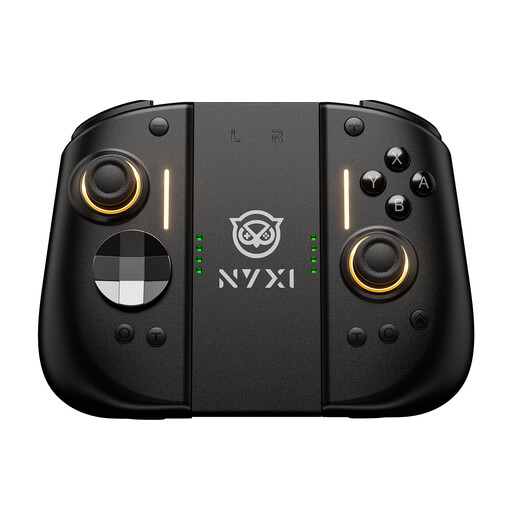 No image available
Designed for gaming on Switch 2; also check that the controller supports the controls you need for your game.
Features listed in the product title: Hall Effect joysticks, mechanical buttons, two rear buttons and adjustable vibration.
 No image available
The product title lists Xbox One, Xbox Series X/S and PC as compatible platforms. For PC gaming, check which connection your device and game support.
The controller requires two AA batteries, which are included according to the product description. The version listed in the title is Pulse Red.
 No image available
Designed for PS5 gaming or a supported PC game. Sony documents USB-C and Bluetooth for compatible PCs; some features depend on the device and game.
According to Sony, haptic feedback on PC requires a USB connection. A USB cable is listed in the product title.
No. Also check the local game mode and controller support for the specific version on your platform. Steam and 2K list local split-screen play and some controller support for NBA 2K27; for multiplayer on Switch 2, Nintendo requires one compatible controller per player.
It depends on the model. Microsoft lists USB, Bluetooth and, where available, Xbox Wireless for Xbox Wireless Controllers; the 8BitDo Ultimate 2C Wireless supports 2.4 GHz or a wired connection on Windows. Connect the devices as instructed, then check that they’re assigned correctly in the game you’re playing.
Charge battery-powered controllers in good time and have the cable or receiver for your model to hand. To charge an older Switch Joy-Con on Switch 2, you’ll need a Switch console or suitable charging accessory; according to Nintendo, connecting it directly to Switch 2 isn’t enough.
If you buy from a trader in the EU, you generally have statutory rights against the seller if the product is faulty; Your Europe says these rights apply for at least two years from receipt. A voluntary manufacturer’s guarantee doesn’t replace these rights. Distance purchases generally come with a 14-day right to cancel, subject to legal exceptions; Your Europe explains these EU rules.
Products covered by the relevant EU rules must carry the CE marking. The European Union describes it as the manufacturer’s declaration that the product meets the applicable requirements; it isn’t a quality mark awarded by a central EU body.