What to look for when buying
When choosing an extra controller for local football games in the living room, it’s important to know what matters most to you. The proportions below relate to this particular buying situation and group shoppers by their main priority.
| Priority |
What to check when buying |
Who it matters most to |
| Platform and game mode |
Check your console or PC, as well as controller support and the local multiplayer settings in the football game you want to play. |
I want to avoid finding that the second controller doesn’t work with my console or the game’s local mode. Around 36% of shoppers put compatibility first. |
| Connection from your seat |
Check whether USB, Bluetooth or a receiver is right for your platform. If you’re choosing a wired controller, consider whether the cable will reach your seat. |
If we’re sitting further apart, the connection needs to suit our setup without leaving a cable in the way. Around 29% of shoppers prioritise being able to sit wherever they like. |
| Controls and extra features |
Compare the button layout and the controls you want to customise, and check which features the game actually supports. |
I want to use buttons or feedback that work with the other players and the football game. Around 21% of shoppers care most about the controls. |
| Power and accessories |
Check whether your chosen variant needs batteries or charging, and whether you’ll need a wireless receiver. |
For our gaming session, I want to know what comes with a ready-to-use second controller and how it’s powered. Around 14% of shoppers are most concerned about what’s needed to get it running. |
Joybuy controllers for PC and console
The controllers listed here are mainly described for PC setups; some product names also mention compatibility with Switch, Switch 2 or PS4. Before buying, check that your exact platform and football game support the local mode you want to play.
 No image available
EasySMX D10 PC controller
The product name lists PC and Switch as compatible platforms. You’ll need to check separately whether the football game you want to play supports it.
The product name lists Bluetooth, a TMR joystick, dual-mode triggers and mechanical buttons.
View at Joybuy
 No image available
VIELLAN wireless gaming controller for PC with PS5-style button layout
The product name lists PC as a platform; a PS5-style button layout doesn’t mean it’s compatible with PS5. Check support for the football game you want to play.
Features listed include Hall Effect joysticks, 255-step Hall Effect triggers, programmable rear buttons, a 1000-mAh battery and USB-C.
View at Joybuy
 No image available
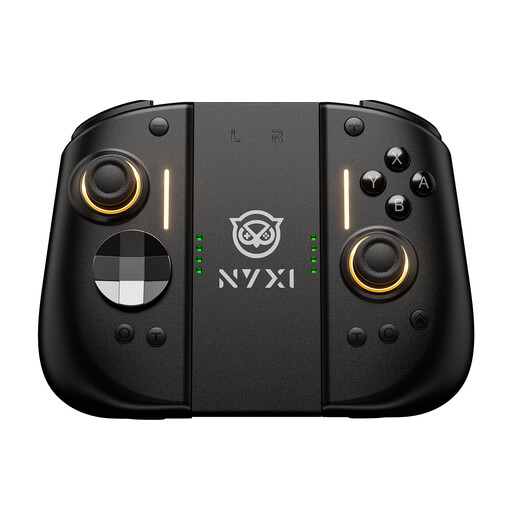
NYXI Hyperion 3 wireless controller for Switch 2, Black
The product name describes this model as a wireless controller for Switch 2. Also check that your football game supports the local mode you want to play.
Features listed include a 9-axis gyroscope, Hall Effect joysticks, mechanical buttons, two rear buttons and adjustable vibration.
View at Joybuy
 No image available
BIGBIG WON GALE HALL wireless controller
The product name lists PC, iOS and Android. Check that your game is supported and that the connection works with your platform.
The product name lists a Hall Effect trigger and four custom buttons as features.
View at Joybuy
 No image available
BIGBIG WON Rainbow 2 Pro Wired
The product name lists PC, Switch Lite and PS4 as platforms. The cable needs to reach your seat.
Features listed include a 6-axis gyroscope and macro, turbo and custom button functions.
View at Joybuy
Frequently asked questions
Is it enough for Windows to recognise the second controller?
No. Connecting to Windows doesn’t automatically mean that every football game will support the controller in the local mode you want. Check controller assignment and multiplayer mode in the game you’re playing.
How do I connect an Xbox Wireless Controller to a Windows PC?
Microsoft lists USB, Bluetooth and Xbox Wireless as connection options. You may need a compatible adapter for Xbox Wireless; for USB, you’ll need a suitable cable.
Can I use the Switch 2 Pro Controller with the original Switch?
No. Nintendo says the Switch 2 Pro Controller is only compatible with Switch 2. According to Nintendo, the older Switch Pro Controller can be used wirelessly with Switch 2.
Who should I contact if my controller is faulty?
When buying from a retailer in Germany, the statutory warranty you have with the seller is separate from any voluntary guarantee. The Verbraucherzentrale generally states that you have two years to claim for faults that were already present when the item was handed over; § 439 BGB covers subsequent performance and the associated costs. An additional guarantee doesn’t replace these rights.
What legal requirements should I check for a wireless controller?
The Bundesnetzagentur lists CE marking, product traceability and accurate manufacturer details among the points it checks during market surveillance. These criteria don’t confirm that a particular controller complies with the requirements, so check the details for the specific variant.


