First, choose an extra controller that works with your existing console or PC and the specific game you want to play. Then you can work out how many separate inputs you’ll need. If you’re sharing the room, also consider the connection that will work best from your seat, as well as power and charging. Wireless connectivity alone tells you nothing about platform compatibility or player numbers.
Who is this guide for?
Console gaming with several players
If several people are playing on a Switch, Switch 2, PS5 or Xbox, what matters is the number of inputs supported by the game, not simply how many gamepads you own. Nintendo and Sony both set out conditions that depend on the platform or controller.
Players using different seats
If you share a bedroom, consider whether a wireless connection, receiver or cable will work best from your chosen seat, and where you can charge your controllers.
PC gaming with different controllers
If you want to connect several input devices to one Windows PC, check the connection type, available USB ports and support from the game you’re playing. Microsoft lists USB, Bluetooth and, where available, Xbox Wireless as connection options for compatible Xbox controllers on PC.
What should you look for when buying?
When you play locally in a shared bedroom, everyone uses the same console or PC. The right controllers will therefore depend on the platform, game, number of players and seating arrangements.
| What you need |
What to check before buying |
Who will find this most important? |
| Platform and game compatibility |
Listed platform and model version; connection type for each platform. |
If I play on a particular console or PC, I want to know that the controller and game will work together. Around 36% of consumers put platform and game compatibility first. |
| Separate inputs |
Does the game support the planned number of players and the type of controller you intend to use? |
If several people are playing, I want to be able to assign each person an input supported by the game. That’s why around 29% of consumers prioritise having enough separate player inputs. |
| Connection from your seat |
Wireless, receiver or cable for the relevant platform; available ports and cable reach. |
I want to play from my seat without running a cable across our shared room, and I need a connection that works with the platform. For around 21% of consumers, the connection from their seat is their main concern. |
| Power and charging |
Battery type, rechargeable battery pack or charging accessories, and available charging space. |
If we have several controllers ready for a gaming session, I want to know how they’re powered and charged. Around 14% of consumers prioritise power and charging requirements. |
Common buying and planning mistakes
-
Assuming “wireless” means the same thing on every platform
Turtle Beach lists the Stealth Pivot as wireless on PC, but only for wired use on Xbox. So the connection you need from your seat may differ depending on the platform.
Before buying, check the connection type for the exact platform you plan to play on, and make room for the cable or receiver you’ll need.
-
Automatically counting a pair of Joy-Con as two full multiplayer inputs
Nintendo says Joy-Con 2 can be used individually when supported by the software and play style. So the possible number of players isn’t determined by the number of Joy-Con alone.
Check the input mode and local player limit for the specific game before deciding how many extra controllers you need.
-
Forgetting to plan for batteries and charging
Rechargeable AA batteries can’t be charged inside the Xbox Wireless Controller. Original Joy-Con can’t be attached to the Switch 2 for charging.
Check the power requirements of every controller you plan to use, and make sure you have a suitable way to charge it and somewhere to do so. Microsoft says the Xbox Wireless Controller uses AA batteries or a compatible rechargeable battery pack.
Key brands at a glance
Nintendo
Joy-Con and Pro Controllers are options for supported ways of playing on the relevant Switch generation.
- Nintendo says Joy-Con 2 can be used individually when supported by the software and play style.
- Joy-Con 2 aren’t compatible with the original Switch. Original Joy-Con need a separate charging solution when used with the Switch 2.
Sony PlayStation
DualSense controllers are a platform-specific option for extra PS5 players; the DualSense Edge offers customisable control profiles.
- Sony says up to four controllers can be used at the same time on PS5.
- The supported number of players and features such as haptic feedback depend on the game. The extra Edge settings aren’t essential for every multiplayer session.
Microsoft Xbox
The Xbox Wireless Controller is designed for Xbox and compatible Windows PCs.
- For compatible Windows devices, Microsoft lists USB, Bluetooth and, where available, Xbox Wireless as connection options.
- The controller uses AA batteries or a compatible rechargeable battery pack. Rechargeable AA batteries can’t be charged inside the controller.
8BitDo
According to the manufacturer, the Ultimate 2C Wireless is designed for specific connections with Windows or Android.
- For Windows, 8BitDo lists a 2.4 GHz connection or cable; for Android, Bluetooth.
- This information doesn’t mean the model is approved for Xbox or Switch.
Turtle Beach
The Stealth Pivot is an option for PC players who want to use its interchangeable button layouts.
- Turtle Beach lists wireless connectivity on PC.
- The manufacturer lists wired use only on Xbox. So the platform determines how you’ll connect the controller from your seat.
Controller picks at Joybuy
This selection includes controllers for Switch or Switch 2, and some for PC. Before buying, check that the listed platform, the input type you want and the specific game are all compatible.
 No image available
BIGBIG WON Fight Master Leverless Controller
This model may suit one of its listed platforms if the game and your preferred control style work with an all-button layout.
Listed for Switch 2, Switch, PC, iOS and Android; all-button hitbox layout; Bluetooth, 2.4 GHz or wired connection.
View at Joybuy
 No image available
EasySMX D10 Controller
If you’re looking for a wireless controller for PC or Switch, check that it’s supported by the specific game you want to play.
Listed for PC, Switch, Android and iOS; Bluetooth; TMR joystick; dual-mode triggers; mechanical buttons; 1000 Hz polling rate.
View at Joybuy
 No image available
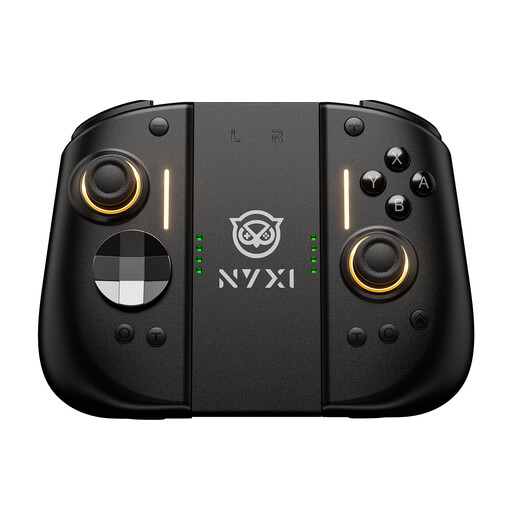
NYXI Hyperion 3 Wireless Controller for Switch 2, Black
According to its product name, this model is designed for gaming on Switch 2. Also check that the game supports the input you want to use.
9-axis gyroscope; Hall-effect joysticks; mechanical buttons; two rear buttons; adjustable vibration.
View at Joybuy
 No image available
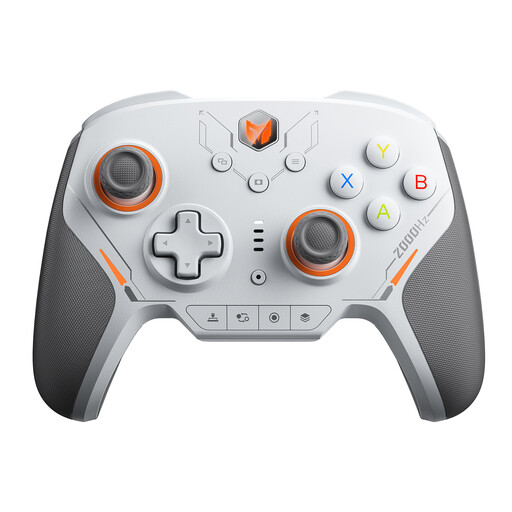
BIGBIG WON BLITZ2 Wireless Controller
If you want to play on one of the listed platforms without a controller cable, check compatibility with the game you’re using first.
Listed for PC, Switch, iOS and Android; TMR electromagnetic joysticks; 16 mechanical microswitch buttons; 2000 Hz report rate.
View at Joybuy
 No image available
BIGBIG WON Rainbow 3 Wireless Controller
This wireless model could be an option for one of its listed platforms, provided the game and controller are compatible.
Listed for PC, Switch 2, iOS and Android; capacitive joystick; 16 mechanical buttons; 6-axis gyroscope; 2000 Hz polling rate.
View at Joybuy
Frequently asked questions
Can each Joy-Con 2 control a separate player on Switch 2?
Only if the software and play style support it. Nintendo says Joy-Con 2 can be held horizontally and used individually as an input; Joy-Con 2 don’t work with the original Switch.
Can I use Bluetooth headphones and several wireless controllers with a Switch at the same time?
According to Nintendo, when Bluetooth audio is active, you can connect no more than two wireless controllers; a pair of Joy-Con counts as two controllers. Bear this limit in mind if several people want to play with headphones.
How is an Xbox Wireless Controller powered?
The controller uses AA batteries or a compatible rechargeable battery pack. According to Microsoft, rechargeable AA batteries can’t be charged inside the controller and need to be charged separately.
What’s the difference between statutory rights and a guarantee?
Statutory rights are set out by law, while a guarantee is voluntary. The consumer advice organisation Verbraucherzentrale makes a clear distinction between the two terms.


