What should you look for when buying?
Switch 2: single Joy-Con or gamepad
Suitable if: The game supports individual Joy-Con 2 controllers, or each player needs a complete controller.
Things to consider: According to Nintendo, when Bluetooth audio is connected, wireless controllers can be connected for a maximum of two players.
Windows PC: wireless or USB
Suitable if: The controller is explicitly compatible with Windows and the connection type you want to use.
Things to consider: A 2.4 GHz controller may need a compatible USB receiver; don’t assume it supports Bluetooth just because it’s described as wireless.
Xbox: wired or supported wireless connection
Suitable if: The Xbox model and its actual connection method work for where you’ll be sitting.
Things to consider: According to the manufacturer, the GameSir G7 Pro is wired when used with Xbox; its 2.4 GHz wireless connection is for PC.
PlayStation 5: DualSense
Suitable if: You’re looking for an extra controller for PS5 or a supported PC game.
Things to consider: According to Sony, haptic feedback on PC requires game support and a USB connection.
Docked Switch: a wired extra controller
Suitable if: A 3-m cable reaches your seat and the game doesn’t need Joy-Con-exclusive features.
Things to consider: The version described by PowerA doesn’t have motion controls, HD rumble, IR or amiibo NFC.
First check the platform and game requirements, then how many controls each player needs, and finally the connection and power options for where you plan to sit.
| Consideration |
What to check before buying |
Who is it most relevant to? |
| Platform and game compatibility |
Check the model variant, supported platform, connection type and the game’s controller requirements. |
If I want to start playing a particular game on the platform I already own, the controller needs to be a precise match. Around 36% of consumers say compatibility is their top priority. |
| Separate controls for everyone |
Check the player limit and permitted controller configurations; count the devices you already have and any more you’ll need. |
If every additional person needs their own player slot accepted by the game, don’t assume that every controller pair automatically counts as two player slots. Around 29% of consumers put this first. |
| Freedom to move on the sofa |
Consider the distance, cable routing, USB ports and platform-specific wireless connection. |
If I’m sitting away from the TV and don’t want a cable running across the room, I need a suitable wireless connection. Around 21% of consumers prioritise a seat where a cable isn’t practical. |
| Power and ongoing costs |
Check what’s included, how it charges, the battery type and the service options for the specific model. |
If I want to keep an eye on charging and future costs, I compare rechargeable batteries, replaceable batteries and wired use. Around 14% of consumers prioritise power and potential ongoing costs. |
Technical requirements vary by model. Under the conditions described, Microsoft specifies support for up to eight Xbox Wireless Controllers connected to a PC via USB; this isn’t a general guarantee for every wireless connection. Nintendo says the Switch 2 Pro Controller has an internal battery that can be replaced for a fee through Nintendo Customer Support if needed.
Controllers at Joybuy
This selection at Joybuy includes controllers for Switch 2, Nintendo Switch, Xbox and Windows PC. Before buying, check that the model and connection are suitable for your specific gaming device.
 No image available
Nintendo Switch 2 Joy-Con 2 2-Piece Set (Blue/Light Yellow)
The set includes one left and one right Joy-Con 2 for local multiplayer in compatible games.
According to Nintendo, individual Joy-Con 2 controllers can be used separately, depending on the software and play style.
Joybuy
 No image available
The G-Lab K-PAD-HELIUM-WL
For a wireless controller on a Windows PC, it connects via 2.4 GHz using the USB receiver.
Windows 10/11 compatibility, two programmable rear buttons, adjustable vibration and a rechargeable battery are listed in the product description. Wireless use requires the supplied USB receiver.
Joybuy
 No image available
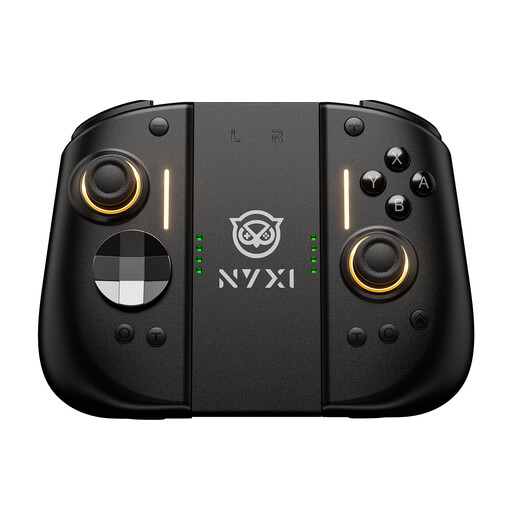
NYXI Hyperion 3 Wireless Controller for Switch 2, Black
The product title lists this wireless controller as an extra controller for Switch 2.
Features listed include a 9-axis gyroscope, Hall effect joysticks, mechanical buttons, two rear buttons and adjustable vibration.
Joybuy
 No image available
Nintendo Switch Pro Controller - Black
The product description lists this wireless Pro Controller for Nintendo Switch.
The description lists motion controls, HD rumble and a rechargeable battery. Check compatibility with your specific gaming device.
Joybuy
 No image available
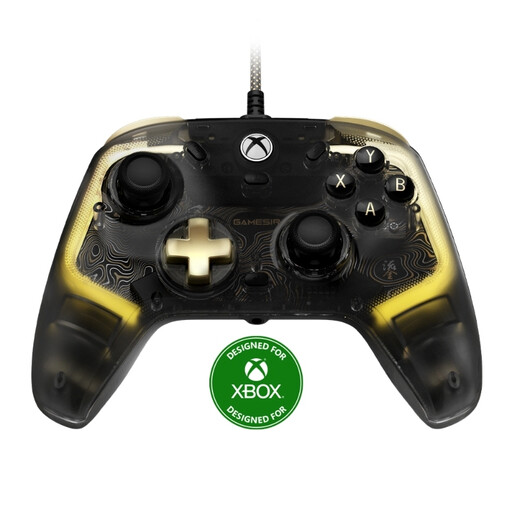
GameSir Kaleid Flux Enhanced Wired Controller for Xbox
This wired controller is listed as compatible with Xbox Series X|S, Xbox One and Windows 10/11 PC.
The description lists Hall effect sticks and a 3-m USB-C cable. Wired use means planning a suitable cable route to your seat.
Joybuy
Frequently asked questions
Are two Joy-Con 2 always enough for two people?
No, it depends on the game. According to Nintendo, a single Joy-Con 2 can be used depending on the software and supported play style; other games use the left and right controllers together. Check the controller configuration for the specific game.
Why might fewer people be able to play wirelessly on Switch 2, even when controller slots are available?
A connected Bluetooth audio device can limit the number of people playing wirelessly. Nintendo specifies a maximum of two players in this case; the possible number also depends on the controller type and features being used.
How do I connect an extra Xbox Wireless Controller to a Windows PC?
Microsoft lists USB, Bluetooth or Xbox Wireless with built-in support, or an adapter if needed. The available connection depends on the controller and PC; also check whether a USB cable can transfer data.
What ongoing costs might a controller battery involve?
It depends on the model. According to Nintendo, the internal battery in the Switch 2 Pro Controller can be replaced for a fee through Nintendo Customer Support if needed. Also check the charging accessories and service terms for your specific controller.
How should I dispose of an old controller and removable batteries in Germany?
According to the German Environment Agency, electrical waste must not be put in household rubbish. Remove the batteries before handing the controller in, where possible, and take them separately to a battery collection point.


