What should you look for when buying?
First compare readability and desk space, then consider evening use and finally decide whether the OLED picture quality is worth the remaining risk of burn-in for you.
| What matters |
What to check before buying |
Who should consider this? |
| Small-menu readability |
Native resolution and in-game display size; choose Full HD or QHD to suit your PC and viewing distance. |
If you need to read small production lines from your usual seating position, readability is the priority; around 33% of consumers focus mainly on this. |
| Desk space and positioning |
Check the overall width and depth with the stand, as well as height adjustment, against the space available. |
If the monitor and stand will share a desk with other activities, they need to fit within the available space; around 27% of consumers place particular importance on this. |
| Considerate evening use |
Check the brightness controls and headphone socket on the specific model, and consider the lighting where you plan to set it up. |
If you want to avoid disturbing others in the bedroom with the screen or sound, adjustable brightness and private listening matter; around 20% of consumers put this consideration first. |
| Picture quality and OLED |
Check the protective features and warranty terms for the exact model variant; always compare refresh rates alongside the corresponding resolution. |
If high contrast matters in other games too, but you leave factory-game menus open for long periods, include the risk of burn-in in your decision; around 20% of consumers prioritise picture quality. |
Joybuy products for factory-building games in a shared bedroom
The Joybuy products below include compact Full HD models as well as QHD and 4K monitors to suit different needs for readability and desk space.
 Image unavailable
Z-Edge AGEX, 27 inches, QHD, 144 Hz
QHD at 2560 × 1440 pixels is an option if you want detailed visuals for small in-game interfaces; also check that the screen will fit on a shared desk.
The product title lists a Fast IPS panel, 144 Hz, 1 ms MPRT, FreeSync, HDR10 and a height-adjustable stand.
View at Joybuy
 Image unavailable
INNOCN 2751S PLUS, 27 inches, QHD Mini LED
The stated QHD resolution of 2560 × 1440 pixels is one option for displaying small in-game interfaces; make sure the monitor size works with your available space.
The listed specifications include 275 Hz and 1 ms. According to the product description, the model reaches 275 Hz via DisplayPort; HDMI is listed with a FreeSync range of up to 144 Hz. The title lists an IPS display, built-in speakers and a height-adjustable stand.
View at Joybuy
 Image unavailable
KTC M27P6, 4K Mini LED, Dual Mode
The stated 4K resolution of 3840 × 2160 pixels is an option if you want plenty of pixels for small in-game interfaces; check which mode your PC supports.
According to the product specifications, it reaches 160 Hz at 4K and 320 Hz at FHD. Other listed features include Fast IPS, HDR1400, 65 W USB-C, KVM and a stand that tilts, swivels and adjusts in height.
View at Joybuy
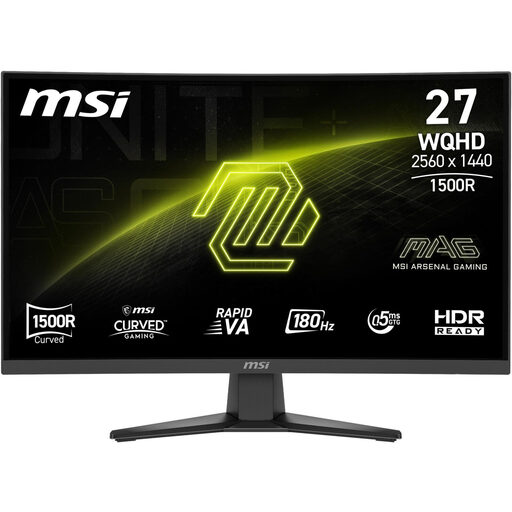 Image unavailable
MSI MAG 275CQFDE E18, 27 inches, QHD
QHD at 2560 × 1440 pixels offers a higher-resolution option for small in-game interfaces; check that your PC can output this resolution in the game you want to play.
The product specifications list a Rapid VA panel, 180 Hz and a headphone output. The description mentions tilt adjustment; if you need height adjustment, check that this is available on the variant on offer before buying.
View at Joybuy
 Image unavailable
KTC H24B9S, 24 inches, Full HD, 144 Hz
The compact 24-inch Full HD size is an option if desk space is limited; Full HD offers fewer pixels than QHD for fine in-game details.
The listed specifications include 1920 × 1080 pixels, an IPS panel, 144 Hz, Adaptive Sync and a headphone socket.
View at Joybuy
Frequently asked questions
Does a gaming monitor for factory-building games need a particularly high refresh rate?
Not just because of the type of game. First compare readability and desk space, then check the refresh rate your PC can actually output at the resolution you choose. LG states that the 27GX790B-B reaches 720 Hz in HD and 540 Hz in QHD.
What should I measure before setting up in a shared bedroom?
Measure the available desk width and depth, including the space needed for the stand, and check your seating position. BenQ lists dimensions of 614 mm wide and 252.5 mm deep for the MOBIUZ EX2710Q with its stand; these measurements do not automatically apply to other models.
How should I use an OLED monitor during long factory-building sessions?
Use the protective features as instructed for the specific model and avoid leaving unchanged images on screen for unnecessarily long periods. LG explains that burn-in can result from images displayed for a long time and notes that it cannot be completely ruled out, even with proper use.
What are my rights when buying online in Germany?
For consumer purchases, you generally have a 14-day right to cancel from the date you receive the goods; you must notify the seller that you wish to cancel. If goods are faulty, your statutory rights against the seller are separate from any voluntary manufacturer’s warranty. The consumer advice centre explains these rights and the conditions that apply to each.
What energy and labelling rules apply to monitors?
The European Commission sets out EU ecodesign and energy-labelling requirements for electronic displays, including computer monitors. The energy label shows an efficiency rating on a scale from A to G; for specific models, also check the figures for SDR and HDR use.


