What should you look for?
When recording a family audio message with a fan running, your choice mainly depends on whether one person or several people will be speaking at once, and how close you can position the microphone.
| Consideration |
What to check before buying |
Who is this important to? |
| Clear speech with fan noise |
Check the speaking direction, a stable position and a comfortable speaking distance. Make a test recording in the intended spot with the fan switched on. |
When I’m recording on my own, I want my voice to remain clear despite the fan. Around 36 % of consumers put clear speech in background noise first. |
| Several voices speaking at once |
Decide whether everyone will speak in turn or at the same time. If you want separate recordings, check how many microphone inputs you’ll need. |
If we’re speaking at the same time, I want to know whether one shared signal will do or whether each voice should be recorded separately. Around 29 % of consumers prioritise being able to hear several voices at once. |
| Simple connection and set-up |
Check the recording device’s USB connection, and whether the specific version comes with a cable and stand or needs an interface. |
For a straightforward message, I want to get started on my PC with as little fuss as possible and check in advance that recording works. Around 21 % of consumers prioritise a simple connection and set-up. |
| Listening back and editing |
Check whether there’s a headphone socket. Before recording your message, try a short recording with the fan running as it will be during the actual recording. |
I want to listen back to the test and be able to edit out steady fan noise if needed. Around 14 % of consumers prioritise monitoring and the option to edit their recording. |
Notable microphone brands
These notes apply to the specific model ranges mentioned, not necessarily to every product from each brand.
Audio-Technica
According to Audio-Technica, the ATR2100x-USB combines USB and XLR connections with direct headphone monitoring and a desktop tripod.
- According to the manufacturer, this model’s cardioid pickup pattern reduces sound coming from the sides and rear.
- You’ll need to speak close enough to the microphone and find a comfortable position in your actual recording spot. It isn’t guaranteed to block out fan noise completely.
Samson
According to Samson, the Q2U is a dynamic cardioid microphone with USB and XLR connections, as well as a headphone output.
- Samson lists a desktop tripod and cable as included with the Q2U.
- The manufacturer’s description of directional recording isn’t independent proof of how much the model reduces noise from a running fan. Test it in the position you intend to use.
RØDE
According to RØDE, the PodMic USB offers USB-C and XLR for voice recording.
- For this specific model, RØDE recommends a speaking distance of around 5–10 cm.
- This close-up position needs to be practical for the person recording. The distance given for this model won’t necessarily apply to other microphones from the brand.
Shure
According to Shure, the MV7+ offers USB-C and XLR; the SM7B is a different model with an XLR connection.
- Shure lists adjustable signal processing for the MV7+.
- Shure’s claims about noise reduction are manufacturer statements, not proof that fan noise can be removed completely. For computer recording with the SM7B, you’ll need to plan for a suitable XLR signal path.
Logitech G
According to the manufacturer, the Yeti offers several switchable pickup patterns and direct headphone monitoring.
- Different pickup patterns let you try different arrangements around a shared microphone.
- One shared microphone signal doesn’t replace separate voice tracks. Test your chosen setting from every seat with the fan running.
Microphones and sets at Joybuy
The selection below includes desktop and lavalier microphones, as well as sets for recording speech on a PC or mobile device. Before buying, check that the connections and set-up suit your recording plans and the number of people speaking at once.
 No image available
FIFINE K688CTW dynamic USB/XLR microphone with boom arm
Could suit an audio message recorded one person at a time if you want to position the microphone on your desk.
Features listed in the product name: dynamic microphone, USB and XLR, boom arm, mute button and headphone socket. According to the product details, an XLR cable isn’t included.
View at Joybuy
 No image available
FIFINE AM8 dynamic USB/XLR microphone
Worth considering if you’re looking for a microphone to record speech on your PC and want to listen back through headphones first.
Features listed in the product name: USB/XLR, headphone socket, desktop stand and mute button. Check which connection you intend to use.
View at Joybuy
 No image available
Yinkaer G10-P15-XB podcast microphone set with audio mixer
Could be an option if you want to use a microphone set with an audio mixer to record speech on a computer or mobile device.
Features listed in the product name: 3.5 mm condenser microphone, audio mixer and boom arm. Check that the connection is compatible with your intended recording device.
View at Joybuy
 No image available
Yinkaer G10-P17 podcast microphone set with audio mixer
A possible choice if you’re looking for a set to record speech on a PC or mobile device.
Features listed in the product name: audio mixer and microphone. Check that the connections you need and your planned recording set-up are compatible with your device.
View at Joybuy
 No image available
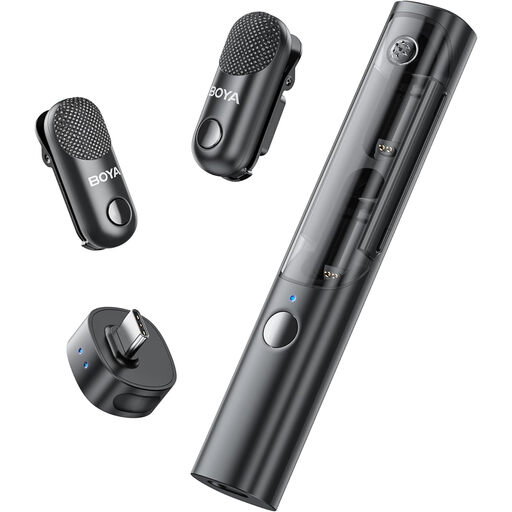
BOYA Magic-05 USB-C AI-powered wireless lavalier microphone, 2 TX + 1 RX + charging case
Could be worth considering for recording several people if a wireless lavalier system is compatible with your recording device.
Features listed in the product name: USB-C, 2 TX, 1 RX and charging case. Check that your device is compatible with USB-C before buying.
View at Joybuy
Frequently asked questions
Can I completely remove the fan noise from my audio message afterwards?
You shouldn’t count on it. Audacity’s guide explains how noise reduction works with steady sounds such as fan noise, but also notes that it has limitations when unwanted noise is loud or similar to the voice. Start by making a short test recording in the actual conditions.
How should I position a microphone for close-up recording?
Point the side you speak into towards your mouth and secure the microphone firmly. RØDE gives a distance of around 5–10 cm for the PodMic USB only. Test the distance and recording level rather than assuming this figure applies to other models.
Do I need extra equipment for an XLR microphone?
To record on a computer via XLR, you’ll need a suitable signal path, such as a compatible audio interface or mixer. A microphone with USB can connect directly, if it’s designed for this; check the cable and mount included with the specific version.
What can I do if the microphone I bought is faulty?
Your statutory rights apply against the seller and are separate from any voluntary guarantee. Verbraucherzentrale recommends asking the seller to put the fault right first. Check the guarantee terms separately.
Can I record other family members without them knowing?
Discuss the recording with the people involved beforehand. The Federal Court of Justice explains, in relation to § 201(1) StGB, that the unauthorised recording on an audio medium of another person’s words spoken in private is covered by the provision. This should not be equated in general with knowingly recording your own spoken message.


