What to look for when buying
First, work out what will have the biggest impact at your shared workstation: noise, switching between devices, hand position or the space needed for entering numbers.
| Buying priority |
What to check |
Who is it important to? |
| Noise |
Switch type and typing noise; “quiet” is not a measurement you can reliably compare across different models. |
If I want to disturb others at the same desk as little as possible while transcribing names and notes, the feel and sound of the keys matter. Around 33% of consumers prioritise a quieter typing experience. |
| Switching between devices |
Check the operating system, connection type and explicitly listed switching feature for each device and model. |
If you want to switch between computers or a tablet at a shared workstation, you need a suitable feature—not just a wireless connection. Around 27% of consumers prioritise switching between devices. |
| Hand position |
Compare the shape, desk space required and specific layout; try the keyboard’s shape for yourself if possible. |
For longer typing sessions, I want a shape that lets me position the keyboard deliberately and also works for anyone sharing the desk. Around 20% of consumers prioritise hand position. |
| Number entry and space |
Weigh up how often you enter numbers against the desk space required; if you’re choosing a separate number pad, check its connection requirements. |
If I enter lots of dates or archive references, a number pad is useful. If space is limited, a more compact keyboard may fit the work area better. Around 20% of consumers are mainly weighing up number entry or keeping desk space free. |
Keyboards at Joybuy
This selection includes keyboards for fixed workstations, switching between devices and different space requirements. Pay particular attention to whether the layout, connection type and number-entry features suit the way you work.
 No image available
Logitech 920-012404 Ergonomic Wave
For a shared workstation where quiet keys and switching between devices are important.
German QWERTZ layout, memory foam wrist rest, quiet membrane keys and the ability to connect to multiple devices. Listed as compatible with macOS, iPadOS and iOS.
View at Joybuy
 No image available
Wired keyboard with number pad
A suitable option if you regularly enter dates or other numbers at a fixed desk.
Full-size keyboard with a QWERTY layout and plug-and-play connection; described as suitable for the office and working from home.
View at Joybuy
 No image available
Foldable Bluetooth keyboard with wireless mouse
For a workstation where a foldable keyboard and switching between devices are useful.
Quiet scissor keys, three connection modes and the ability to connect to up to three devices. USB-C charging; listed as compatible with Windows, Android and iOS.
View at Joybuy
 No image available
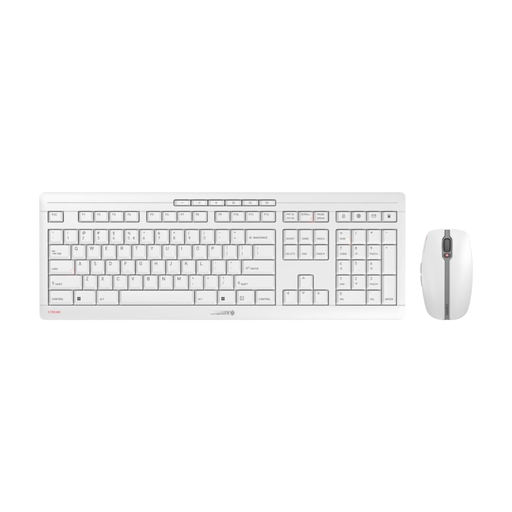
CHERRY Stream Desktop Recharge
For a shared workstation where quiet typing and wireless use are important.
Wireless keyboard and mouse set with an EU QWERTY layout, 2.4 GHz wireless connection and quiet scissor keys. Rechargeable via USB-C.
View at Joybuy
 No image available
CHERRY STREAM KEYBOARD TKL
For a fixed workstation where a compact layout matters more than an integrated number pad.
Wired USB connection, TKL format, CHERRY SX scissor keys and six multimedia keys. The listed layout is US English with a euro symbol.
View at Joybuy
Frequently asked questions
Do I need an integrated number pad for entering dates?
Not necessarily. If you enter numbers frequently, compare a keyboard with a number pad against a compact model and, if needed, a separate number pad. For its Microsoft Number Pad, Microsoft specifies Windows 10 or 11 and Bluetooth 4.0 or later; other models may have different requirements.
How do I set up a keyboard for use with multiple devices?
Check the connections and switching feature on the exact model. Logitech describes Easy-Switch for compatible keyboards, while CHERRY lists two Bluetooth channels, a wireless receiver and a cable for the STREAM KEYBOARD ULTIMATE. Wireless operation alone doesn’t guarantee multi-device functionality.
How do I clean a shared keyboard?
Logitech recommends disconnecting wired keyboards before cleaning and switching off wireless keyboards. Remove any replaceable batteries. For other models, follow the relevant cleaning instructions.
Who should I contact if there’s a fault?
For your statutory consumer rights, the seller is generally your point of contact, not the manufacturer. Verbraucherzentrale distinguishes these rights from an additional manufacturer’s warranty. The applicable requirements and time limits depend on your specific circumstances.
Can I put an old keyboard in the household rubbish in Germany?
No. Section 10 of the German Electrical and Electronic Equipment Act (ElektroG) requires waste electrical and electronic equipment to be collected separately from unsorted municipal waste. The German Environment Agency also advises against disposing of electrical equipment in household rubbish.


