If you spend a long time reading archive pages and want to avoid disturbing others at the desk, look for quiet clicks and a scroll wheel that’s easy to control. If you often switch between devices, a dedicated switching function matters. For longer sessions, make sure the size and handedness suit the person who’ll actually be using it. Manufacturers’ comfort claims don’t prove that a mouse will prevent discomfort.
Who will be using the mouse for family history research?
Readers of digital archive pages
If you work through lots of registers and long lists of search results, controlled scrolling and quiet clicks are likely to matter more than a host of extra buttons. Logitech and Trust describe scroll and click features designed for this.
People who switch between computers
If you take turns using several devices at a shared desk, you’ll want to switch connections without having to set up the mouse again each time. Trust describes the Ozaa+ as a mouse for use with multiple devices.
People with specific fit requirements
For longer periods of use, or if you specifically need a left-handed shape, size and handedness matter. The Federal Institute for Occupational Safety and Health stresses the need for space for the mouse and for supporting your hand and arm. Logitech and CHERRY offer different sizes and shapes for different hands.
What should you look for when buying?
| Priority |
What to check when buying |
Who will value this? |
| Quiet, controlled navigation |
Check how quiet the clicks are and how the scroll wheel actually behaves. Don’t treat manufacturers’ claims as independent noise measurements. |
If you spend a long time reading registers at a shared desk, you’ll want to disturb others as little as possible while being able to scroll both precisely and quickly. Around 36% of consumers have this as their main priority. |
| Switching between devices |
Check how many devices are supported, how you switch between them and whether you need Bluetooth or a USB connection. |
If you work with research, images and notes across several devices, you’ll want to switch between them without pairing again. Around 29% of consumers prioritise switching between devices. |
| Fit for longer sessions |
Consider your hand size, grip, space beside the keyboard and whether you’ll need time to get used to the mouse. |
For longer sessions, the mouse should suit your hand and the space available. A vertical shape won’t automatically suit everyone who shares the desk. Around 21% of consumers prioritise how the mouse fits their hand. |
| Left-handed use |
Check the full variant name and button layout, not just whether the click functions can be switched. |
If you’re left-handed, you may need a shape and button layout specifically designed for left-handed use. Around 14% of consumers consider a left-handed shape essential. |
Common mistakes when buying a mouse
-
Confusing multiple connection types with the ability to switch between devices
Having Bluetooth and a USB receiver as connection options doesn’t, by itself, mean you can switch between several paired computers.
Check the exact model’s stated number of supported devices and how you switch between them.
-
Choosing based only on the model family name
Variants in the same range can differ in size and handedness. At a shared desk, a mouse shaped for one hand may not suit everyone.
Decide who’ll use the mouse most often and check the full variant name.
-
Treating ergonomic claims as promises of a cure
A particular shape or a manufacturer’s claim doesn’t prove that a mouse will prevent or treat discomfort.
Try out the shape and grip. If discomfort persists, seek a professional assessment.
Key brands to consider
Logitech
The M650 range includes options for different hand sizes and a left-handed version; the Lift has a separate vertical design.
- Logitech describes the M650 as featuring SilentTouch and SmartWheel, with Bluetooth or Logi Bolt connectivity. A left-handed version of the Lift is also available.
- Not every version suits both left- and right-handed users. The product details don’t prove any medical benefit.
Trust
The Ozaa+ is a larger mouse that supports multiple devices. It may appeal to people who want to switch between devices at their desk.
- Trust lists up to three connections, two scroll wheels and quiet buttons.
- Make sure its large size suits your hand. The noise claim is the manufacturer’s description, not the result of an independent comparison test.
CHERRY
The MW 4500 range includes a wireless mouse angled for left-handed use, as well as a right-handed version.
- CHERRY describes the MW 4500 LEFT as angled at around 45° and fitted with browser back and forward buttons.
- A manufacturer’s claim about reducing strain doesn’t prove that discomfort will be prevented or treated for any particular person.
Mouse models at Joybuy
The models below are selected for quiet working at a shared desk. Scroll wheels, connection types and ways to switch between devices vary by model, so check which features suit your setup.
 No image available
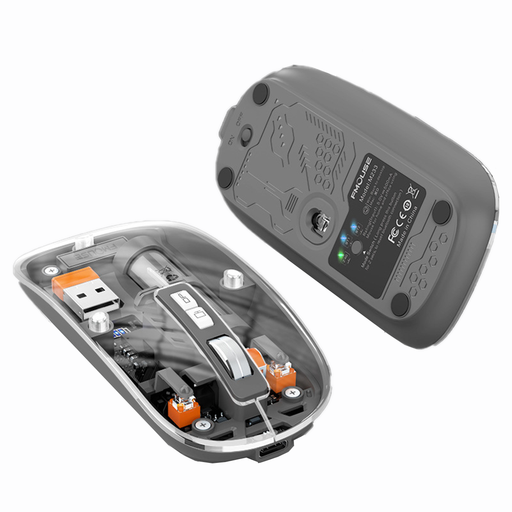
KINSI M233 wireless Bluetooth mouse
This could be a good fit if you’re looking for a rechargeable mouse with clicks described as quiet and several connection modes. Check that the specific modes let you switch between the devices you want to use.
The product description lists three connection modes and 1,600 DPI.
View at Joybuy
 No image available
HOFOTEK M308 2.4G Silent Office Mouse
This could be an option if you’re looking for a mouse described as quiet, with a wireless USB receiver. Check that you have a compatible USB port available on your computer.
The description lists 2.4 GHz wireless connectivity, a USB receiver, a scroll wheel, optical tracking and several DPI settings.
View at Joybuy
 No image available
HOFOTEK M311 2.4G+BT Silent Office Mouse (1xAA Battery)
This could suit a shared desk if you’re looking for quiet clicks and a clearly specified way to switch between several devices.
The product description lists Bluetooth 5.1, 2.4 GHz wireless connectivity, switching between up to three devices and five DPI settings. Powered by 1 × AA battery.
View at Joybuy
 No image available
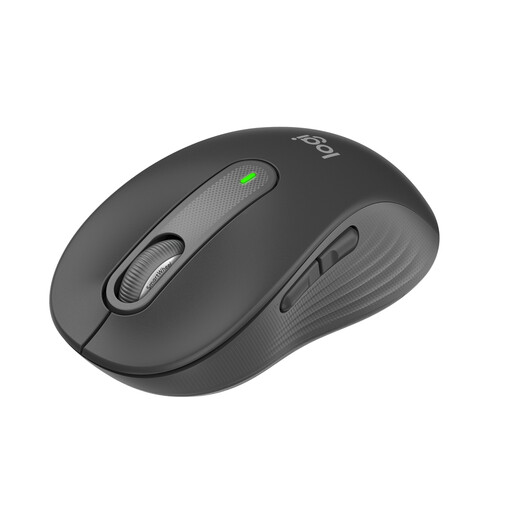
Logitech Signature M650 for small to medium-sized hands
The right size can make a difference if you spend long periods researching at your desk. Logitech describes this model as featuring SilentTouch and SmartWheel, for precise or fast scrolling.
Bluetooth or Logi Bolt USB receiver; powered by 1 × AA battery, according to the product description.
View at Joybuy
 No image available
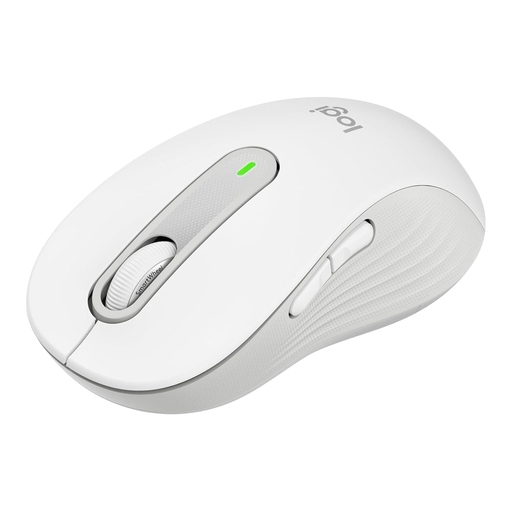
Logitech Signature M650 L for large hands
This version may suit you if you’re looking for a mouse for larger hands and a right-handed shape works for you. Logitech describes SilentTouch and SmartWheel as offering precise and faster scrolling.
Bluetooth or Logi Bolt USB receiver; powered by 1 × AA battery, according to the product description.
View at Joybuy
Frequently asked questions
How should I set up the mouse at a shared desk?
Leave enough space beside the keyboard to move the mouse and support your hand and arm. Adjust the desk and chair for whoever is using them, and if you have a wireless mouse, check whether your device supports Bluetooth or has a compatible USB port available.
Will a vertical mouse definitely help with wrist discomfort?
No. A particular shape or a manufacturer’s claim doesn’t guarantee treatment or prevention. The German Statutory Accident Insurance recommends an individual ergonomic assessment if you have symptoms. You may also need time to get used to a different type of input device.
What should I check about the battery, rechargeable battery and warranty?
Check whether your chosen model is rechargeable or uses a battery, and whether a battery is included. The consumer advice centre distinguishes between your statutory rights against the seller and a voluntary manufacturer’s guarantee. If a product is faulty, you should first ask the seller to put things right (consumer advice centre information correct as at 28 September 2026).
Can you put an old mouse in household waste in Germany?
No. Waste electrical equipment is collected separately. The Federal Environment Agency recommends removing batteries before disposal, where possible, and handing them in separately. Retailers’ take-back obligations under § 17 ElektroG apply only in the circumstances set out in the law (Federal Ministry of Justice and Federal Office of Justice).


