Researchers with multiple project versions
If you keep several complete versions of your family tree, along with scans and photos, consider both how much storage you need and how long regular backups will take.


Check how much space your existing project folders take up, then allow room for the versions you want to keep. If you make large backups regularly, write speed and the right connection matter too. Germany’s Federal Office for Information Security (BSI) recommends keeping backups separately and checking that you can restore them, so a single USB flash drive shouldn’t be your only long-term archive. Encryption can make it harder for someone to access sensitive family data if a drive is lost, but it doesn’t replace having another copy.
If you keep several complete versions of your family tree, along with scans and photos, consider both how much storage you need and how long regular backups will take.
If you want to keep older versions, it makes sense to have an additional copy and to open and check its files from time to time. The BSI recommends testing whether backups can be restored.
If you carry files containing information about living people, capacity isn’t the only consideration: access protection and managing a passcode or encryption reliably matter too.
First check how much storage your folders need, then check the connections and write speed. And whatever you choose, plan to keep a separate backup that you can check.
| What matters | What to look for when buying | Who should consider this? |
|---|---|---|
| Space for multiple versions | Check the size of the project folders you plan to store, including scans and photos, and allow for future versions too. Usable capacity may be lower than the stated capacity, as Samsung Germany points out. | If I want to keep complete project versions and image files, I’ll first work out their total size. Around 31% of consumers put having enough space for multiple versions first. |
| Restoring your files | Use the drive as an additional copy, then open selected files and older versions after copying to check them. The BSI points out that the lifespan of storage media can’t be predicted precisely. | If I want to retrieve older versions after losing files, I don’t just want to store them; I want to check that they’re readable. Around 31% of consumers prioritise being able to restore their project versions. |
| Protecting sensitive data | For the specific model, check the type of encryption, how it’s unlocked and what happens if you forget or enter the wrong passcode. The BSI explains how encryption protects data on portable storage devices. | If I carry files containing information about living relatives, I want to make sure that anyone unauthorised can’t simply access them if the drive is lost. Around 19% of consumers put protecting sensitive family data first. |
| Connection and copying time | Check that the plugs match your devices’ ports. If you make large backups regularly, compare the write speed of the exact model. Kingston lists write speeds of up to 60 MB/s for certain Kyson capacities; CHIP assesses read and write speeds separately. | If I switch between devices with USB-A and USB-C, or regularly copy large folders, I check the plugs and write speed for my devices. Around 19% of consumers consider connection and copying time a priority. |
The BSI says that the lifespan of storage media can’t be predicted precisely. A stored folder is only a useful backup if you can open the files again.
Keep a separate copy and occasionally check that you can open older project versions.
Reading and writing are different performance measures. A high read speed doesn’t automatically tell you how quickly a large folder will copy to the drive.
Check the write speed of the exact model and the connection you need, especially if you regularly back up large project folders.
Encryption protects access to files, but not against a fault or a lost passcode. For the Verbatim Keypad Secure #49429, the manufacturer says the drive must be reformatted after 20 incorrect passcode entries.
Keep your passcode safe and have a separate copy that you can check.
The Extreme PRO range is a USB-A option if you regularly copy larger project folders.
The Keypad Secure #49429 may suit you if keypad access protection is important for family records you take with you.
The BAR Plus and FIT Plus have different USB-A designs. Samsung describes the FIT Plus as a compact model designed to stay plugged in.
DataTraveler Kyson is a USB-A range, while microDuo 3C and Duo are designed for switching between devices with USB-A and USB-C.
This selection includes USB flash drives with different capacities and connections for project files. Check that the specific version suits the amount of data you have and the connections on your devices.
 No image available
The two drives may be useful if you switch between devices with USB-A and USB-C.
USB 2.0; two drives, each with 32 GB; USB-A and USB-C connections.
 No image available
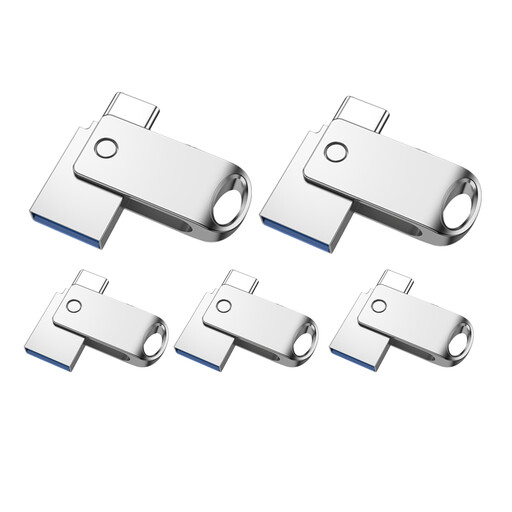
The set may help you keep different projects separate if you organise the drives individually.
USB 2.0; USB-A and USB-C connections; OTG support is mentioned in the product description. The product listing states 32 GB and a set of five.
 No image available
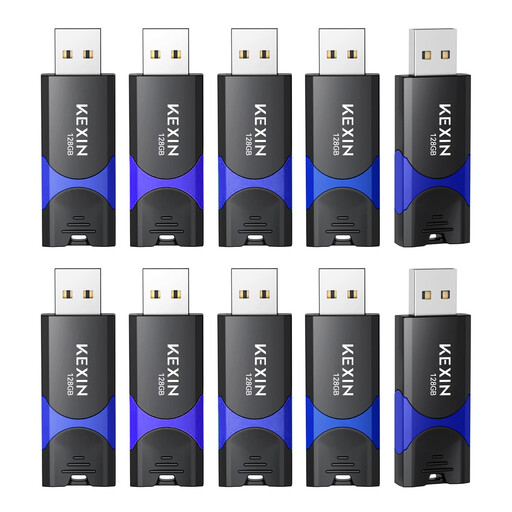
The stated 128 GB capacity may suit project files; check how much storage your folders need.
USB 2.0; 128 GB; retractable connector. The product title specifies a pack of ten.
 No image available
Compare the stated capacity with the measured size of your project files.
64 GB; USB 2.0. The product description mentions a compact, lightweight design and a loop for a key ring.
 No image available
If you regularly copy larger files, compare the stated write speed with your needs; read speed alone doesn’t tell you how long copying will take.
USB 3.0; up to 150 MB/s read and 4 MB/s write, according to the product description.
No. Treat it as an additional copy. The BSI points out that the lifespan of storage media can’t be predicted precisely, and that you should also check whether you can restore files later. So regularly open your copies and selected older project versions.
Not as a general rule. For digital records, the German Federal Archives recommends keeping the original format and, where necessary, also creating a PDF/A version that is as faithful to the original as possible. This advice is for archival contexts and isn’t a requirement for personal family trees.
First, back up the files you need and check that you can restore them. The BSI recommends protecting personal data from unauthorised access, or securely deleting it, before giving away, repairing or disposing of a device.
No. A manufacturer’s guarantee is an optional extra with its own terms and conditions; when you buy as a consumer, your statutory rights relating to faults are against the seller. The consumer advice centre generally allows two years for goods to be free from defects at the time of delivery. A guarantee doesn’t promise that archived files will be preserved.
Not to every activity carried out solely for personal or family reasons with no professional or commercial connection: Article 2(2)(c) of the GDPR provides an exemption for this. Whether a particular instance of sharing or publishing is covered can’t be determined by the storage device alone; you should handle information about living people carefully.