If you’re mainly recording the voice of the person telling their story at a computer, a wired USB headset is a simple place to start. If you already have audio equipment, a separate headworn microphone may fit better into your existing recording setup. The key things to consider are comfort, the exact connection to your recording device and a test recording that includes questions from other family members. The Oral-History.Digital guidance from Freie Universität Berlin puts the story ahead of the technology.
Which microphone is right for you?
Family interviewers recording on a computer
If you want to record someone telling their story while seated, without a complicated setup, first check that the recording device and connection are compatible. Then decide whether you want to capture just their voice or also the questions asked by other people.
People planning long storytelling conversations
If the person telling their story will be wearing the microphone for a while, discuss in advance which style feels comfortable. An ear-worn microphone, a headworn microphone and a headset with headphones are all options, but there’s no evidence that one is more comfortable for everyone.
People with existing audio equipment
If you already have a microphone input or wireless system, the headworn microphone must be compatible with it. The connector type and exact model make all the difference.
What should you look for when choosing?
First decide whether you want to capture just the person telling their story or also the interviewer clearly. Then make sure the wearing style and the complete recording setup suit the conversation you have planned.
| Priority |
What to check before buying |
Who should pay particular attention? |
| The storyteller’s voice |
Adjust the microphone position while seated and listen to a test recording, including a question asked from the interviewer’s seat. |
If I want to preserve someone’s memories, their storytelling voice should take centre stage. Around 31% of consumers have this as their main priority. |
| Comfort |
Before a longer conversation, try out the fit and microphone position with the person telling their story. |
If the equipment shouldn’t be a distraction during a longer conversation, choosing a comfortable fit together is key. Around 25% of consumers say comfortable wear is their top priority. |
| The right connection |
Check that the exact microphone model is compatible with the recording device; USB-A, XLR and connections for bodypack transmitters are different recording setups. |
If I want to record on a computer without needing extra adapters, the model I choose must be compatible with my existing device. Around 25% of consumers prioritise a simple, compatible connection. |
| Existing audio equipment |
Check the model and connector details, along with any components you may need. For wireless systems, also consider the frequency range and conditions of use. |
If I already use a transmitter, receiver or microphone input, the new microphone should fit into that exact recording setup. Around 19% of consumers prioritise reusing their existing audio equipment. |
Common selection mistakes
-
Confusing a connector with a complete recording setup
A compatible connector isn’t always enough. Shure offers the SM35 in XLR and TQG versions. For wired use of the TQG version, the manufacturer specifies an additional preamp; an additional preamp is also required for wired use of the PGA31-TQG.
Check every piece of equipment you’ll need, from the microphone to the saved recording, and confirm the exact connector type.
Depending on the version you choose, you may also need a preamp, bodypack transmitter, receiver or other compatible recording equipment.
-
Assuming a microphone for one person will capture everyone
A microphone worn close to the mouth is designed for the person wearing it. The product details don’t guarantee that questions or interjections from other seats will also be recorded clearly.
Test the recording from the actual seats people will use. If you want other voices to be clearly audible, check whether you’ll need an additional recording setup.
An additional microphone setup may require more compatible recording equipment.
-
Choosing wireless just to avoid a cable
For someone who’ll be seated, freedom of movement may not be a priority. The microphone, transmitter, receiver and recording device must all be compatible. Wireless systems are also subject to the conditions that apply to their frequency range.
First compare a suitable wired option with the specific wireless setup you’re considering. For wireless systems, check the intended frequency band with the Bundesnetzagentur.
A wireless system requires compatible additional components. Some frequency uses may require an individual allocation.
Relevant brands and product ranges
Logitech
The H390 is a computer headset with headphones, a microphone boom and a USB connection for recording on a computer.
- Logitech says it’s available in USB-A and USB-C versions, with an in-line mute switch and an adjustable headband.
- These details don’t confirm that it can record other family members or that it’s specifically suited to recording personal histories.
Shure
The SM35 and PGA31 are headworn microphones for people with compatible wired or wireless audio equipment.
- Shure offers the SM35 as an XLR version with a permanently attached preamp, and as a TQG version for use with its own wireless systems.
- For wired use of the SM35-TQG and PGA31-TQG versions, Shure specifies an additional preamp. The manufacturer’s claims about sound and comfort aren’t independent tests for interview use.
Sennheiser
The ME 3 is a separate cardioid headworn microphone for specific wireless systems such as EW-D and XSW.
- Sennheiser’s instructions describe connecting it to a bodypack transmitter and positioning it 2 to 3 cm from the corner of the mouth.
- A 3.5 mm plug alone doesn’t guarantee direct compatibility with every smartphone or computer.
Audio-Technica
The BP892x is an ear-worn microphone with an optional dual-ear attachment, for people who prefer this style to a traditional computer headset.
- Audio-Technica specifies an omnidirectional pickup pattern, a detachable cable and various connector options, including a wired version with a power module.
- The manufacturer’s description of how it reproduces voices isn’t an independent assessment for a family conversation. You’ll need to select the right connector version separately.
Joybuy products for computer recording
The following wired USB headsets are designed for recording a seated storyteller on a computer. Before you buy, check that the connection is compatible with your recording device and decide whether you also want to record other voices in the conversation.
 No image available
Logitech H540 Stereo Headset
The adjustable microphone boom is suited to recording the person wearing it on a computer.
USB-A connection. The product description also mentions on-ear controls, a built-in equaliser and compatibility with PC, Mac and laptop.
View at Joybuy
 No image available
JBL Quantum 400 Over-Ear Headset
The flip-up microphone boom is an option if the person telling their story is to wear a wired headset with a microphone.
The product name specifies a 3.5 mm connection, USB and a black finish.
View at Joybuy
 No image available
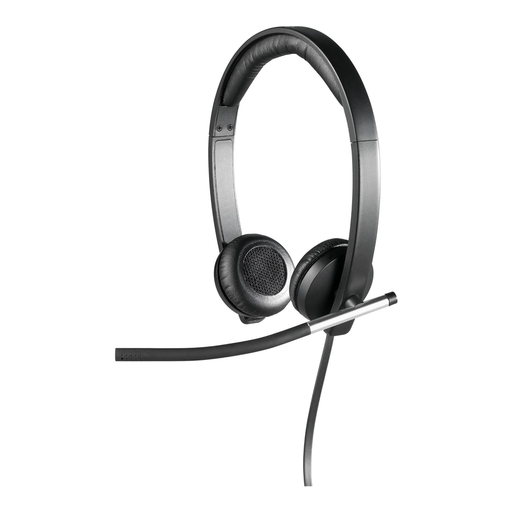
Logitech H650e Stereo USB Headset
The rotating microphone boom is designed for recording the person wearing it on a computer.
USB connection. The product description specifies padded ear cushions and a padded headband.
View at Joybuy
 No image available
Logitech 960 Stereo USB Headset
The adjustable microphone boom is positioned to pick up the voice of the person wearing it.
USB connection with a 2.4 m cable. The product name specifies compatibility with PC, Mac and laptop.
View at Joybuy
 No image available
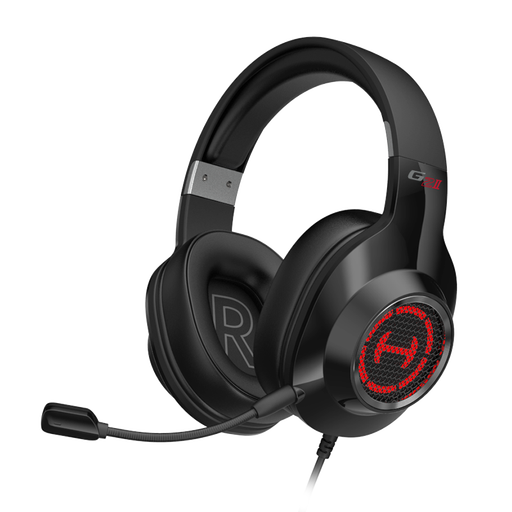
Edifier G2II USB Headset
The built-in microphone is described as suitable for voice communication and can be used by the person wearing it when recording on a computer.
Wired USB connection. The product description specifies an adjustable headband and padded ear cups.
View at Joybuy
Frequently asked questions
Can a headset worn by one person record the whole family conversation?
Don’t assume it will without making a test recording. Product details describe microphones for the person wearing them, not a guarantee that everyone present will be recorded. During a test, speak from both the storyteller’s seat and the interviewer’s seat, then listen back to both voices.
Where should a headworn microphone sit during a conversation?
For the Sennheiser ME 3, the manufacturer’s instructions recommend positioning it 2 to 3 cm from the corner of the mouth. Don’t assume the same distance is right for other models.
Will I need anything else besides the microphone?
That depends on the microphone version and the equipment you already have. For wired use of the SM35-TQG and PGA31-TQG versions, Shure specifies additional preamps. With a wireless system, all the components must be compatible. Check the complete recording setup and what’s included before you buy.
Can I simply record and share a private family conversation in Germany?
Secretly recording a conversation isn’t automatically permitted. Section 201 of the German Criminal Code (StGB) concerns the unauthorised recording of another person’s private spoken words, as well as the unauthorised use or sharing of such a recording. Before recording or sharing it, check that the people involved agree. The fact that it’s for family purposes doesn’t automatically make it permissible.
Can I use a wireless headset microphone in Germany without registering it?
There’s no blanket answer for every device. According to the Bundesnetzagentur, certain frequencies can be used without registration under the conditions of the relevant general allocation; other uses may require an individual allocation. Check the frequency range and conditions of use for the specific system. General Allocation Vfg. 37/2026, among other things, revoked Vfg. 109/2025, so don’t assume that earlier conditions still apply.


