Which approach is right for you?

Families building an archive

If you want to be able to find original interviews and older project versions later, plan an additional copy and keep it somewhere separate. Check that you can read back the files, too. The BSI recommends planning backups so that your data can be restored.

People with growing interview projects

If you want to keep recordings, transcripts and several edited versions together, work out how much space you need from the folders you actually plan to store. The stated capacity alone won’t tell you whether your whole collection will fit.

People with confidential interviews

If you’re carrying personal stories on a flash drive, choose access protection that works with your devices. The German Federal Commissioner for Data Protection and Freedom of Information (BfDI) recommends encrypting data stored on USB flash drives and USB hard drives.

What should you look for when buying?

USB-A flash drive

A good fit if: the computers you use have USB-A ports and you’re planning an additional copy to keep separately.

Consider: a stated read speed doesn’t tell you the write speed, and confidential files may need an extra layer of access protection.

USB-A and USB-C flash drive

A good fit if: you need to transfer or open files between devices that use both types of connection.

Consider: having two connectors doesn’t guarantee a particular write speed or that every device you use can read the file system.

Flash drive with built-in access protection

A good fit if: you’re carrying confidential interviews and need an unlocking method that works with your devices.

Consider: access protection isn’t a substitute for an additional backup. With the Verbatim Keypad Secure, the manufacturer requires you to reformat the drive after 20 incorrect code entries.

What you’re buying for What to check Who it matters most to
Recoverability Plan an additional copy stored separately; open selected files after copying. If I want to restore older versions when needed, a readable copy matters more to me than having just one flash drive. Around 29% of consumers put recoverability first.
Space for project versions Check the size of the folders you need and compare it with the available capacity of the specific model. If I need all recordings, transcripts and edited versions to be available at the same time, I check the total amount of data. Around 23% of consumers prioritise space for every version.
Keeping files confidential in transit Check that encryption and unlocking work with your devices; plan a separate copy independently. If I’m carrying personal interviews, I don’t want someone to be able to read the files if the flash drive is lost. Around 18% of consumers prioritise protecting confidential files.
Access across different devices Check for USB-A and USB-C ports and file system support; open a test file on the destination device. If I need to use the same project files on several devices, I need suitable connections and files that can be read. Around 18% of consumers focus on access across devices.
Write time Compare write speeds or measurements for the exact model and capacity you’re considering. If I regularly back up large project folders, write time matters more to me than a high read speed. Around 12% of consumers prioritise the time needed to make repeated copies.

Avoid common mistakes

  • Making the flash drive your only copy

    A flash drive can be lost or fail. The BSI points out that the lifespan of storage media cannot be predicted precisely, and that you need to be able to restore a backup.

    Plan an additional copy and keep it somewhere separate. After copying, check that you can read selected files.

  • Assuming read speed is the same as backup speed

    Samsung lists sequential read speeds of up to 400 MB/s for the BAR Plus MUF-256BE3/APC. This manufacturer’s figure doesn’t describe the write speed when backing up files.

    If you regularly copy large folders, look for write speeds or measurements for the same model and capacity.

  • Confusing encryption with a backup

    Encryption protects confidential files if the storage device is lost, but it won’t restore a deleted or damaged sole copy. With the Verbatim Keypad Secure, the manufacturer requires you to reformat the drive after 20 incorrect code entries.

    Plan access protection and recovery separately. Store any unlocking code you need somewhere you’ll be able to find it again.

  • Reformatting a drive with existing files without backing them up

    Apple points out that formatting deletes all files on the drive.

    First, back up existing files somewhere else. Then check the file system and make sure the files can be read on the devices you actually use.

Brands to consider

Samsung

The BAR Plus is a USB-A option for computers with a compatible port; you’ll need to plan your backup separately.

  • Samsung lists a capacity of 256 GB and sequential read speeds of up to 400 MB/s for the BAR Plus MUF-256BE3/APC.
  • The read speed isn’t a write speed or a guarantee of how long an archive will last.

SanDisk

The Ultra Dual Drive Go is one option for switching between USB-A and USB-C devices; other SanDisk ranges are different products.

  • SanDisk lists both connector types and a capacity of 256 GB for the Ultra Dual Drive Go SDDDC3-256G-G46.
  • The manufacturer’s specifications don’t guarantee a particular backup write time or compatibility with every device.

Kingston

The DataTraveler Duo range has USB-A and USB-C connectors; the DataTraveler Exodia is a separate USB-A range.

  • Kingston lists 128 and 256 GB capacities, USB 3.2 Gen 1, a five-year limited warranty and technical support for the DataTraveler Duo.
  • Check the specifications for the exact model and the file system used by your devices. A warranty and support don’t guarantee that lost data can be recovered.

Verbatim

The Keypad Secure USB-A is designed for situations where you carry a flash drive that requires a code to unlock.

  • Verbatim lists AES-256 hardware encryption for the 128 GB model #49429.
  • According to the manufacturer, the model requires reformatting after 20 incorrect code entries; the Nero Backup software included is compatible with Windows only. These claims aren’t an independent security certification.

Joybuy products

This selection from Joybuy includes USB flash drives with built-in access protection, models for USB-A and USB-C devices, and portable options for additional copies.

Kingston IronKey 32 GB Keypad 200

Kingston IronKey 32 GB Keypad 200

An option for confidential files if you want to use a PIN keypad and hardware encryption.

32 GB; USB 3.2 Gen 1; stated write speed of up to 115 MB/s; PIN keypad and XTS-AES-256 hardware encryption, according to the product description.

View at Joybuy

Kexin 2-in-1 USB flash drives, pack of 2, 32 GB each

Kexin 2-in-1 USB flash drives, pack of 2, 32 GB each

This set may suit you if you want to keep portable copies separately and use both USB-A and USB-C devices.

Two drives, each with 32 GB; USB 2.0; USB-A and USB-C connectors, according to the product description. It also lists Windows, Mac OS and Android.

View at Joybuy

Kexin 2-in-1 USB flash drives, pack of 5, 32 GB each

Kexin 2-in-1 USB flash drives, pack of 5, 32 GB each

Several individual storage devices may suit your filing system if you want to organise files separately; they don’t replace a planned recovery copy.

Five drives, each with 32 GB; USB 2.0; USB-A and USB-C connectors, according to the product description; retractable design.

View at Joybuy

SanDisk Cruzer Blade CZ50, 64 GB

SanDisk Cruzer Blade CZ50, 64 GB

A portable additional copy is worth considering if it has enough capacity for the project files you’ve selected.

64 GB; USB 2.0; the product description lists SecureAccess with 128-bit AES encryption and password protection for files.

View at Joybuy
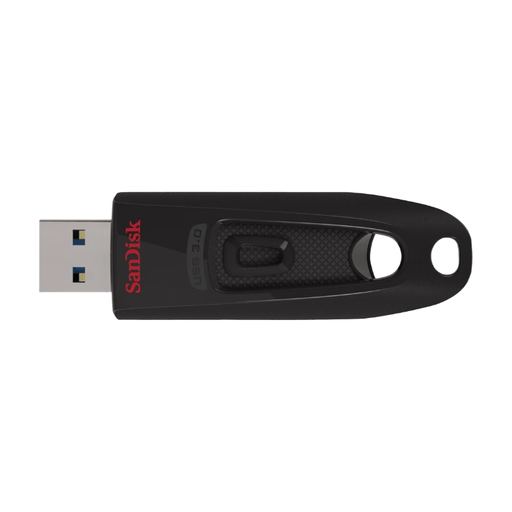
SanDisk Ultra USB flash drive, 64 GB

SanDisk Ultra USB flash drive, 64 GB

A portable additional copy could be a good fit if 64 GB is enough for the files you’ve selected and your devices can read the flash drive.

64 GB; USB 3.2 Gen 1; retractable connector; stated write speed of up to 27 MB/s. The product description lists SecureAccess, password protection, and compatibility with Windows and Mac OS.

View at Joybuy

Frequently asked questions

Is one USB flash drive enough as the only archive for your interviews?

No, not if you want to keep the files safe if the flash drive is lost or fails. Plan another copy and keep it somewhere separate, then check that you can read back the files. The BSI points out that the lifespan of storage media cannot be predicted precisely.

How do I prepare a flash drive for Mac and Windows?

Apple describes exFAT as an option for an external drive that you want to use with Mac and Windows. Then check that your devices can read it. Formatting deletes existing files, so back them up somewhere else first.

What should I do after copying files and before unplugging the drive?

Open a sample of files from the backed-up project version, and safely eject the USB drive in Windows before disconnecting it. Microsoft recommends safely removing the drive to avoid data loss.

What costs or services should I compare alongside capacity?

Include another backup option in your archive plan and check the warranty terms for the specific model. Kingston lists a five-year limited warranty and technical support for the DataTraveler Duo; this doesn’t guarantee that lost interview data can be recovered.

Do the same data protection rules automatically apply to a private family interview as to a published archive?

No, it isn’t right to assume they’re always the same. The European Data Protection Board distinguishes processing for purely personal or family purposes, which falls outside the scope of the GDPR, from information made available to the general public. The rules that apply to a specific project and planned publication depend on how the information will be used and who will receive it. Encryption remains an option for protecting confidential files in transit, whatever the circumstances.