For a family letter archive, the first priority is suitable archive software with an appropriate set of fields. The PC should then match your operating system, scanner, screen and storage needs. A mini PC is a good fit for a compact workspace where you already have a screen; an all-in-one combines the computer and screen, while a separate desktop may offer more ports or expansion options, depending on the model. Tropy’s documentation recommends backing up the project file, your own templates and the original scans together.
Who is this PC suitable for?
Letter collectors who want their own index fields
If you want to record the sender, recipient, date or place of discovery consistently and find letters again later, start by trying a suitable field template in the application you plan to use. Tropy’s documentation explains how metadata templates can be tailored to your cataloguing needs.
Anyone managing a growing collection of scans
If you have lots of scans to keep or may want to change computers later, you’ll need a clear filing and backup process. Tropy links to the original files rather than creating a complete copy of them in the project when you import them, so your backup plan must include the original scans.
Archivists working at a fixed desk
If you sort paper letters beside your screen and want to connect a scanner and backup drive, your existing devices and available desk space should help determine which form factor to choose. Lenovo and HP document the ports and expansion options available on certain configurations; these details apply to the specific model in question.
What should you look for when buying?
Start with the software and your backup process. Then choose a form factor and ports to suit your workspace and the devices you already own.
Mini PC with a separate screen
A good fit if: you already have a suitable screen and need space to sort letters beside it.
Consider: For the Lenovo ThinkCentre M70q Gen 5 configuration 12TN0017EZ documented by Lenovo, the screen, keyboard and mouse are sold separately. Lenovo PSREF lists 16 GB RAM, a 512-GB SSD, HDMI and DisplayPort for this version.
All-in-one PC
A good fit if: you want to buy the computer and screen together as a complete workstation.
Consider: You have less flexibility to choose the screen and computer separately. Lenovo describes a 27-inch display for the IdeaCentre AIO Gen 11 range; specifications vary by version.
Separate SFF or tower PC
A good fit if: you have the space and want to connect several devices or leave room for future internal upgrades.
Consider: Ports and expansion options vary by model. HP lists PCIe slots, 16 GB RAM and a 512-GB SSD for the Pro 400 G9 SFF CP9J4EA#ABD; this does not mean it has a general advantage over every mini PC.
| Buying priority |
What to check |
Who is it important to? |
| Custom fields and search |
Try a field template with a few letters and check that the application is compatible with the operating system you plan to use. Tropy’s documentation explains how to customise metadata templates. |
If I want to record the sender, recipient and date in detail and find them again later, I’ll check the template in the archive software first. Around 33% of consumers put customisable index fields top of their list. |
| Backing up the project and original scans |
Allow storage space for scans and a separate backup. For Tropy, your backup plan should include the project file, templates and original files. The BSI recommends disconnecting the backup medium from the device when it isn’t being used for a backup. |
If I want to keep the collection safe even if a device fails or I change computers, I need a process that covers the project file, templates and original scans. Around 27% of consumers prioritise backup and recovery. |
| Ports for your devices |
Check the connectors required by your scanner, screen and backup drive against the port list for the specific PC configuration. Also check which ports can be used at the same time. |
If I want to keep using my existing scanner, screen and backup drive, I’ll check that I can connect them to the computer I choose. Around 20% of consumers prioritise having the right ports for their devices. |
| Workspace and equipment |
Measure the space available and take into account any screen and input devices you already own. Compare the complete setup you’ll need, not just the computer’s form factor. |
If my desk has limited space or I still need a screen and input devices, I want to put together a complete setup that works for me. Around 20% of consumers prioritise desk space and the equipment they need for the whole setup. |
Avoiding common buying mistakes
-
Treating custom index fields as a hardware feature
A faster computer won’t give you a suitable template or consistent entries. Your field structure and how you use it depend on the archive software.
Decide on a few fields first and try the software you plan to use with sample letters before choosing a PC.
Choosing, setting up and consistently maintaining a field template takes time.
-
Backing up only the project file
In Tropy, entries link to the original files, and your own templates are also stored outside the project file. Backing up the project alone therefore won’t automatically include everything in your archive.
Back up the project file, templates and original scans together. Then check that the files open again by testing a sample. The BSI recommends disconnecting a backup medium from the device when it isn’t being used for a backup.
A separate backup drive, along with time for regular backups and recovery tests, should be part of your planned workflow.
-
Assuming a mini PC is a complete workstation
For the Lenovo Tiny configuration documented here, the screen, keyboard and mouse are sold separately. With an all-in-one, the computer and screen are part of the same device.
Check what’s included with the exact version and make a note of the parts you already own before comparing setups.
Depending on the accessories you already have, you may also need a screen, input devices, suitable connections and a backup drive.
Key brands at a glance
Lenovo
The ThinkCentre M70q Gen 5 is a compact computer for use with a separate screen; the IdeaCentre AIO Gen 11 is a workstation with an integrated display.
- Lenovo PSREF documents the ports and specifications for the specific ThinkCentre M70q Gen 5 configuration 12TN0017EZ.
- For this version, the screen, keyboard and mouse are sold separately. Don’t assume specifications for the AIO range apply to every configuration.
HP
The Pro 400 G9 SFF is a standalone desktop for a workstation where ports and potential internal upgrades matter.
- HP lists 16 GB RAM, a 512-GB SSD and PCIe slots for the Pro 400 G9 SFF CP9J4EA#ABD.
- These specifications apply to the configuration shown. They are not an independent performance test or proof that all HP desktops offer the same features.
Dell
The Pro Micro QCM1250 is a compact desktop range designed for use with a separate screen.
- Dell describes the QCM1250 as a Micro desktop.
- The specifications depend on the configuration you choose. Check the ports on the specific product for your scanner, storage and screen.
GEEKOM
The A5 Pro 2026 Edition is a mini PC range; a configuration with a Ryzen 5 7530U is listed for Germany.
- GEEKOM lists 16 GB RAM and a 1-TB SSD for the A5 Pro 2026 Edition.
- Specifications provided for this edition don’t necessarily apply to other versions.
MSI
The Cubi NUC 1M is a mini PC range with documented USB, HDMI and other connection options.
- The MSI data sheet lists several connection options for the range.
- Processors and operating systems vary by version. Before buying, check the full model number and specifications.
Joybuy products for a compact workspace
This selection features mini PCs for a compact workspace with a separate screen. Check the specific version for the ports you’ll need to connect your scanner and backup drive.
 No image available
BMAX B6 Pro Mini PC, Intel Core i5-1030NG7, 16 GB LPDDR4, 512 GB NVMe SSD
This model is a compact mini PC option for a workspace where you already have a screen.
The product title lists 16 GB LPDDR4, a 512-GB NVMe SSD, Windows 11 and outputs for three 4K displays.
View at Joybuy
 No image available
ACEMAGIC E3B Mini Desktop Computer, AMD Ryzen 7 7735HS, 24 GB LPDDR5, 512 GB NVMe SSD
The mini PC form factor is an option for a compact desk with a separate screen.
The product title lists 24 GB LPDDR5, a 512-GB NVMe SSD, Windows 11 Pro, as well as HDMI, DisplayPort and USB-C. It also lists 2× M.2 2280 slots supporting up to 4 TB.
View at Joybuy
 No image available
MaxMini B3 Mini PC, Intel N4100, 8 GB LPDDR4, 256 GB SSD
This compact model may suit a workspace where you have a separate screen.
The product title lists 8 GB LPDDR4, a 256-GB SSD, dual HDMI, Gigabit LAN, 2.4 and 5 GHz Wi-Fi, and Bluetooth 5.0.
View at Joybuy
 No image available
BMAX B6 Mini PC, Intel Core i3-8109U, 12 GB RAM, 256 GB SSD
This mini PC is a compact option for a setup with a separate screen.
The product title lists 12 GB RAM, a 256-GB SSD, HDMI, DisplayPort, Gigabit LAN, Wi-Fi 5 and Bluetooth 5.0.
View at Joybuy
 No image available
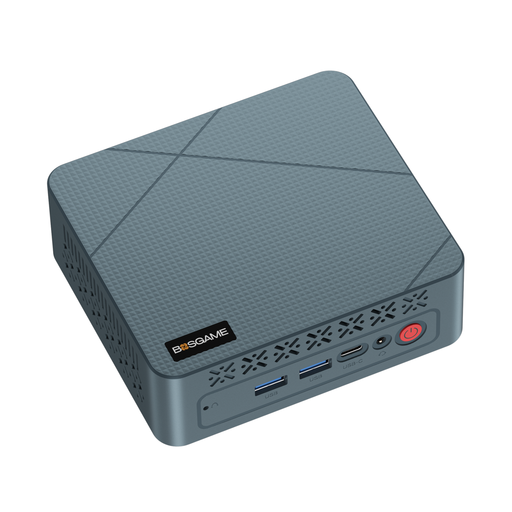
BOSGAME E2 neo Mini PC, AMD Ryzen 5 3500U, 16 GB RAM, 256 GB SSD
This mini PC is a compact option for a workspace with a separate screen.
The product title lists an AMD Ryzen 5 3500U, 16 GB RAM and a 256-GB SSD.
View at Joybuy
Frequently asked questions
Do I need a particularly powerful processor to use custom fields for my letters?
Not just because you want custom index fields. The first thing to check is whether the archive software supports the metadata templates you need. Tropy’s documentation describes these templates, but that doesn’t establish a general minimum processor or memory requirement.
How do I file multi-page letters in Tropy?
In Tropy, you can group photos of several pages of a letter under one entry. Keep the original files in a permanent storage location, as Tropy links to them rather than creating a complete copy in the project when you import them.
What should I back up when changing computers?
For a Tropy project, your backup should include the project file, the user folder containing your own templates and the original scans. The Federal Office for Information Security recommends disconnecting the backup medium from the device when it isn’t being used for a backup. After moving your files, also check that the links to your images still work.
Can I digitise and publish family letters for personal use?
A private family archive and a public publication are not the same thing. The European Data Protection Board explains the exception for activities that are exclusively personal or domestic; this does not amount to blanket permission to make personal information in letters publicly available. For a specific project, consider the circumstances and the rights involved separately.


