For quiz nights on TV, start by choosing a specific game that suits your language, group size and preferred way to play. Only then should support for your video sources influence your choice of console. Nintendo lists TV, tabletop and handheld modes for the Switch OLED, while PlayStation and Microsoft explain how to play supported files from USB. You’ll need a console with a disc drive to play discs. For the Switch 2, Nintendo advises checking compatibility with older Switch games on a title-by-title basis.
Which console should you choose?
Quiz night on TV
If you’re playing together, check the language, player count and input devices required for the specific quiz game. The PlayStation Store Germany lists these details for Trivial Pursuit Live! 2, while Nintendo says Party Trivia requires one compatible controller per player.
Families with their own videos
If you want to switch between quizzes and your own recordings, treat USB files, video discs and streaming as separate requirements. PlayStation and Xbox each set out the conditions for playing supported media from USB.
Families with children
As well as checking the age rating, consider the content and features of the specific game. The USK points out that an age rating does not certify a game as educationally suitable.
What should you consider when choosing?
First, decide which quiz game and input method will work for your group. Then check the video sources you need and the game’s age rating.
Nintendo Switch – OLED Model
A good fit if: you want to play a suitable Switch quiz on TV, as well as in tabletop or handheld mode.
Things to consider: The YouTube app for Switch doesn’t confirm support for your own videos on USB. Nintendo says Party Trivia requires one compatible controller per person in multiplayer mode.
Nintendo Switch 2
A good fit if: you also want to play Switch 2 games and are happy to check compatibility with the specific older quiz game first.
Things to consider: Nintendo warns that some Switch games may have limited support or may not be supported at all.
PlayStation 5 with disc drive
A good fit if: you want to play a suitable quiz and also use the console to play supported videos from USB or video discs.
Things to consider: USB playback depends on the file format, and a PS5 Digital Edition without a disc drive can’t play video discs. PlayStation explains the differences between the models.
Xbox Series X – 1 TB Digital Edition
A good fit if: you mainly want to use supported files from USB and compatible digital quiz games.
Things to consider: Microsoft describes the Robot White version as all-digital. It doesn’t support every file and can’t play video discs.
| What matters |
What to check before buying |
Who is it important to? |
| Quiz game and participation |
Check the platform, language, player count and whether the specific game uses a controller or mobile phone for input. |
When we play together, I need a quiz with a language, group size and input method that suit us. This is likely to be the deciding factor for around 36% of consumers. |
| Playing your own videos |
Check the video source, file format, app availability and disc drive for the exact model. |
Between quiz rounds, I want to be able to play my existing videos from the right source. Playing your own videos is likely to be the deciding factor for around 29% of consumers. |
| Age-appropriate content |
Assess the German age rating and the content of the specific game separately. |
When children are playing, I look at the age rating and game content rather than relying on the label ‘family quiz’ alone. Suitable content for children is likely to be the top priority for around 21% of consumers. |
| Where you play and accessories |
Check whether you’ll play on TV or on the go, and confirm compatibility and the input devices you’ll need. |
If we want the flexibility to play in different ways, I want to know which devices and accessories our group will actually need. Where you can play and ongoing costs are likely to matter most to around 14% of consumers. |
Common misconceptions about quizzes and video playback
-
A family quiz is automatically suitable for children
Age ratings and game content answer different questions. The USK says an age rating does not certify a game as educationally suitable.
Read the description of the specific game and check its German age rating before letting children join in.
-
Digital Editions and models with disc drives are interchangeable
USB playback is no substitute for a disc drive. Microsoft describes the Robot White Xbox as all-digital, while PlayStation distinguishes between PS5 models with and without a disc drive.
Decide whether you want to use game or video discs, then check that the exact console model supports them.
-
You can work out which controllers you need after buying
Nintendo says Party Trivia requires one compatible controller per person. For supported Jackbox games, players can use their mobile phones to enter their answers, according to Jackbox.
Choose the game and decide how many people will play first, then check which controllers or devices you’ll need.
-
Every older Switch quiz works on the Switch 2
Nintendo warns that some Switch titles may have limited support or may not be supported on the Switch 2.
Check compatibility for the specific game you want before choosing your console.
Key console brands at a glance
Nintendo
For quiz nights where tabletop or handheld play matters as well as playing on the TV.
- Nintendo lists TV, tabletop and handheld modes for the Switch OLED.
- Party Trivia requires one compatible controller per person in multiplayer mode. Check older games individually for compatibility with the Switch 2.
Sony PlayStation
For households looking to pair a compatible PlayStation quiz with supported videos from USB or video discs.
- The PlayStation Store Germany lists Trivial Pursuit Live! 2 in German. PlayStation explains how to play supported content from USB and discs on compatible models.
- The PS5 Digital Edition has no disc drive, and USB playback doesn’t mean every file will work.
Microsoft Xbox
For digital quiz games and supported videos from USB using the Media Player app.
- Microsoft explains how to play content from USB using the Media Player app.
- According to Microsoft, the Robot White version is all-digital; unsupported files may not play.
Joybuy games consoles for this topic
The Joybuy products below are retro games consoles. For your quiz night, check which games are available and whether you can use your chosen video source with the console.
 No image available
Retro Game Console with 4K HDMI output and two wireless 2.4G controllers
A retro games console for playing on your TV. Check in advance whether the quiz games you want are available for this device.
The product title lists a 4K HDMI output and two wireless 2.4G controllers.
The product title lists TVs, PCs and projectors as compatible devices.
View on Joybuy
 No image available
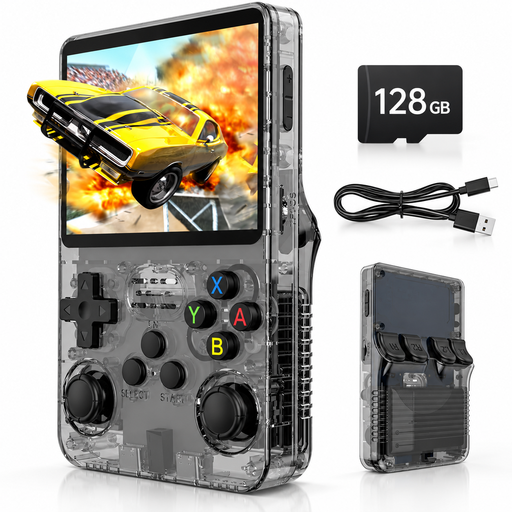
Retro handheld console, 3.5-inch IPS display, 128 GB, (Black) Grey
A portable retro games console. Check in advance whether the quiz games you want are available for this model.
The product title lists a 3.5-inch IPS display, 128 GB of storage and a Linux system.
View on Joybuy
Frequently asked questions
Does connecting the console to the TV via HDMI let me play videos from other devices through the console?
No. An HDMI connection from the console to the TV doesn’t mean the console has an HDMI input for other devices. If you want to use another video player, check how to connect it to your TV separately from the console.
How can several people answer questions in a quiz?
It depends on the game. Nintendo requires one compatible controller per person for Party Trivia in multiplayer mode. According to Jackbox, players can join supported Jackbox games on their mobile phones by visiting a website and entering the room code shown on screen.
What should I check if a video on my USB drive won’t play?
Check the file format and playback guidance for your exact console. Xbox warns that unsupported content may not play in Media Player; PlayStation explains how to play videos from USB on PS5, but doesn’t promise support for every file.
Who should I contact if my console develops a fault after purchase?
For faults that were already present at the relevant time, the seller is generally your point of contact. The Verbraucherzentrale explains that new goods are generally covered by a statutory two-year warranty period from delivery. This is separate from any voluntary manufacturer’s guarantee.
What should I bear in mind if children are playing the quiz?
Check the age rating for the specific game and consider its content as well. The Federal Centre for the Protection of Children and Young People in the Media explains age ratings for games; the USK says an age rating does not certify a game as educationally suitable.


