Who are the different input methods suitable for?

Families with their own quiz

If you read out the questions yourselves, individual buzzers can provide a clear visual and audible signal when someone answers. For close contests, consider whether you’ll decide the order yourselves or need a lockout function. Learning Resources describes lights and sounds when pressed for its LER3776 set; Retekess lists a configurable lockout function for its TM102 system.

Families with a screen-based quiz

If you want to play a particular console or PC quiz, check its input method first. It might use a smartphone with a browser or companion app rather than a gamepad. Jackbox Games Support describes browser-based controls, while Nintendo distinguishes between Joy-Con and smartphone modes in Everybody 1-2-Switch!.

Players with a compatible console

If you’d also like to use a lit gamepad, both the platform and the game mode need to be compatible. Lighting zones on the controller’s body don’t necessarily mean the buttons are illuminated. PDP lists RGB zones for its Afterglow Wave gamepad for certain Nintendo Switch models; PowerA describes lighting zones on its wired Spectra Infinity for Xbox.

What should you consider when choosing?

Individual light-and-sound buzzers

Best suited to: reading out the questions yourselves and marking individual answers with a visual and audible signal. Learning Resources describes these signals for its four-piece LER3776 set.

Bear in mind: The product information doesn’t confirm that the buzzers work together electronically to detect the first response. Each buzzer in the set requires two AAA batteries, which aren’t included.

Buzzer system with receiver

Best suited to: quizzes you host yourselves when you need a configurable answer order or lockout function. Retekess describes these features for its TM102 system.

Bear in mind: Check the size of the set you’ve chosen and what’s included. These features don’t make the system an input device for a console quiz.

Smartphone or another internet-enabled device

Best suited to: screen-based quizzes that support browser or smartphone controls. Jackbox Games Support describes browser-based controls; Nintendo states that an internet connection is required for the smartphone mode in Everybody 1-2-Switch!.

Bear in mind: Check in advance whether the game requires a browser, companion app or additional device features.

Lit console gamepad

Best suited to: games where the selected mode supports gamepad input and the model is compatible with your console. PDP and PowerA list illuminated gamepad zones for specific platforms.

Bear in mind: The lighting zones mentioned don’t confirm that the button labels are illuminated. Nintendo’s Joy-Con mode in Everybody 1-2-Switch! also doesn’t confirm support for any gamepad.

Priority What to check before buying Who should pay particular attention?
Quiz compatibility Check the game, platform and mode, and which input devices it supports. If I’ve already chosen a particular quiz, I want to know whether it requires a browser, app, smartphone or gamepad. Around 31% of consumers would make game compatibility their top priority.
Easy-to-see controls in the dark Check which parts light up, when they light up and whether the brightness is adjustable. If the room is dim, I want to know whether the button or just the controller’s body lights up. Around 31% of consumers would prioritise visibility in the dark.
Answer order Find out whether the set gives individual signals or manages the answer order and lockout. In a close quiz contest, I want to know who answered first and how the round will decide. Around 19% of consumers would prioritise a fair way to establish who answered first.
Extra equipment and effort Check what’s included, the power supply and any browser, app or connection requirements. If I want to use devices I already own or avoid extra equipment, I’ll check which batteries, devices and connections are needed. Around 19% of consumers would consider the extra effort their top priority.

Avoid common buying mistakes

  • Don’t confuse RGB lighting on the controller with easy-to-read buttons

    Lighting zones on a gamepad don’t prove that the button labels are visible in the dark.

    Check which parts of the specific model light up and whether you can adjust the brightness.

  • Don’t assume individual buzzers automatically detect who pressed first

    Individual light-and-sound signals don’t confirm that the buzzers work together electronically to detect the first press. A system with a receiver may offer additional features for managing the answer order.

    Before buying, decide whether the host will judge close answers or whether you want the system to manage the order.

  • Don’t choose the hardware before you’ve picked the quiz

    Browser, app, smartphone and gamepad controls vary from one game and mode to another.

    Choose the game, platform and mode first, then check that each device you plan to use is compatible.

Brands and product ranges at a glance

Learning Resources

The four-piece LER3776 set is designed for quizzes you host yourselves, with individual light-and-sound signals.

  • The manufacturer describes a light and a separate sound when each buzzer is pressed.
  • According to the manufacturer, each buzzer requires two AAA batteries, which aren’t included. The product information doesn’t confirm a shared electronic lockout function.

Retekess

The TM102 system combines answer buttons and a receiver for quizzes you host yourselves.

  • The manufacturer lists coloured answer indicators, three modes and a configurable lockout function.
  • Check the size of the set and what’s included in the specific version. The system’s features don’t confirm that it can be used as an input device in console games.

PDP

The Afterglow Wave Wireless is a lit gamepad for the Nintendo Switch models specified by Turtle Beach.

  • Turtle Beach lists eight RGB zones, four preset effects and up to 20 hours of battery life, according to the manufacturer.
  • The lighting zones don’t confirm that the button labels are illuminated. Also check whether the specific quiz supports the controller.

PowerA

The Spectra Infinity Enhanced Wired Controller, model 1522360-01, is a wired gamepad for compatible Xbox games.

  • PowerA lists three separate lighting zones with adjustable brightness.
  • This refers to lighting zones, not explicitly to illuminated buttons. Bear the cable and the game’s supported input methods in mind when choosing.

Nintendo

In Everybody 1-2-Switch!, the input method depends on whether you’re playing in Joy-Con or smartphone mode.

  • Nintendo lists minigames in Joy-Con mode and a smartphone mode that requires an internet connection.
  • Support for these modes doesn’t mean that any lit gamepad can control the quiz party game.

Joybuy gamepads for supported quiz modes

This Joybuy selection features lit gamepads for quiz modes that support controller input. Before buying, check that the platform and game mode are compatible with your chosen model. RGB lighting alone doesn’t tell you whether the buttons are easy to see.

NAXSIR Wireless Gamepad for Switch, T4-14707098

NAXSIR Wireless Gamepad for Switch, T4-14707098

An option if the quiz supports gamepad input on Nintendo Switch; the lighting alone doesn’t confirm that the buttons are easy to see.

Bluetooth connection, 7-colour LED, vibration feedback and 10 m range, according to the product name.

View at Joybuy
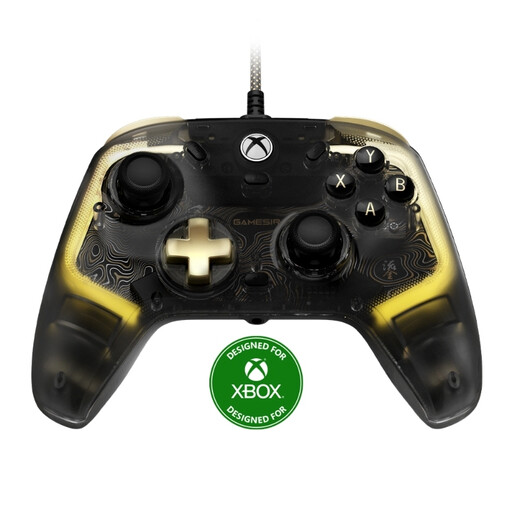
GameSir Kaleid Flux Enhanced Wired Controller for Xbox

GameSir Kaleid Flux Enhanced Wired Controller for Xbox

For quiz modes that support controller input on one of the listed platforms; check compatibility with the specific game.

Wired, with RGB lighting and Hall Effect joystick. According to the product details, compatible with Xbox Series X|S, Xbox One and Windows 10/11 PC. Detachable 3 m USB-C cable.

View at Joybuy
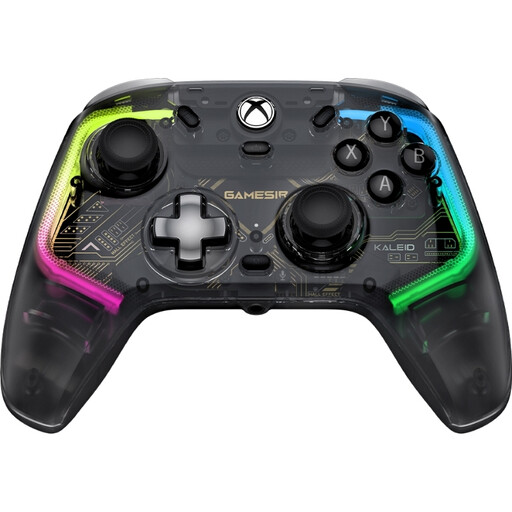
GameSir Kaleid Smoke Transparent RGB Wired Game Controller for Xbox

GameSir Kaleid Smoke Transparent RGB Wired Game Controller for Xbox

Suitable for quiz modes that support gamepads on Xbox or PC; check the game’s input requirements in advance.

Wired, with RGB lighting and adjustable Hall Effect joysticks. According to the product name, designed for Xbox Series X|S, Xbox One and Windows 10/11. Detachable 3 m USB-C cable.

View at Joybuy

Frequently asked questions

Can I use any lit gamepad for a family quiz?

No. What matters is the input method supported by the specific game and mode. Jackbox Games Support describes browser-based controls, while Nintendo distinguishes between Joy-Con and smartphone modes in Everybody 1-2-Switch!. RGB lighting doesn’t tell you whether a game supports the gamepad.

What do I need to prepare for a quiz using smartphones?

Check whether the game requires a browser, companion app or internet connection. In Jackbox, players open the browser-based controls and enter the room code. Nintendo says an internet connection is required for the smartphone mode in Everybody 1-2-Switch!; some minigames may also need the device’s camera and motion sensors.

Which batteries does the Learning Resources buzzer set need?

Learning Resources states that each buzzer in the four-piece LER3776 set needs two AAA batteries, which aren’t included. Make sure you have enough batteries for all four buzzers.

When is a buzzer system with a receiver useful?

It’s worth considering if you need a set answer order or configurable lockout function for a quiz you host yourselves. Retekess describes these features for its TM102 system; check the size of the set and what’s included before buying.

Are the buttons on an RGB gamepad illuminated in the dark?

You can’t tell from a mention of RGB zones alone. PDP and PowerA describe lighting on their gamepads, but this doesn’t confirm that the button labels are backlit. Check which parts of the specific model light up and whether you can adjust the brightness.