Start by checking the quiz you want to play. Supported Jackbox games can use internet-connected smartphones or tablets as input devices, while Joy-Con and traditional gamepads work only if the game and mode support them. Nintendo lists separate Joy-Con and smartphone modes for Everybody 1-2-Switch!, with different player limits and internet requirements. To reduce reflections, try changing seats, adjusting the screen angle or controlling the light coming through the window. The guidance from the German Federal Institute for Occupational Safety and Health relates to computer workstations; applying it to a living room is a practical interpretation.
Which input option matters for you?
Families with several players
Check whether the smartphones you already have will be enough, or whether the game requires extra controllers and input devices. Jackbox Games and Nintendo describe games that use players' own internet-connected devices as input.
Switch families planning a quiz night
If you want to use Joy-Con you already own or buy extra ones, check that your console, game mode and number of separate inputs are compatible. Nintendo notes that a single Joy-Con can be used as a controller in supported games.
Families in a bright living room
If you want questions on the shared screen and answers on personal devices to remain easy to read in daylight, seating and screen position matter too. Applying the German Federal Institute for Occupational Safety and Health's guidance on computer workstations to a living room is a practical conclusion.
What should you consider when choosing?
Choose your game and mode first, then check which devices, input options and conditions your group will need.
Smartphone or internet-connected device
A good fit if: The quiz you choose uses personal devices as input and everyone playing has a suitable device.
Bear in mind: Player limits and internet requirements depend on the game mode. Some smartphone games may also rely on device sensors.
Nintendo Joy-Con or Joy-Con 2
A good fit if: Your Switch console and chosen quiz mode support using individual Joy-Con as input devices.
Bear in mind: Nintendo says Joy-Con 2 are designed for Switch 2; original Joy-Con can only be wirelessly synchronised with Switch 2.
Traditional gamepad
A good fit if: The platform and specific quiz support gamepad input for the session you have planned.
Bear in mind: Being able to connect a controller to a PC or console does not necessarily mean the quiz will support it. For wired models, the cable needs to reach your seat.
| What matters |
What to check before buying |
Who it matters most to |
| Game and platform compatibility |
Check the quiz, platform, console generation and input type supported by the specific mode. |
If I'm buying a controller for a particular quiz, I want to know whether the game will actually support it. Around 29% of consumers put compatibility first. |
| Enough inputs for everyone |
Check the mode's player limit and how many input devices you already have. |
If everyone in the group is to answer at the same time, the game mode must allow enough inputs. Around 24% of consumers prioritise group size. |
| Readability in daylight |
Check the screen and personal displays from the seats you plan to use, at the time you intend to play. |
If I want to see questions and answers clearly despite bright windows, I first check the viewing angle and reflections. Around 18% of consumers put daylight readability first. |
| Language and content |
Check the game's language options, specific content and age rating. |
If children or players with different language skills are joining in, the questions and content should suit the group. Around 17% of consumers prioritise the suitability of the game's content. |
| Additional purchases |
Count the smartphones and controllers you already have, and check whether the mode needs an internet connection. |
If I want to avoid buying extra devices unnecessarily, I first check whether my current equipment will do the job. Around 12% of consumers put avoiding additional purchases first. |
Avoid common buying mistakes
-
Buying a controller before checking how the quiz is played
Supported Jackbox games can use players' own internet-connected devices as input. In that case, an extra gamepad is only useful if the game you choose supports it too.
Choose the title and game mode first, then check which input devices they support.
-
Assuming Joy-Con and Joy-Con 2 are interchangeable
Nintendo designed Joy-Con 2 for Switch 2. Original Joy-Con can only be wirelessly synchronised with Switch 2.
Before buying, check your console model against the controller's full product name.
-
Assuming the number of controllers equals the number of players
The number of controllers that can connect to a console and the number of people allowed in a particular quiz mode are not the same thing.
Check the player limit for the specific mode before planning to buy extra controllers.
-
Blaming the controller when a screen is hard to read in daylight
Light from a window can cause glare on screens; changing the controller will not change the lighting. The German Federal Institute for Occupational Safety and Health's guidance relates to computer workstations, not this living room.
First try different seats and screen angles, and see whether you can adjust the amount of light coming in.
Key brands at a glance
Nintendo
Joy-Con for the original Switch family and Joy-Con 2 for Switch 2 are worth considering if a supported local game mode requires separate inputs.
- Nintendo says each Joy-Con can be used individually in supported games.
- Joy-Con 2 are designed for Switch 2; original Joy-Con can only be used wirelessly with it. This does not guarantee that every quiz supports Joy-Con controls.
Microsoft Xbox
The Xbox Wireless Controller is an option for Xbox or PC quiz games that explicitly support controllers.
- Microsoft lists connections to Xbox consoles and PCs for the Xbox Wireless Controller in Astral Purple.
- Being able to connect the device does not prove that a particular family quiz supports gamepads for multiple players.
8BitDo
The Ultimate 2C Wired is a wired option for compatible Windows quiz games.
- 8BitDo lists USB and Windows 10 or later for this model.
- You'll need a USB port and a cable long enough to reach your seat. The manufacturer's information does not confirm that your quiz supports it.
Sony PlayStation
DualSense can be used as an existing or additional input device for supported PS5 games and compatible PC applications.
- Sony documents USB and Bluetooth connections to supported devices.
- Features depend on the game and, in some cases, the connection type. This does not guarantee quiz support or reduce glare from windows.
Joybuy products for compatible quiz modes
This selection includes gamepads for PC or Xbox games, as well as Joy-Con for compatible Switch quiz modes. The key thing is whether the specific game supports each input device.
 No image available
EasySMX D10 PC Controller
An option if the quiz supports gamepad input on PC or Switch.
The product title lists Bluetooth and compatibility with PC, Switch, Android and iOS.
The title also lists TMR joystick, dual-mode triggers, mechanical buttons and RGB lighting.
View at Joybuy
 No image available
Microsoft Xbox Series X/S Wireless Controller – Deep Pink
Suitable as a quiz input only if the specific game supports Xbox or PC gamepads.
The product title lists Xbox One, Xbox Series X/S and PC as compatible platforms.
View at Joybuy
 No image available
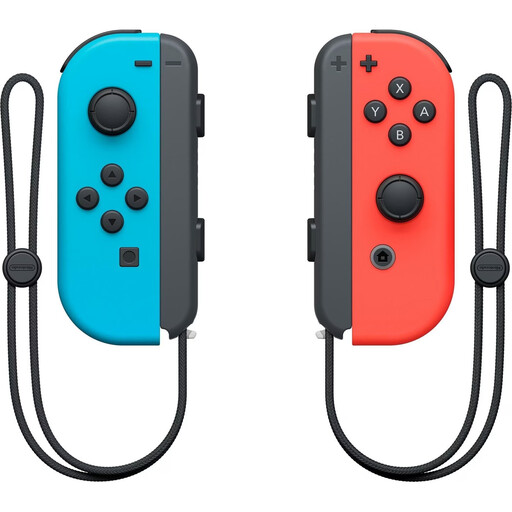
Nintendo Switch Joy-Con Pair – Neon Red/Neon Blue
Suitable if a Switch quiz supports separate Joy-Con input; Nintendo confirms that Joy-Con can be used individually in supported games.
According to the product title, the set includes one left and one right Joy-Con in Neon Red and Neon Blue.
View at Joybuy
 No image available
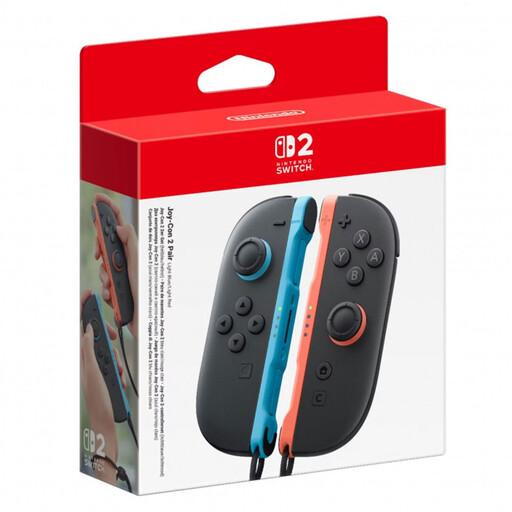
Nintendo Switch 2 Joy-Con 2 (L+R) – Light Blue/Light Red
An option for a Switch 2 quiz if the chosen mode supports Joy-Con input.
According to the product title, the set includes one left and one right Joy-Con 2.
Designed for Nintendo Switch 2 only.
View at Joybuy
 No image available
GameSir G7 HE Wired Controller – Black
An option if the quiz supports wired Xbox or Windows gamepads.
The product title lists Xbox Series X|S, Xbox One and Windows 10|11, as well as PC.
Wired; the cable needs to reach your seat.
View at Joybuy
Frequently asked questions
Does everyone need to buy their own game controller for a quiz?
No, not for every game: the German-language Jackbox Party Bundle lists mobile phones, tablets or other internet-connected devices as controllers. Check the player limit and input type for the title you actually plan to play.
Can I use Joy-Con 2 with my original Switch?
No. Nintendo designed Joy-Con 2 exclusively for Switch 2. Original Joy-Con can be wirelessly synchronised with Switch 2; whether your quiz accepts individual controllers depends on the game.
Does the smartphone mode in Everybody 1-2-Switch! work without the internet?
No. Nintendo requires an internet connection for smartphone mode, but not for Joy-Con mode. Smartphone mode may also be affected by device sensors and an unstable connection.
What should I change first if sunlight is hitting the TV screen?
Check the viewing angle, screen position and whether you can control the light coming through the window before buying a different controller because the screen is hard to read. The German Federal Institute for Occupational Safety and Health's guidance relates to computer workstations; applying it to your living room is a practical interpretation.
What ongoing requirements should I check before playing?
Check whether your existing devices are enough and whether the chosen game mode needs an internet connection. Requirements can vary within the same game, as they do between the Joy-Con and smartphone modes in Everybody 1-2-Switch!.


