Families who already own a screen-based quiz game
Check the game mode, console and permitted input methods before equipping any more players. Nintendo and Jackbox Games describe different ways to play, depending on the game.


Choose your input method to suit the quiz: standalone buzzers are enough for rounds hosted by one of you, Jackbox uses internet-connected devices, and supported Switch games can use Joy-Con or compatible gamepads. Check the specific game mode, the devices required and the number of players before buying anything else. In a bright living room, you should also check that everyone can see the shared screen clearly from where they’re sitting – extra controllers won’t solve screen glare.
Check the game mode, console and permitted input methods before equipping any more players. Nintendo and Jackbox Games describe different ways to play, depending on the game.
If you read out the questions yourselves, standalone buzzers can provide an audible signal when someone wants to answer. Learning Resources describes its set of four as having different sounds.
In supported Jackbox games, players join using their own internet-connected devices. Jackbox Games recommends positioning the host’s screen so that everyone can see it.
A good fit if: You host the questions yourselves and just need a signal to show who wants to answer.
Bear in mind: The buzzers aren’t connected to a screen-based game, so the host has to judge who buzzed first by listening to the sounds.
A good fit if: The quiz explicitly supports this input method and players can use suitable devices.
Bear in mind: Connectivity, language and player numbers depend on the game. Jackbox also requires the host to have the game on a device.
A good fit if: Your console and chosen game mode support controller input.
Bear in mind: A controller won’t replace smartphone input if the quiz requires it. Nintendo states that the Joy-Con mode in Everybody 1-2-Switch! supports 2 to 8 people; the Quiz Party mode uses smartphones.
| Consideration | What to check before buying | Who is it important to? |
|---|---|---|
| Compatible input method | Check the game mode, console and explicitly supported devices. | If I want to avoid buying the wrong thing, I first check whether my quiz supports a controller, a smartphone or no additional input device at all. Around 31% of consumers focus primarily on this compatibility. |
| Buzz-in signal | Check the number of signals, how easy they are to distinguish, connectivity and batteries. | If I’m hosting, I want to be able to tell who buzzed without a console or app. Around 25% of consumers prioritise a simple buzzer quiz. |
| Getting guests involved | Check how players join, which devices they need, the internet connection and the game’s language. | If I often have different guests joining in, I want to know whether they can use their own devices to take part. Around 25% of consumers focus on making it easy for different players to join in. |
| Visibility | Test the screen and seating in the room’s usual lighting. | If everyone needs to see the same questions on one screen, I want to check the display from every seat. Around 19% of consumers pay particular attention to how easy the screen is to read in a bright living room. |
The Learning Resources set described here isn’t connected and doesn’t send answers to a video game. Jackbox games, on the other hand, use internet-connected devices as input.
First decide whether someone will host the questions themselves or a screen-based game will receive the answers.
In Everybody 1-2-Switch!, Quiz Party and Joy-Con mode are different ways to play, with different input methods.
Check the mode you want and how many people can play at the same time – not just the game title.
An extra input device won’t reduce screen glare or make questions on a shared host screen easier to see.
Test the display from every seat in the room’s usual lighting before buying any more devices.
Nintendo confirms that original Joy-Con can be used wirelessly with Switch 2, but not that they can be attached to or charged directly from the console.
As well as checking game compatibility, consider how you’ll charge your existing or planned Joy-Con.
A provider of standalone answer buzzers for quiz rounds hosted by one of you.
Joy-Con and games with different input modes; the right choice depends on the console and game mode.
A provider of alternative gamepads for Switch games that explicitly support controller input.
A provider of party games that can use internet-connected devices as input.
These Joybuy products are for families whose chosen Switch game supports the relevant controller input. Before buying, check compatibility with the specific game and console. This selection doesn’t replace smartphone input or separate buzzers.
 No image available
An option for supported local multiplayer games that need two separate inputs.
The set includes two Joy-Con 2 in Blue/Light Yellow.
 No image available
Consider this gamepad only for a quiz whose Switch mode explicitly supports controller input.
The product details list Bluetooth, vibration feedback and a gyroscope.
The description gives a range of up to 10 m and recommends resetting the controller with a paperclip before pairing it for the first time.
 No image available
A wired option for a Switch game that explicitly supports controller input.
The product details list support for PC, Nintendo Switch, Switch Lite and PS4, as well as a gyroscope, macro, turbo and customisable button functions.
 No image available
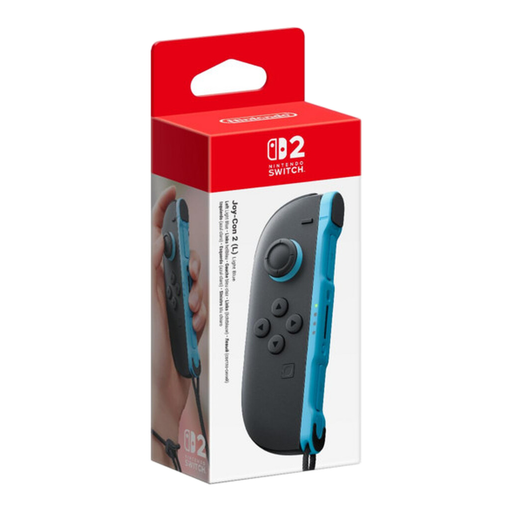
A single input for a supported Switch 2 game; this product isn’t a controller pair.
The product details list wireless connectivity, motion controls and HD Rumble.
 No image available
A pair for supported Switch game modes that can use two separate Joy-Con inputs.
The product details list a left and a right Joy-Con, which can be used separately. The Joy-Con grip for using them as a traditional gamepad is sold separately.
No. In supported Jackbox games, the host runs the game on a suitable device, while players join through a browser on an internet-connected device using a room code. Check the player numbers and language for the title you choose.
Nintendo classifies Quiz Party as part of Smartphone Mode. The separate Joy-Con mode features different mini-games for 2 to 8 people and, according to Nintendo, doesn’t need an internet connection.
The set of four Learning Resources buzzers described here requires eight AAA batteries, which aren’t included. If the questions appear on a host screen, check the view from every seat beforehand. For Everybody 1-2-Switch!, Nintendo recommends TV Mode so everyone can see the instructions.
According to Nintendo, original Joy-Con can be used wirelessly with a Switch 2. However, they can’t be attached to or charged directly from the console, so remember to consider how you’ll charge them.