Who are the different input options best suited to?

Families creating their own video questions

If you want to include local clips or online videos in questions you’ve created yourself, check which video sources the quiz software supports first, then look at its input options. QuizXpress describes video questions, while Kahoot! offers different video options depending on the user group and plan.

Families hosting a buzzer round

If one person presents the questions and videos while everyone else buzzes in from their own spot, check whether the system has a shared first-in lockout. Learning Resources describes individual buzzers on the LER3776 model as having light and sound signals; QuizXpress says Octobuzzy locks out the other buttons after the first one is pressed.

Families with an existing screen-based quiz

If you want to play a particular quiz on a console or another screen you already own, check which input method that title uses. Jackbox describes internet-connected devices as controllers; Nintendo notes that Joy-Con only control the menus in the first Jackbox Party Pack.

What should you consider when choosing?

Standalone individual buzzers

Best suited to: showing the questions and video clips yourself, when one signal per person is enough.

Bear in mind: There’s no documented shared first-in lockout for the Learning Resources LER3776 set, so you may need to host the round yourself.

Standalone buzzer system with first-in lockout

Best suited to: host-led rounds where you want it to be clear which button was pressed first.

Bear in mind: According to the supplier, the wireless QuizXpress Octobuzzy works without a computer. Its stated range is 3–5 m, and its controls don’t automatically integrate videos or scoring into quiz software.

Smartphones as quiz controllers

Best suited to: screen-based quizzes that support mobile devices as inputs. Jackbox uses a browser and room code for this.

Bear in mind: The documented Jackbox setup requires a host device and internet-connected input devices; the supplier lists QuizXpress Mobile Home as an annual subscription.

Console or PC gamepad

Best suited to: quizzes that support gamepad input and work with your platform.

Bear in mind: Platform compatibility alone doesn’t guarantee compatibility with a quiz. Nintendo says Joy-Con are only used for menu controls, not answering, in the first Jackbox Party Pack.

What matters What to check before buying Who is this particularly important to?
Video sources and quiz software Test your own video sources and check how they work with the specific quiz and plan. If I want to use local clips and online videos in my own questions, the software comes first. This matters most to around 33% of consumers who prioritise video sources.
Answer method and player numbers Check the game and mode, host device, number of active players, and whether the input is for answering rather than navigating menus. If I’m looking for a controller for a particular screen-based quiz, I want to know that I can actually use it to submit answers. This matters most to around 27% of consumers who prioritise input compatibility.
First-in lockout for buzzers Look for an explicitly stated shared first-in lockout, and check the number of buttons and how the system works. If I’m planning a host-led round with close calls, it’s important to be able to clearly identify the first answer. This matters most to around 20% of consumers who prioritise fair identification of the first answer.
Devices you already own and extra setup Check the platform and game mode, as well as any batteries, connections and software you’ll need. If I want to keep using my console or PC and avoid extra devices, I also check whether I’ll need mobile devices or ongoing software. This matters most to around 20% of consumers who prioritise using an existing platform and avoiding ongoing costs.

Common buying mistakes

  • Assuming console compatibility means quiz compatibility

    A controller may work with a console but still not function as an answer device for a particular quiz. Nintendo explains that Joy-Con only control the menus in the first Jackbox Party Pack.

    Check the input requirements for the exact game title and mode before choosing a gamepad.

    Key brands at a glance

    QuizXpress

    A good fit for creating your own multimedia questions and standalone buzzer systems when you want to combine video questions with host-led rounds.

    • QuizXpress describes video questions in Studio and an eight-button first-in lockout for the wireless Octobuzzy.
    • There’s no evidence that the standalone Octobuzzy works as an input device for QuizXpress software. The supplier lists Mobile Home as an annual subscription.

    Learning Resources

    An option for simple, standalone buzzers in a small, host-led round.

    • Learning Resources describes the LER3776 model as having four light-and-sound buzzers.
    • There’s no evidence that this model has a shared first-in lockout or connects to a quiz programme. According to the manufacturer, each buzzer needs two AAA batteries.

    Nintendo

    Joy-Con may be suitable for supported quiz games on Nintendo Switch, particularly if you already own the console.

    • Nintendo describes using Joy-Con separately with supported games.
    • According to Nintendo, Joy-Con are only used for menu controls, not answering, in the first Jackbox Party Pack. Accessories for Switch and Switch 2 aren’t compatible in every use case.

    8BitDo

    PC or Android gamepads may be an option if the specific quiz supports gamepad input.

    • 8BitDo lists 2.4 GHz or wired connections to Windows, and Bluetooth to Android, for the Ultimate 2C Wireless.
    • These platform connections don’t confirm support for Nintendo Switch or a specific quiz.

Joybuy products for gamepad quizzes

The following Joybuy products are gamepad options for quizzes that explicitly support controller input on the relevant platform.
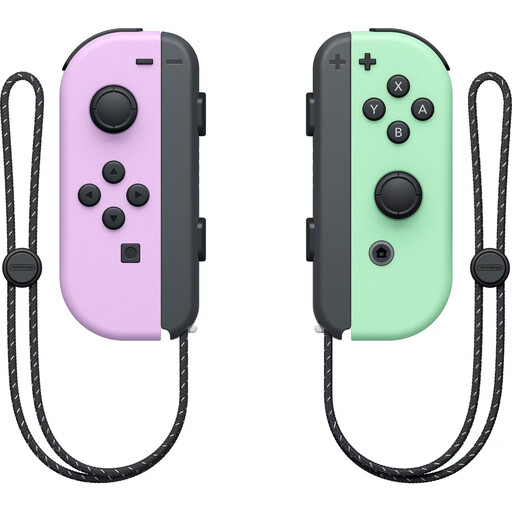
Nintendo Switch Joy-Con controller pair in Pastel Purple and Pastel Green

Nintendo Switch Joy-Con controller pair, Pastel Purple/Pastel Green

For a supported Switch game that uses separate Joy-Con inputs; according to Nintendo, Joy-Con are only used for menu controls, not answering, in the first Jackbox Party Pack.

Set of two Joy-Con for Nintendo Switch.

View on Joybuy
Rokid and GameSir co-branded controller

Rokid × GameSir co-branded controller

A gamepad option if the specific quiz supports controller input; check compatibility with your device and game before buying.

View on Joybuy

EasySMX D10 gamepad

EasySMX D10 gamepad

A gamepad option for quizzes that allow controller input on a supported platform; check input compatibility with the specific game separately.

Platforms listed in the product name: PC, Switch, Android and iOS.

View on Joybuy

PlayStation DualSense wireless controller in Midnight Black with USB cable

PlayStation DualSense wireless controller, Midnight Black, with USB cable

An option for a quiz that supports gamepad input; check that the specific game and your device can use this controller.

USB cable included, as stated in the product name.

View on Joybuy

Wireless game controller compatible with PS4 and PC

Wireless game controller compatible with PS4 and PC

An option for a gamepad-compatible quiz on PS4 or PC; check that the specific game supports it before buying.

View on Joybuy

Frequently asked questions

Can a new controller bring videos from different sources into a quiz?

No, the quiz software is what matters. QuizXpress describes video questions, while Kahoot! offers Vimeo integrations and file uploads depending on the user group and plan. According to Kahoot!, YouTube videos are no longer supported for Business and Social users. Check your account type and plan, and test every clip you need.

Do I need extra gamepads to play Jackbox on Switch?

In the first The Jackbox Party Pack, Joy-Con or a Pro Controller can be used to control the menu, according to Nintendo; answering requires internet-connected devices via Jackbox.tv. Check the input requirements for other titles separately.

What do I need to set up before our first family round?

For the Jackbox setup described, you’ll need a device running the game, a screen everyone can see and internet-connected input devices to enter the room code. For the wireless Octobuzzy, QuizXpress specifies two AAA batteries for the remote; the buttons are rechargeable.

What ongoing costs and return rights should I be aware of?

According to the supplier, the QuizXpress Mobile Home licence is an annual subscription. According to Your Europe, when buying goods from an online trader in the EU, you generally have 14 days from delivery to withdraw from the purchase; exceptions apply to digital content and certain other cases. Under the conditions explained there, the buyer may have to pay return postage.

What should I look out for when buying electronic or wireless buzzers in Germany?

For certain electronic products, the Bundesnetzagentur lists points to check including correct CE marking, identifiable manufacturer details, German-language instructions with any necessary warnings, and a declaration of conformity. CE marking is not an independent quality test mark.