Families with a particular quiz game in mind
Before buying accessories, check whether your chosen game mode requires smartphones, Joy-Con or another type of input. Nintendo says Everybody 1-2-Switch! has both a smartphone mode and a Joy-Con mode.


First, check the specific quiz and game mode. In Jackbox, players submit their answers using a device with a browser, while the quiz party in Everybody 1-2-Switch! is part of the smartphone mode. An extra gamepad won’t replace these required inputs; additional Joy-Con are only an option for games and modes that support them. Check subtitles and German in-game text for each game separately, regardless of which controller you use.
Before buying accessories, check whether your chosen game mode requires smartphones, Joy-Con or another type of input. Nintendo says Everybody 1-2-Switch! has both a smartphone mode and a Joy-Con mode.
Check subtitles and, where relevant, German in-game text for each game. Changing the controller won’t affect these game settings. Jackbox Games says games in The Jackbox Party Pack 7 and later instalments have a subtitle option.
Additional Joy-Con may be suitable for supported multiplayer modes. Nintendo says older Joy-Con can be used wirelessly with a Switch 2, but they need to be attached to a Switch or charged using suitable charging accessories.
A good fit if: the quiz requires input through a browser or smartphone. Jackbox Games says players can join using a device with a browser; Everybody 1-2-Switch! has a smartphone mode.
Bear in mind: An extra gamepad won’t replace the required input. Check in advance which device and, where relevant, which sensors the mode needs.
A good fit if: the specific Switch game supports Joy-Con input and you need additional controllers. Nintendo says a single Joy-Con can be used on its own in supported games.
Bear in mind: The quiz party in Everybody 1-2-Switch! is part of smartphone mode, not automatically Joy-Con mode.
A good fit if: your chosen game supports gamepad input and you’d also like to use the gamepad with other compatible games.
Bear in mind: Features and connection types vary by model. The PowerA wired model reviewed here requires the Switch to be docked and doesn’t support motion controls.
| Buying priority | What to check | Who is it most important to? |
|---|---|---|
| Quiz input | Check the game, platform, mode and required input separately. | I want to be sure everyone can answer using the intended device before game night. Around 33% of consumers would focus above all on support for the specific input mode. |
| Subtitles and game language | For the specific title, check subtitle options and German-language support separately. | If everyone is going to read along, I want to be able to turn on subtitles and have clear in-game text. Around 27% of consumers would rank subtitles and game language as their top priority. |
| Enough input devices | Check the supported player count and controller setup for the mode you plan to play. | For a larger group, I want to know whether the chosen mode supports more players with additional Joy-Con. Around 20% of consumers would focus above all on extra Switch input devices. |
| Connection and setup | Check the console mode and motion controls, and, for wired models, the cable length and model name. | I want to know in advance whether a cable or charging accessory will work with our setup. Around 20% of consumers would give particular weight to the connection and any extra setup involved. |
Everybody 1-2-Switch! uses smartphone mode for its quiz party, while Jackbox games use devices with a browser as the input method. A gamepad that isn’t compatible may end up unused.
Before you buy, check the input requirements for the specific game and mode.
An accessory that the chosen mode doesn’t use will sit idle during game night.
A subtitle option doesn’t guarantee that questions and in-game text are also available in German.
Check subtitles and German-language support separately for the same title.
8BitDo lists Switch support for the Ultimate 2C Bluetooth, but the Ultimate 2C Wireless is listed for Windows and Android.
Check the full model name and platform details before you decide.
According to PowerA, the Enhanced Wired Controller model reviewed here doesn’t support motion controls and can only be used when the Switch is docked.
Check the features you need and the console mode against the details for the specific model.
Joy-Con are an option for Nintendo Switch games whose mode supports Joy-Con input.
Alternative gamepads for games that support standard gamepad input.
Wired Switch gamepads for supported games when the console is docked.
This selection includes gamepads and individual Joy-Con for quiz and Switch games, provided the relevant mode supports that type of input. None of these devices replaces a required smartphone or browser input.
 No image available
Only suitable for games that support this type of gamepad input.
The product title lists an all-button layout and Bluetooth, 2.4 GHz and wired connections. The listed platforms are Switch, Switch 2, PC, iOS and Android.
 No image available
An option if your chosen game supports standard Switch gamepad input.
The product details list Bluetooth, vibration feedback and a 6-axis gyroscope.
 No image available
Only suitable for games that support standard gamepad input.
The product title lists a wired connection and Switch compatibility; the product details also mention a 6-axis gyroscope.
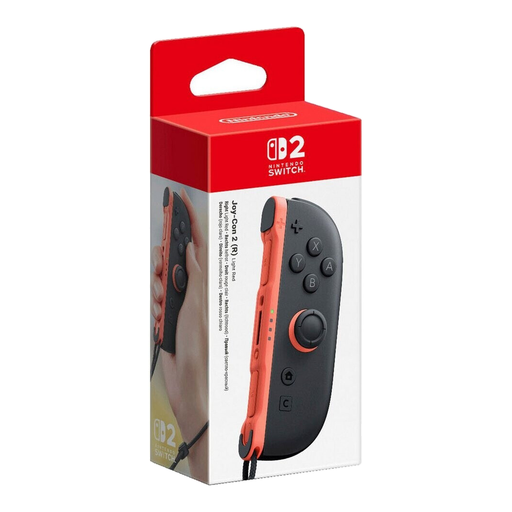 No image available
A single right Joy-Con 2 for Switch 2, provided the game supports the relevant Joy-Con mode.
The product details list motion controls. This is a single right-hand controller.
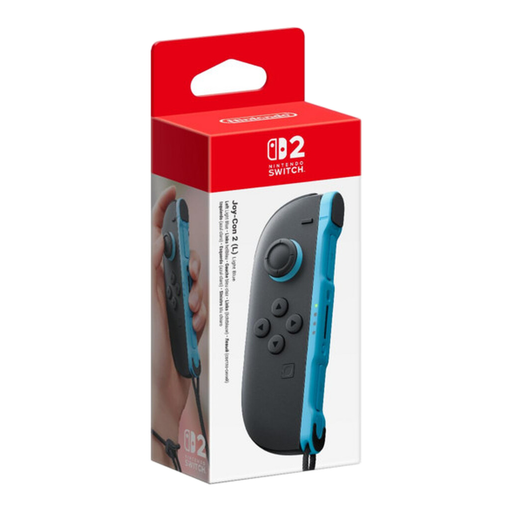 No image available
A single left Joy-Con 2 for Switch 2, provided the game supports the relevant Joy-Con mode.
The product details list motion controls. This is a single left-hand controller.
No. Subtitles are a setting in the game itself. Jackbox Games says The Jackbox Party Pack 7 and later instalments have a subtitle option; also check whether the specific title is available in German.
According to Jackbox Games, each person joins using a device with a browser and enters the four-digit room code shown on screen, along with a name. One person can sign in per browser and device.
Nintendo says they can be used wirelessly with the Switch 2. Older Joy-Con can’t be attached to the console for charging; you’ll need a Switch or suitable charging accessories instead.
According to the German Environment Agency, electrical and electronic waste must not be put in household rubbish. You can return it to municipal collection points or, depending on the take-back scheme, to a retailer.