Family videos with separate audio
If you want to combine camera footage with separately recorded conversations, check how syncing works in your editing software. Adobe, Blackmagic Design and Apple all document the relevant software features.


For family videos with separately recorded audio, it’s less about choosing a particular type of PC and more about finding the right combination of editing software, operating system and recording format. The software takes care of syncing. A Mac mini suits a macOS workflow where you’re planning to use a separate monitor; with a Windows tower, check the specifications and potential upgrade options of the specific model. If you regularly edit 4K footage in Adobe Premiere on Windows, pay particular attention to whether the RAM meets the software requirements.
If you want to combine camera footage with separately recorded conversations, check how syncing works in your editing software. Adobe, Blackmagic Design and Apple all document the relevant software features.
If you often edit high-resolution footage, compare the processor, RAM, graphics and storage in the configuration actually on offer with your software’s requirements. Adobe recommends 32 GB or more of RAM for 4K and higher resolutions in Premiere on Windows. Proxies can also be a useful option when working with demanding files.
If you want to keep original footage, separate audio files, project files and exports, treat your working drive and a separate backup as two different things. Adobe describes proxy files as additional working copies of high-resolution files.
A good fit if: you want to work with macOS, plan to use a separate monitor, and the ports and storage on your chosen configuration suit your files. Final Cut Pro can sync separate audio and video clips.
Consider: Check the storage and ports on the specific model, and allow room for external storage.
A good fit if: you want to use Windows software or upgrade components later, and the specific case has the options you need. Adobe recommends 32 GB or more of RAM for 4K and higher resolutions in Premiere on Windows.
Consider: Specifications can vary within a model range. Neither the range nor the word ‘tower’ guarantees that a particular model can be upgraded in specific ways.
If you’re choosing a desktop PC for family videos with separately recorded audio, the most important thing to check depends on what matters most to you.
| Your priority | What to check before buying | Who is this most important to? |
|---|---|---|
| Syncing separate audio | Does your editing software support syncing your clips? Are the ports and import options compatible with your recording devices? | If I’m combining video with separately recorded audio, I want to understand the process in the software I choose. Around 36% of consumers put audio syncing first. |
| Smooth editing | What does your software version recommend for resolution and RAM? Check the specific graphics and storage too. | If I often edit high-resolution footage, I want the actual configuration to suit my files. Around 29% of consumers prioritise editing performance. |
| Storing files | How large are your video and audio files? Have you allowed enough space for originals, working files and exports? | If I want to keep family footage for the long term, I need a separate backup as well as a working drive. Around 21% of consumers put archiving first. |
| Form factor and accessories | Are your monitor and storage devices compatible with the ports? Do you already have a screen and input devices? | If desk space is limited, I want a computer that works with the accessories I already own. Around 14% of consumers prioritise a compact setup. |
The amount of RAM you need depends on the software and resolution. For Premiere 26.x on Windows, Adobe recommends 16 GB for HD and 32 GB or more for 4K and higher resolutions.
Check that the software version and recording format you use are a good match for the RAM in the specific model you’re ordering. Proxies may be an alternative for demanding footage, but they require extra files and storage space.
Working copies or proxy files stored on the same computer are not an independent backup of your original footage.
Plan your storage around your files, and keep your backup separate from your working drive.
Components can vary between configurations, so the model name alone isn’t a reliable guide to the specifications of the specific model you’re ordering.
Compare the full model number and each configuration detail before you decide.
The Mac mini range is worth considering for a compact macOS editing setup.
The Tower Plus EBT2250 is a Windows tower range with configurations offering different specifications.
The Z2 Tower G1i is a configurable workstation range for buyers who want to compare specific Windows specifications.
The ThinkStation P3 Tower Gen 2 is a tower range for buyers with specific requirements for ports or upgrades.
The configurable High End Gaming PC Next Level, item 64258, is a tower alternative if the chosen specifications meet your editing needs.
The following Joybuy products are Windows desktops and mini PCs for a software-based editing workflow. Check the specific configuration, the storage space you need and the ports for your accessories.
 No image available
Could work as a Windows PC for an editing workflow with separately recorded audio; syncing is handled by your chosen editing software.
Windows 11 Home; 32 GB RAM; RTX 5060; 1-TB SSD and 1-TB HDD.
The drives don’t replace a separate backup of your original footage.
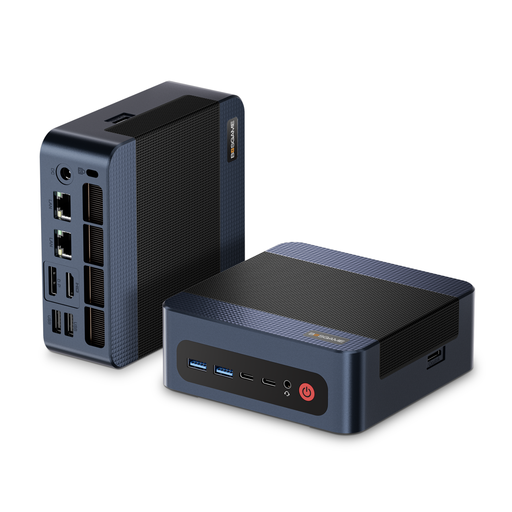 No image available
Could work as a compact Windows PC for editing and storing media files; check that the ports suit your accessories.
Windows 11 Pro; 32 GB DDR5 RAM; 1 TB PCIe 4.0 SSD.
 No image available
This compact Windows system could suit an editing workflow with separate audio and video files. Check that its specifications match your recording format and software.
Windows 11 Pro; 16 GB DDR5 RAM; 512 GB SSD; USB 4.0.
For Premiere on Windows, Adobe recommends 32 GB or more of RAM for 4K and higher resolutions; this model is listed with 16 GB.
Not just to sync it: Premiere, DaVinci Resolve and Final Cut Pro all document software-based methods for working with separate recordings. Also check how you can connect your recording devices or import your files.
Adobe describes proxies as smaller working copies of high-resolution files. Check whether your software supports this workflow and whether you have enough storage for the extra files. Keep the original files available for export.
For a consumer purchase, your statutory rights apply against the seller and are separate from any voluntary manufacturer’s warranty. The Verbraucherzentrale states that new goods are generally covered for two years; if there’s a fault, repair or replacement is the first step.
The Bundesnetzagentur says that checks on electrical and electronic products include looking for a correct CE mark, as well as product and manufacturer details. The CE mark is the manufacturer’s declaration, not an independent quality mark for video editing.