Start with the fantasy games you actually want to play, then consider whether you’ll mainly play on a TV or handheld. For TV gaming, options include PS5 and Xbox Series X, although HDR and higher resolutions depend on the game and a compatible display. An OLED screen on a handheld won’t automatically give you an OLED picture on your TV.
Which console is right for you?
Fantasy fans who know what they want to play
If you have particular adventures or an existing games library in mind, your choice of platform should depend on whether those games are available and compatible. General graphics specifications won’t tell you whether the game you want will run on it.
TV gamers in a dark room
If you mainly play on a TV, check whether your chosen game and display actually support the console’s picture features. This will help you work out whether 4K or HDR matters for the way you play.
Handheld gamers
If you want to play without a TV, the built-in screen matters. Switch OLED and Steam Deck OLED have OLED displays; Switch 2 uses an LCD. Also check that your chosen games will run on the device.
What to consider when buying
First, check that your chosen games will run on the console. Then weigh up the way you want to play and the screen, as well as the disc drive, storage and any additional purchases you may need.
| What matters |
What to check before buying |
Who it matters most to |
| Chosen games and games library |
Check the platform and edition for each title. For Switch games, check compatibility with Switch 2; for Steam games, check their Deck rating. |
If particular fantasy adventures or games I’ve already bought are a must, I want to make sure I can play them before considering graphics features. Around 33% of consumers put games and their existing library first. |
| Picture on a TV |
Check the picture modes supported by the game against your TV’s capabilities. On Switch 2, 4K and HDR require supported games and a suitable display. |
If I mainly play on a TV in a dark room, I want to make sure I can use picture features that suit my device and game. Around 27% of consumers prioritise picture quality on a TV. |
| Handheld picture and play style |
Consider the screen type and size, the games you want to play and, for portable gaming, battery life, which varies by game. |
If I want to play without a TV, the built-in screen matters more than TV output. Around 20% of consumers prioritise handheld gaming. |
| Discs, downloads and storage |
Check the exact version and whether it has a disc drive. Also consider usable storage, compatible storage expansion and the terms of any online services you want. |
If I want to use discs or limit extra digital purchases, I should check format compatibility and storage before choosing. Around 20% of consumers prioritise media format and potential ongoing costs. |
Common misconceptions when buying a console
-
‘Series X’ or ‘PS5 Pro’ automatically means a disc drive
The Xbox Series X Robot White All-Digital and PS5 Pro don’t come with a disc drive. The model suffix matters if you want to use game discs.
Before buying, compare the full variant name and check whether a disc drive is actually included.
To use discs with a PS5 Pro, you may need to buy a compatible disc drive separately. With all-digital versions, you’ll need to use digital copies of games.
-
An OLED handheld also gives you an OLED picture on your TV
The OLED screen on Switch OLED or Steam Deck OLED is built into the device. The picture on your TV, on the other hand, depends on the connected TV and the output it supports.
First decide whether you’ll mainly play on the built-in screen or on a TV.
-
A standard microSD card is the right storage expansion for Switch 2
Nintendo specifies microSD Express for expanding Switch 2 storage. According to Nintendo, other microSD cards can only be used to copy screenshots and videos from an original Switch.
Check the card type and any requirements before buying accessories.
You may need to buy a microSD Express card separately to expand the storage.
-
All your existing Switch or Steam games will run without restrictions
Nintendo lists exceptions to the compatibility of older Switch games with Switch 2. Valve rates individual Steam games for Steam Deck, so having a PC version doesn’t guarantee that it will play well on the handheld.
Check each game you want on the relevant platform and make sure you have the right edition.
Depending on compatibility, you may need a different version of a game, or a title you want may not work as expected on the device.
Key console brands at a glance
Sony PlayStation
PS5 models are worth considering if the games you want are available for PlayStation. The different versions vary in features, including whether they have a disc drive.
- Sony lists a 1-TB SSD for the German PS5 model with a disc drive.
- The PS5 Pro is sold without a disc drive. Sony describes PSSR and improvements in optimised games as manufacturer claims, so check whether the specific games you play benefit from them.
Microsoft Xbox
Xbox Series X is a TV gaming option with versions that differ in whether they have a disc drive. The Series S is an all-digital alternative.
- In its model comparison, Microsoft lists 4K gaming resolution for Series X and 1440p for Series S.
- The Series X Robot White All-Digital can’t read game discs, so the exact version is an important factor when buying.
Nintendo
Switch 2 combines handheld and TV gaming. Switch OLED is for players who want a built-in OLED display and access to games for the original Switch.
- Nintendo lists a 7.9-inch LCD with HDR10 support for Switch 2. 4K in TV mode requires a supported game and a suitable display.
- Switch OLED has a 7-inch OLED display and 64 GB of internal storage. Some older Switch games may not be compatible with Switch 2.
Valve Steam Deck
Steam Deck OLED is a portable gaming PC for compatible titles in your Steam library.
- Valve specifies a 7.4-inch HDR OLED display and provides compatibility ratings for individual games.
- Battery life depends on the game. Check the rating for each title you want rather than assuming the PC version will offer the same experience on a handheld.
Consoles at Joybuy
This selection includes Nintendo consoles for handheld and TV gaming, as well as a digital PS5 Slim for playing on a TV. Your choice will still depend on the games you want, your preferred screen and whether you need a disc drive.
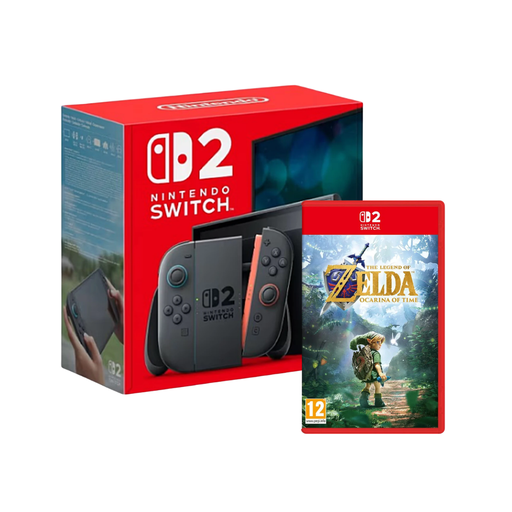 Image unavailable
Nintendo Switch 2 (EU) with The Legend of Zelda: Ocarina of Time
An option if you’re looking for a fantasy adventure bundled with a Nintendo Switch 2.
According to the product name, the bundle includes The Legend of Zelda: Ocarina of Time.
View at Joybuy
 Image unavailable
Nintendo Switch OLED White
A good fit if you mainly play on the built-in screen and the games you want are available for the original Switch.
7-inch OLED display and 64 GB of internal storage. According to the product description, a compatible microSD card is sold separately.
View at Joybuy
 Image unavailable
Nintendo Switch 2 (EU)
A hybrid console for switching between handheld and TV gaming, provided the games you want are compatible with Switch 2.
7.9-inch LCD with HDR10 support. 4K TV output requires a supported game and a suitable display; some Switch games may not be fully compatible, or may not work at all.
View at Joybuy
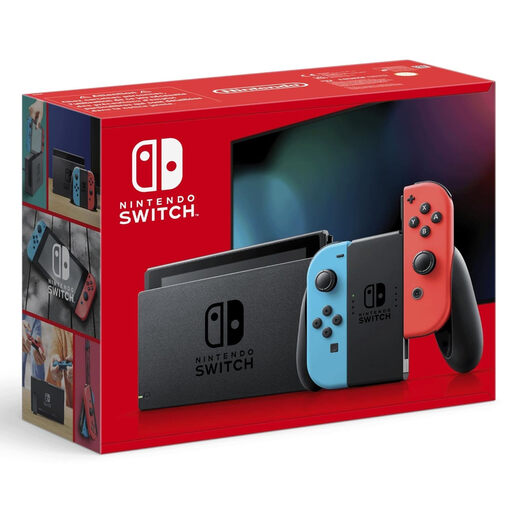 Image unavailable
Nintendo Switch Neon Red/Neon Blue (New Edition)
Another Switch option if you want to switch between handheld, tabletop and TV modes, and the games you play are designed for the original Switch.
6.2-inch display with 1280 × 720 pixels and 32 GB of internal storage. According to the product description, a microSD card is sold separately.
View at Joybuy
 Image unavailable
PlayStation PS5 Slim Digital Edition, 825 GB
A TV gaming option if the adventures you want are available for PS5 and you’re happy to use digital copies of games.
Digital Edition without a disc drive; the product description lists an 825-GB SSD. According to the product description, games are bought digitally.
View at Joybuy
Frequently asked questions
Is an HDR-capable console all you need to play HDR fantasy games on a TV?
No. For HDR and 4K on Switch 2, Nintendo requires a supported game and a compatible screen. For other consoles, check the picture modes supported by the specific game and your TV’s capabilities too.
Which memory card works with Switch 2?
Nintendo specifies microSD Express cards for expanding storage and requires a system update via the internet. According to Nintendo, other microSD cards can only be used with Switch 2 to copy screenshots and videos from an original Switch.
Does every PS5 Pro or Xbox Series X have a disc drive?
No. The PS5 Pro and Xbox Series X Robot White All-Digital are sold without a built-in disc drive. Check the full model name if you want to use game discs.
Can I assume that my Switch or Steam games will run on any handheld?
No. Nintendo lists exceptions to the compatibility of older Switch games with Switch 2, and Valve rates Steam games individually for Steam Deck. Check each game you want on the relevant platform.
Which age rating matters in Germany if children are playing?
Check the German age rating for the specific game, not just the information about the console. The USK explains that games may only be made available to minors if they have the appropriate German age rating. Games without a USK rating, however, may be supplied to adults.


