Fantasy fans with a particular game in mind
You already have a specific adventure in mind and first want to check which platform and edition it’s available on.


When choosing a console for fantasy adventures on the big screen, start with the game you want to play: Nintendo offers Zelda: Tears of the Kingdom – Nintendo Switch 2 Edition for Switch 2, Microsoft offers Avowed for Xbox Series X|S, and PlayStation offers Elden Ring for PS5. Then consider the specific console model, whether you want to use discs or digital downloads, the supported display output and whether you’d also like to play on the go. A console’s ability to output at 4K doesn’t mean every game runs in 4K.
You already have a specific adventure in mind and first want to check which platform and edition it’s available on.
You mainly play on your TV and want to match the display capabilities of your console, game and screen.
You want to use the same console system on the big screen and away from it.
A good fit if: Your chosen fantasy game is available for PS5; PlayStation offers Elden Ring for PS5.
Things to consider: Check whether the specific model has a disc drive. Sony says PS5 Pro enhancements are available only in supported games.
A good fit if: You want to play Xbox fantasy games such as Avowed; Microsoft lists the game as optimised for Series X|S.
Things to consider: Series X models are available with a disc drive or as an All-Digital edition. Series S is disc-free and, according to Microsoft, designed for 1440p gaming.
A good fit if: You want to play Zelda: Tears of the Kingdom – Nintendo Switch 2 Edition and switch between TV and handheld modes.
Things to consider: You’ll need the dock for TV mode. According to Nintendo, 4K and HDR require a supported game and a compatible screen.
First, check that your chosen game and edition are available for your platform. Then make sure the display output, how you’ll use the console and how you’ll buy games suit your needs.
| What you’re looking for | What to check before you buy | Who this matters most to |
|---|---|---|
| Games you want and platform | Check the platform and edition of the specific game. For upgrades, also check what you need to own the base game. | If I want to play a particular fantasy adventure, it needs to be available on my console and in the edition I’ve chosen. Around 33% of consumers put access to the game they want first. |
| Display output on your TV | Compare your TV’s capabilities with the console’s output and the features supported by the game in question. | If how games look on my big TV matters to me, I want to know which display features the game and screen actually support. Around 27% of consumers prioritise TV display output that suits their needs. |
| TV and handheld gaming | Check the TV mode, whether you need a dock, and compatibility with the specific games you want to play. | If I want to play on my TV or away from it depending on the situation, being able to switch between the two is important to me. Around 20% of consumers prioritise flexible ways to play. |
| Discs, downloads and future purchases | Check for a disc drive and the storage capacity. For game upgrades, find out whether you need the base game or a membership. | If I want to use games I already own on disc or plan my digital game purchases, the console needs to support the format I choose. Around 20% of consumers prioritise game formats and future purchases. |
Microsoft offers a Series X with a disc drive as well as an All-Digital edition. The model name alone doesn’t tell you whether you can play games on disc.
Before you buy, check the full model name and the type of disc drive listed.
With a digital model, you can’t use games you already own on disc, so you’ll need to plan to buy games digitally.
Nintendo says Switch 2 needs a supported game and a compatible screen for 4K. At 4K output, the maximum frame rate is 60 fps, according to Nintendo. Microsoft describes Series S as designed for 1440p gaming, with possible upscaling to 4K.
Check the details for the specific game separately from the capabilities of your TV and console.
Nintendo says you need to own the separately sold Switch base game to use the upgrade pack for Zelda: Tears of the Kingdom.
Before you buy, check the requirements and what’s included in the specific game edition.
For fantasy games on PS5, the specific console model, game library and any enhancements supported by PS5 Pro are key considerations.
With Xbox Series X|S, the games available, whether there’s a disc drive and the intended display output of each model are all important factors.
Switch 2 could be a good choice for fantasy adventures if you want to combine TV mode with handheld gaming.
These Joybuy product options are for consoles and TV gaming devices. Check that each model works with the fantasy games you want to play and suits how you plan to use it.
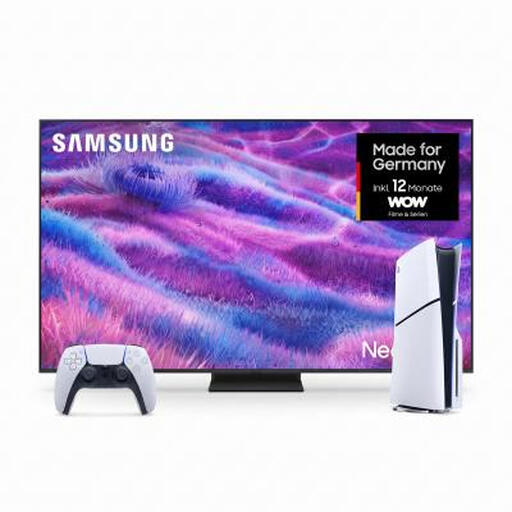 Image unavailable
This bundle could be a good fit if you want to play Elden Ring on PS5 and buy games digitally; PlayStation offers Elden Ring for PS5.
It combines a Samsung Neo QLED TV GQ85QN80FAU with a PS5 Slim Digital Edition with 825 GB of storage. The PS5 Digital Edition doesn’t have a built-in disc drive.
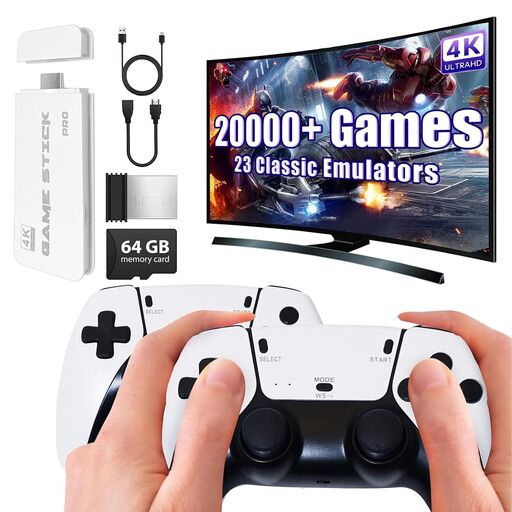 Image unavailable
If you want to play a particular fantasy adventure, check that the game is compatible with this device before you buy.
The product title mentions 4K HDMI output and two 2.4 GHz wireless gamepads. Check compatibility with any specific game separately.
 Image unavailable
According to Nintendo, you need a Switch 2 to play Zelda: Tears of the Kingdom – Nintendo Switch 2 Edition. The system is also a good choice if you want to switch between TV and handheld modes.
According to Nintendo, 4K and HDR output require a supported game and a compatible screen.
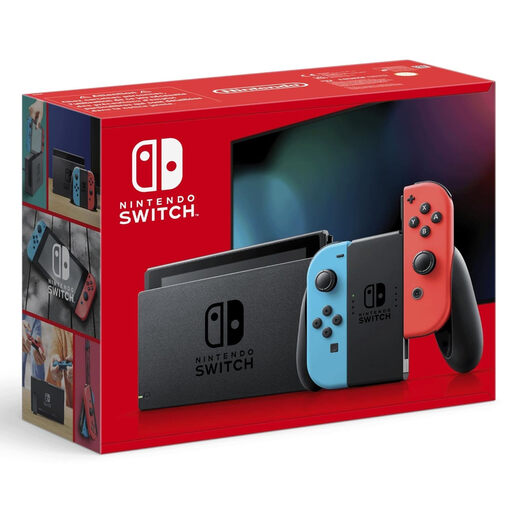 Image unavailable
If you want to switch between TV, tabletop and handheld modes, check that this Switch model and the games you want to play are suitable.
Before you buy, check that the specific games you want to play are compatible with this model.
No. The specific game must support it, and you’ll also need a compatible screen. For 4K in Switch 2 TV mode, Nintendo says you need supported games and limits 4K output to a maximum of 60 fps. Microsoft describes Series S as designed for 1440p gaming, with possible upscaling to 4K.
Nintendo says to use the Switch 2 dock connected to your TV for TV mode. Remove the Joy-Con 2 controllers, place the console in the dock and start your game.
According to Verbraucherzentrale, online orders are generally covered by a 14-day cancellation period from the date of delivery. When buying goods from a business seller, you’re also covered by the statutory guarantee. According to Your Europe, goods bought in the EU have a minimum guarantee period of two years from receipt. This is separate from any voluntary manufacturer’s warranty.
Check the age rating for each game, not just the console. In Germany, retailers must comply with the sales restrictions associated with the ratings. The USK also provides parents with additional guidance, for example on purchasing and communication features.
No. Nintendo says you need to own the separately sold Switch base game, The Legend of Zelda: Tears of the Kingdom, to use the upgrade pack.