Putting fantasy games first
If you already have a particular adventure in mind, check that the exact game version works on the console before you buy. Nintendo, PlayStation and Xbox each offer different relevant titles.


First, choose the console that supports the fantasy games you want to play. Then check how your specific headphone model connects. The Nintendo Switch 2 is a particularly good option if you want to play on the go, while your choice of games, disc drive and headset connection could make all the difference with PS5 and Xbox Series X|S. Nintendo outlines the Switch 2’s play modes, while PlayStation and Xbox both list games such as Baldur’s Gate 3 for their consoles.
If you already have a particular adventure in mind, check that the exact game version works on the console before you buy. Nintendo, PlayStation and Xbox each offer different relevant titles.
If you want to keep using your headphones, consider whether you only need game audio or also need a microphone for voice chat. Connection options vary depending on the console and headset.
If you want to play somewhere other than in front of your TV, portability is an important factor. Nintendo describes Handheld, Tabletop and TV modes for the Switch 2.
A good fit if: You want to play The Legend of Zelda: Tears of the Kingdom – Nintendo Switch 2 Edition and switch between Handheld, Tabletop and TV modes.
The trade-off: Bluetooth audio doesn’t transmit microphone input, and sound may be delayed depending on the device.
A good fit if: A PS5 game such as Baldur’s Gate 3 is top of your list, and you’re deciding between a model with a disc drive and a Digital Edition.
The trade-off: Don’t assume that wireless headphones will work just because they’re described as Bluetooth: Sony says the PULSE Elite connects via a PlayStation Link USB adapter.
A good fit if: The games you want are available for Xbox Series X|S and you’re looking for a home console.
The trade-off: The Series X and Series S models compared here differ in several ways, including their disc drives and stated gaming resolution. Microsoft’s specifications aren’t a guarantee for every game.
| Buying consideration | What to check before buying | Who it matters most to |
|---|---|---|
| Availability of the game you want | Check the specific title, edition and supported console. | If I want to play a particular fantasy adventure, my first priority is making sure that exact version works on the console. This applies to around 29% of consumers who put the game title at the top of their list. |
| Headphones and voice chat | Check your headphone model, connection type and microphone requirements. | If I want to use my existing headset and chat when needed, I need to check game audio and microphone input separately. Around 29% of consumers put headphone features first. |
| Playing on the go | Consider Handheld, Tabletop and TV modes, as well as the requirements of the game you want. | If I want to play in different places without a TV, a suitable portable play mode is essential. Around 24% of consumers prioritise gaming on the go. |
| Disc drive, storage and ongoing costs | Check the exact model, disc compatibility and the storage requirements of the games you plan to play. | If I want to use the discs I already own or keep the cost of games and storage in check, I need to compare the exact console versions. Around 18% of consumers put overall costs first. |
Game audio, a wireless connection and microphone input are separate features. Nintendo doesn’t support microphone input via Bluetooth audio on the Switch 2; Sony and Microsoft specify different connection methods for the console headsets they mention.
Before you buy, check how your exact headphone model connects and whether you need a microphone for voice chat.
You may need to buy digitally any games you already own on disc.
Nintendo specifies compatible microSD Express cards for expanding the Switch 2’s storage.
Before buying accessories, check how much storage your games need and whether the card is the right type.
You may need a compatible microSD Express card to expand your storage.
The Switch 2 is a good Nintendo option if you want to play compatible games in Handheld or Tabletop mode as well.
Sony lists games such as Baldur’s Gate 3 for PS5. When choosing a console, you’ll need to decide between the model with a disc drive and the Digital Edition.
Xbox Series X|S is worth considering if the games you want are available for the platform and you’re looking for a home console.
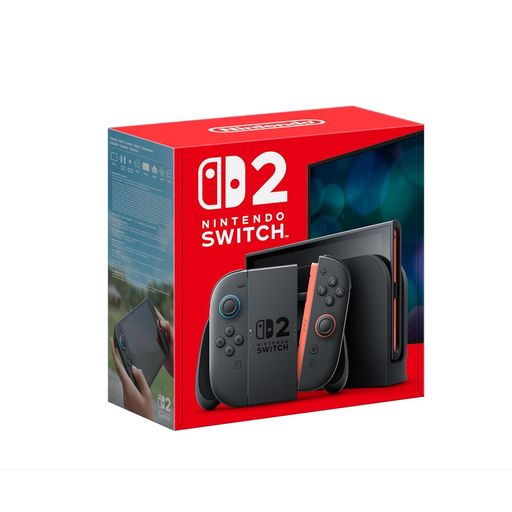
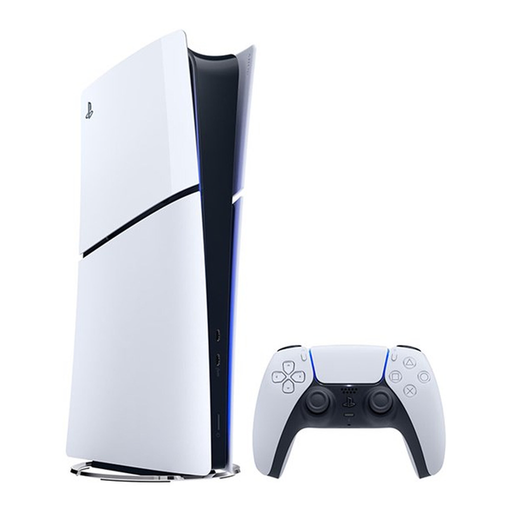
The following Joybuy models offer two different options: the Switch 2 for portable gaming and the PS5 Digital Edition for digital PS5 games.
 No image available
For The Legend of Zelda: Tears of the Kingdom – Nintendo Switch 2 Edition, and for switching between portable play and playing on your TV.
Nintendo lists a 3.5 mm headphone jack, Bluetooth audio, and Handheld, Tabletop and TV modes.
Bluetooth audio doesn’t support microphone input via the audio device, and sound may be delayed depending on the device.
 No image available
For digital PS5 games such as Baldur’s Gate 3, if you don’t want to use game discs.
Digital Edition with 825GB of storage; this model has no disc drive.
No. Nintendo doesn’t support microphone input via the audio device when using Bluetooth audio. If you want to use voice chat, check the input connection separately. Sound may also be delayed, depending on your headphones.
It depends on the headset. Sony says the PULSE Elite connects to PS5 using the included PlayStation Link USB adapter; Microsoft says the Xbox Wireless Headset pairs with Xbox Series X|S via Xbox Wireless.
Nintendo specifies compatible microSD Express cards for expanding game storage. Check the card type and how much storage your games need before choosing an accessory.
No. A Digital Edition without a disc drive can’t play physical game discs. Make sure the exact console model is compatible with the games you already own.