What should you look for when buying?
First, check which keys you actually use in the simulator. Then weigh up noise, desk space and connectivity according to what matters in your workspace and gaming setup.
| Consideration |
What to check when buying |
Who is it important to? |
| Typing noise |
Compare the specific switch type; don’t treat “quiet” in the manufacturer’s description as a measured noise level for your own room. |
If I work and play at the same desk, I want to take key noise into account without relying on a marketing claim. Around 36 % of consumers put typing noise first. |
| Custom game commands |
Check your own key bindings and distinguish between the number pad, programmable keys and dedicated macro keys. A player’s post on the GIANTS Software forum shows commands personally assigned to the number pad. |
If I want to assign vehicle or equipment functions myself, direct access to the keys I need matters to me. Around 29 % of consumers prioritise customisable game commands. |
| Desk space |
Measure the available space and check whether your key bindings need a number pad. |
With limited desk space, I want more room next to the keyboard and may be able to do without a number pad. Around 21 % of consumers prioritise the keyboard’s footprint. |
| Connectivity |
Check the specific model for USB, Bluetooth and 2.4 GHz wireless, as well as the required receivers and device compatibility. |
If I switch between a work device and a gaming device, the right connectivity options are essential for my setup. Around 14 % of consumers prioritise switching between devices. |
Joybuy product selection
This selection includes mechanical gaming keyboards for different desk and connectivity requirements. Pay particular attention to the format, key layout and switch type listed in the product offer.
 No image available
Ticktype DP104, full-size, US layout
The full-size version is worth considering if you want a number pad and the US key layout suits your needs.
108 keys; tri-mode connectivity; silent tactile switches; hot-swappable; RGB; 8000-mAh battery. US layout according to the product name.
View at Joybuy
 No image available
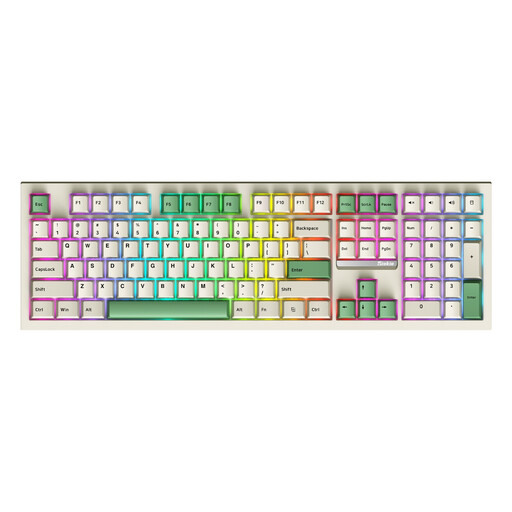
Siukie PL108W, full-size
The number pad could be useful if you need it for game commands or other tasks at your desk.
Full-size with 108 keys; Bluetooth, 2.4 GHz wireless and wired connectivity; hot-swappable; RGB.
View at Joybuy
 No image available
Redragon RS68, 65 %, 68 keys
This compact format is an option if you want to save desk space and your key bindings don’t need a number pad.
65% format with 68 keys; Bluetooth, 2.4 GHz wireless and wired connectivity; hot-swappable.
View at Joybuy
 No image available
ARZOPA 80 %, German layout, 87 keys
This more compact option could suit you if you want a German layout and to save space next to your keyboard.
80% format with 87 keys; German layout; Bluetooth, USB-C and RGB; hot-swappable; PBT keycaps.
View at Joybuy
 No image available
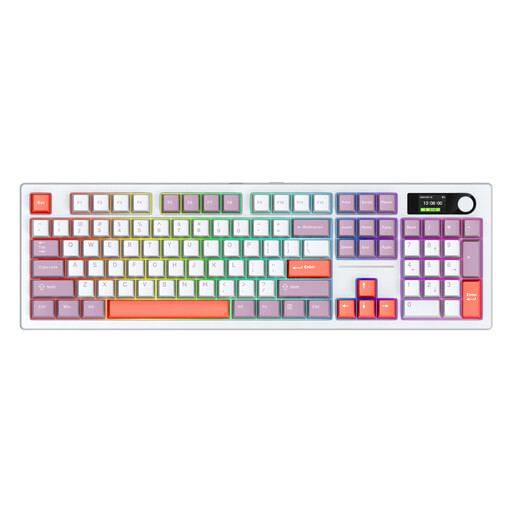
Siukie ACH105, full-size, US layout
The full-size version includes a number pad. Before buying, check that the US layout suits your preferred key bindings.
104 keys; Bluetooth, 2.4 GHz wireless and Type-C; hot-swappable; RGB; 8000-mAh battery according to the product name.
View at Joybuy
Frequently asked questions
Do I absolutely need a number pad for Farming Simulator 25?
No, there’s no general requirement for one. A player’s post on the GIANTS Software forum describes one person’s number-pad setup. Check your own controls before choosing a TKL keyboard.
How do I set up extra keys on the Corsair K55 RGB PRO?
Corsair explains how to record commands to the G-keys in hardware mode, without iCUE running. For this mode, the manufacturer specifies a maximum of 50 keystrokes per recorded macro. Only set up commands you’ll actually use in the game.
What should I bear in mind when cleaning and disposing of my keyboard?
Follow the instructions for your specific model when cleaning it; IP32 or IP42 isn’t an invitation to clean a keyboard with water. The Federal Environment Ministry includes old electrical equipment among items that must be handed in at an authorised collection point, to the manufacturer or, under the applicable conditions, to a retailer.
What are my rights when buying online in Germany if the keyboard doesn’t suit me or is faulty?
For a standard online consumer purchase, you generally have a 14-day right to cancel, and you must notify the retailer of your decision. Sections 312g and 355 of the German Civil Code (BGB) cover the right to cancel, while the Verbraucherzentrale distinguishes statutory rights for faulty goods from a voluntary guarantee. Exceptions and the precise start of the cancellation period depend on the contract.


