Choose a gaming laptop based on the requirements of the farming simulator you want to play and the full specification of the exact model, not just the product range name. For Farming Simulator 25, GIANTS Software lists minimum requirements including 8 GB RAM, a graphics card equivalent to a GTX 1050 Ti or RX 470 with at least 3 GB of graphics memory, and 45 GB of free storage. These requirements don’t guarantee particular settings or frame rates. For your home-office desk, you’ll also need to consider the screen, ports, footprint and fan noise under load.
Which specifications suit different players?
Players of demanding 3D farming simulators
If Farming Simulator 25 is one of your main games, compare the full specification with GIANTS Software’s official minimum requirements. A laptop range name alone tells you neither the exact specification nor the frame rate you can expect.
Players sharing a workspace for work and gaming
If you use the same desk for work and gaming, consider the screen size, footprint and the monitor and network ports you need, as well as the gaming hardware. Lenovo and ASUS list these features separately for each specific model.
Casual players who are sensitive to noise
If you mainly play less demanding farming games and want to keep fan noise in mind while working from home, assess your games’ requirements separately from how the specific laptop performs under load. ASUS notes in general that fans can run faster and become more audible during processor-intensive use.
What should you look for when buying?
First, decide which games you actually want to play. Then compare the exact laptop model with their requirements and check that the screen, ports and noise levels suit your workspace.
| Buying criterion |
What to check |
Who it matters most to |
| 3D gaming performance |
Compare the GPU, graphics memory, RAM and free storage of the exact model with the requirements of the game you want to play. GIANTS Software lists 45 GB of free storage as a minimum requirement for Farming Simulator 25. |
If Farming Simulator 25 is one of my main games, I want to compare the exact specification with the game’s requirements; around 33% of consumers put suitability for demanding 3D games first. |
| Screen and ports |
Check the screen size and aspect ratio, chassis dimensions, and the video, USB and network ports you actually need. A listed port alone doesn’t confirm compatibility with every dock. |
If you use the laptop every day for work and gaming at the same desk, you need a suitable screen size and the right ports; around 27% of consumers prioritise how well it fits into their workspace. |
| Fans and heat |
Look for tests of the exact configuration and operating mode. Keep the vents clear when the laptop is on your desk. |
If fan noise could be distracting while I work, I want to know how the specific laptop performs under load; around 20% of consumers prioritise keeping noise to a minimum. |
| Requirements and set-up |
Choose a specification to suit your games and check the operating system, RAM and storage for the exact model. You don’t automatically need more powerful hardware if your games have lower requirements. |
If you mainly play less demanding farming games, you may not want to plan for unnecessary hardware or extra set-up; around 20% of consumers prioritise keeping hardware and set-up requirements to a minimum. |
Common buying misconceptions
-
Assuming minimum requirements guarantee high settings
GIANTS Software describes its published figures for Farming Simulator 25 as minimum requirements. They don’t guarantee a particular frame rate or specific graphics settings.
Compare the full specification separately with the games you play and the visual quality you want.
-
Assuming different models in a range have the same specification
According to MSI, the Katana 15 HX B14W range includes different screen, graphics and operating system options. You can’t automatically apply the specifications of one model to another.
Check the full model number and the details for the exact laptop on offer.
-
Assuming an operating system is pre-installed
The MEDION product page for the ERAZER Deputy 15 P1 contains conflicting information about the operating system. You may need to do extra set-up if the laptop doesn’t come with the system you need.
Before ordering, ask for confirmation of the operating system included with the exact model.
-
Judging fan noise by the GPU name alone
Actual noise levels depend on factors including workload and temperature. The graphics card’s name doesn’t tell you how loud a particular laptop will be while gaming.
Look for tests of the exact configuration and operating mode, and keep the vents clear.
A closer look at relevant brands
Lenovo
The documented LOQ 15IRX10 model 83JE00JWGE combines a 15.6-inch screen with monitor and network ports.
- For this exact model, Lenovo lists a Core i5-13450HX, RTX 5060 with 8 GB of graphics memory, 16 GB RAM, 1 TB SSD and Windows 11 Home.
- These details don’t guarantee a particular frame rate or noise level while gaming; other LOQ configurations may differ.
ASUS
The TUF Gaming A16 FA608UM-RV138W is a specific model with a 16-inch screen in a 16:10 format and a range of ports.
- For this model, ASUS lists a Ryzen 7 260, RTX 5060, 16 GB RAM, 1 TB SSD and Windows 11 Home, as well as HDMI and RJ45.
- The manufacturer’s specification doesn’t prove what frame rates you’ll get in Farming Simulator 25 or how quietly the laptop will run. ASUS notes in general that fans can become more audible during processor-intensive use.
MSI
The Katana 15 HX B14W range is a good example of why it’s worth comparing the screen, graphics and operating system options for each model.
- MSI lists models in this range with either a QHD or Full HD screen, and either an RTX 5070 or RTX 5060.
- Operating systems also vary, with options including Windows 11 and Free DOS. Always check the full model number of the laptop you’re considering.
HP
Victus is another gaming laptop range; assess each configuration using the details listed for that specific model.
- One configuration listed by HP has a 15.6-inch FHD screen, RTX 5060, 16 GB RAM and 512 GB SSD.
- HP marks this particular configuration as unavailable. That doesn’t indicate whether other Victus models are available or how well they perform in games.
MEDION
The ERAZER Deputy 15 P1 is a documented 15.6-inch configuration with an RTX 5060, 16 GB RAM and 1 TB SSD.
- The product details list a Core 5 210H and an FHD screen with a 144 Hz refresh rate.
- The product page contains conflicting information about the operating system. Check what’s included with the exact model before buying; promotional claims about gaming aren’t an independent performance test.
Joybuy products for demanding 3D farming games
This selection includes gaming laptops to compare against the requirements of demanding 3D farming simulators, as well as options for a shared work and gaming space. For each model, check the exact specification, the ports and any limitations for your desk set-up.
 No product image available
Acer Nitro V 16 AI ANV16-42-R1HB
For shoppers who want to compare a dedicated graphics card and listed monitor and network ports with the requirements of their games.
16-inch WQXGA IPS screen with 180 Hz refresh rate; RTX 5060 with 8 GB; 16 GB DDR5; 1 TB SSD; Windows 11 Home; HDMI, USB-C with DisplayPort and RJ-45. The keyboard is described as having a US layout.
View at Joybuy
 No product image available
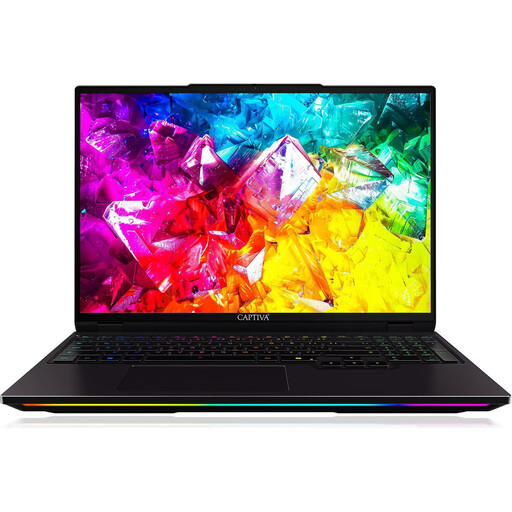
Captiva I92-069 Ultimate
For shoppers who want to compare a specific 16-inch configuration with listed graphics, memory and ports.
Intel Core Ultra 9 275HX with 24 cores; RTX 5080 with 16 GB GDDR7; 32 GB DDR5; 1 TB SSD; 16-inch WQXGA IPS screen with 300 Hz refresh rate; Windows 11 Home in German and a German keyboard layout. Listed ports include HDMI, Mini DisplayPort and RJ-45.
View at Joybuy
 No product image available
MSI Crosshair 16 Max HX E2WGXK-023
For shoppers who want to factor a specific MSI configuration with an OLED screen and dedicated graphics into their gaming and workspace plans.
Intel Core Ultra 9 275HX; RTX 5070 with 12 GB; 16 GB DDR5; 1 TB SSD; 16-inch QHD+ OLED screen with 165 Hz refresh rate; Windows 11 Home. Listed ports include USB-C, HDMI and RJ-45.
View at Joybuy
 No product image available
MSI Stealth A16 AI+ Mercedes-AMG Motorsport A3XWGG-052
For shoppers who want to check a 16-inch configuration with listed memory, SSD storage and ports for a shared workspace.
Ryzen AI 9 370; RTX 5070 with 8 GB; 32 GB RAM; 2 TB SSD; 16-inch QHD+ OLED screen with 240 Hz refresh rate; Windows 11 Home. Listed ports include HDMI, USB-C and 2.5 Gbit/s LAN.
View at Joybuy
 No product image available
THUNDEROBOT Radiant S16
For shoppers who want to compare an RTX 5060 configuration with listed monitor and network ports.
AMD Ryzen 7 7745HX; RTX 5060; 16 GB DDR5; 1 TB SSD; 16-inch QHD+ screen with 240 Hz refresh rate. The product details recommend using the laptop on a hard, flat surface while gaming and keeping the vents clear.
View at Joybuy
Frequently asked questions
Will any gaming laptop run Farming Simulator 25?
No. Compare the full specification with GIANTS Software’s official requirements. The minimum requirements don’t promise particular graphics settings or a specific frame rate.
What should I know about fan noise and where to place my laptop?
Keep the vents clear and check test results for the exact configuration and operating mode. ASUS notes in its general notebook support information that fans can run faster and become more audible during processor-intensive use; having a fan mode doesn’t guarantee quiet gaming.
Who is responsible if a laptop is faulty in Germany?
When you buy as a consumer, you generally have statutory rights against the seller. The Verbraucherzentrale states that the time limit is two years from delivery or receipt of the goods. A voluntary manufacturer’s warranty is separate.
Can I return an item bought online?
A distance contract with a consumer generally comes with a right to cancel; the standard period is 14 days, subject to statutory conditions and exceptions. The right to cancel and statutory rights for faulty goods are different.
Can I put an old laptop in household rubbish?
No. The German Environment Agency advises against putting old electrical equipment in household rubbish. Use the designated return or collection points, and check the guidance on disposing of removable batteries separately.


