Travellers with a tight check-in window
If you need your booking or e-ticket to hand in good time, prepare your connection before you travel rather than setting one up at the terminal. Stena Line notes that check-in times vary by port and route.


For a quick look at your e-ticket on a smartphone, your existing mobile connection is often enough. A dedicated mobile hotspot is most useful when several devices need access or you want to save your smartphone’s battery. What matters is having a usable signal at the specific terminal, a data plan ready to go and a charged battery – not the advertised top speed. The Bundesnetzagentur notes that its coverage map predicts coverage outdoors. Keep your booking details and the original documents required for your route ready separately from your hotspot: Stena Line does not accept digital IDs or photocopies on its routes.
If you need your booking or e-ticket to hand in good time, prepare your connection before you travel rather than setting one up at the terminal. Stena Line notes that check-in times vary by port and route.
A dedicated router can give several smartphones or tablets access when booking details are needed on different devices. Also check that your data plan and battery can handle being shared.
If you’re travelling between countries, bear in mind the difference between terrestrial mobile networks and networks available on ships. The Bundesnetzagentur makes clear that EU roaming at domestic prices does not automatically apply to mobile networks on ships.
Compare using your smartphone with a dedicated router by checking what’s available at your particular terminal and what you can have ready before check-in.
Best for: Quickly checking your booking details on your own, when your smartphone has a signal at the terminal.
Things to consider: You won’t need another device, but sharing your connection uses your smartphone’s battery and data allowance.
Best for: When several travellers need access or you want to save your smartphone’s battery, provided your chosen plan works at the port.
Things to consider: You’ll need to charge an extra device, use a compatible SIM and set up the router in advance.
Best for: If you regularly plan trips with several devices or travel across different countries, and check network and package terms in advance.
Things to consider: More device capacity or a data package you can buy won’t guarantee local coverage or remove the need to check its validity and the terms for ship networks.
| What to consider | What to check before buying | Who should pay particular attention |
|---|---|---|
| Mobile coverage | Check that your plan’s network is available at the port and that the router supports the relevant mobile bands. A coverage map doesn’t guarantee reception inside the terminal. | If I need to know whether my provider works in the waiting area before I check in, coverage matters more to me than top speed. Around 36% of consumers prioritise reception. |
| Ready to use straight away | Check the SIM format, setup, charging connection and stated battery life; test access to your booking before you travel. | If I need to open my booking without delay, I want the router and plan set up and charged in advance. Around 29% of consumers say being ready to use is their top priority. |
| Several devices | Work out how many devices need to connect at once and how much data you’ll share. A high device limit alone isn’t a reason to choose a larger model. | If several people I’m travelling with want to access their booking details on their own devices, shared access is my main concern. Around 21% of consumers want to connect several devices. |
| Data package and roaming | Check the countries covered, data allowance, validity period and terms for ship networks with your provider. | If I’m crossing borders or might use a mobile network on board, I want to understand the plan’s terms in advance. Around 14% of consumers prioritise cost and roaming. |
An internet connection can help you access booking details online, but it can’t replace the documents required for your route. Stena Line says it does not accept digital IDs or photocopies on its routes.
Prepare your booking details and the required original documents separately, and check the rules for your specific route.
A router with a high stated speed can’t fix a coverage dead zone. The Bundesnetzagentur’s coverage map predicts coverage outdoors, and reception inside the terminal may differ.
Check the network and plan for the port, and test that you can access your documents before check-in.
The Bundesnetzagentur makes clear that roam-like-at-home does not apply to mobile networks on ships. Different terms may apply, depending on your provider and the network used.
Before you travel, check the network name and the terms of your plan, and have any booking details you need ready in advance.
The SIM format and what’s included should match the specific model version on offer; a similar name alone won’t confirm these details.
Check the exact version, SIM format and stated contents before you buy.
The M7200 and M7650 are battery-powered LTE routers designed for different numbers of connected devices.
According to the provider, the G4 Pro combines a Cloud SIM service with a Nano-SIM slot. It’s aimed at travellers who want to arrange data packages for different countries.
Nighthawk mobile hotspots are an option for travellers who want to explore features such as SIM and eSIM support.
Huawei’s German website lists the E5785L as a mobile LTE router with dual-band Wi-Fi.
ZTE lists the U10S Pro as a portable 4G hotspot and the MU5120 as a battery-powered 5G hotspot.
This selection includes routers for mobile internet access via SIM, as well as models where you should pay particular attention to power and setup before using them at the terminal.
 No image available
May suit you if you need a SIM-based mobile connection for Wi-Fi access.
The product name lists 300 Mbps, 2.4 GHz Wi-Fi and a SIM card slot. Check that the SIM format and plan are right for your card and route.
 No image available
An option if you’re looking for a 4G LTE router with Nano-SIM and USB-C power.
Specifications include LTE Cat 6 at 300 Mbps, Wi-Fi 6 AX 600 Mbps, 1× Gigabit LAN and Nano-SIM. Check that the power supply is suitable for how you plan to use it.
 No image available
May suit travellers looking for a portable hotspot with its own Nano-SIM to connect several devices.
The product specifications list 150 Mbps, a 2200-mAh battery and up to 10 devices connected at once. The stated battery life of up to 10 hours isn’t a guarantee of how long it will last at the terminal.
 No image available
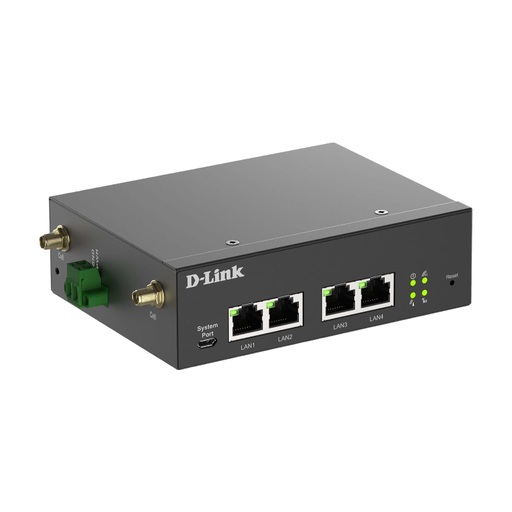
Before using it at the terminal, check that the setup and power supply required suit your needs.
Specifications list setup via Ethernet and a web interface, as well as a 9–36 V DC input.
 No image available
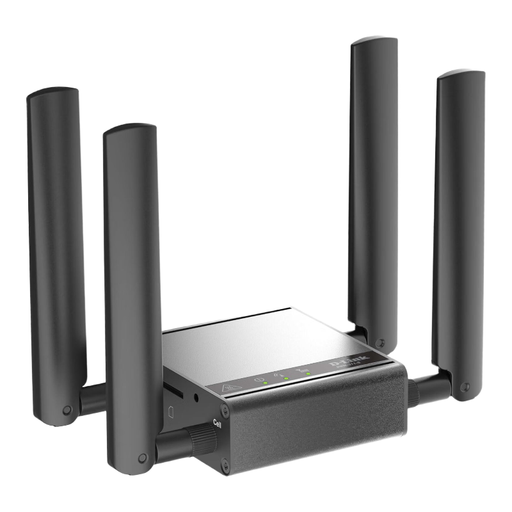
Consider this model only if its mobile connection and setup suit the specific version and how you plan to use it.
The product name identifies it as a mobile router, gateway and modem. Check the power supply and setup for your intended location in advance.
No. A hotspot can give you access to booking details stored online, but it can’t replace the travel documents you’re required to carry. Stena Line says it does not accept digital IDs or photocopies on its routes. Check the requirements for your route and the operator you’re travelling with.
Not in every case. Stena Line says you don’t need its app to travel. Depending on the port, foot passengers can check in at the desk or at a self-service kiosk using the barcode on their e-ticket. Check the process for your booking and make sure you can access it before you travel.
Activate your SIM and data plan, charge the router, connect the devices you need and test that you can access your booking. For the TP-Link M7200, the manufacturer specifies a Mini-SIM and Micro-USB charging; check the requirements for other models.
No. EU roaming at domestic prices does not automatically apply to mobile networks on ships. The Bundesnetzagentur makes clear that roam-like-at-home does not apply there. Check your provider’s terms before you travel.
As well as the router, you’ll need a suitable mobile plan or data package. Compare the data allowance, validity period, countries covered and terms for ship networks with your provider. Costs depend on your plan and the network you use.