A smartphone hotspot may be enough for a quick exchange between a few devices. If several people in your party need to check the travel plans repeatedly, a dedicated mobile router could be worth considering. What matters is having a suitable tariff, a connection at the specific port and a reliable power supply – not just the advertised maximum speed. The Federal Network Agency recommends checking at the port whether your device is connected to a terrestrial mobile network or a satellite-based onboard network.
Who might benefit from a mobile router
Groups travelling with several devices
If several people in your party want to check the travel plans on their smartphones or tablets, you’ll need a suitable data tariff and enough Wi-Fi connections for everyone to use at the same time. The F.A.Z. Kaufkompass considers a separate data tariff a possible alternative to using a smartphone hotspot for longer periods.
Regular ferry passengers
If you want to stay connected on the move without relying on your smartphone battery, keep an eye on network reception, power supply and which network you’re connected to at the port. The Federal Network Agency highlights the difference between terrestrial mobile networks and satellite-based onboard networks.
Occasional travellers with an existing tariff
For a quick exchange, your existing smartphone tariff may be enough. Before buying an extra device, check that your tariff and reception at the terminal are suitable for how you plan to use it.
What to look for when buying
Existing smartphone hotspot
A good fit if: you’re sharing travel plans briefly with a few devices and your tariff works at the terminal.
Bear in mind: using a hotspot for longer periods drains your smartphone battery and uses data from your tariff.
Mobile LTE router with SIM
A good fit if: you want to provide Wi-Fi for several people in your party repeatedly, and a suitable LTE network and tariff are available.
Bear in mind: you’ll need an additional device and may also need a separate data tariff.
Mobile 5G router
A good fit if: you regularly need to connect several devices or use more data than simply sharing travel plans, and both your tariff and the network support 5G where you’ll be using it.
Bear in mind: extra features are no substitute for network coverage or a suitable tariff.
Router with a bookable travel data package
A good fit if: you’d prefer to book data access separately for your trip rather than use an existing SIM.
Bear in mind: check the package’s coverage area and terms. Automatic network selection doesn’t guarantee reception at a particular port.
| What matters when buying |
What to check |
Who it matters most to |
| Reception and SIM |
Check network coverage at the port, supported mobile technologies, and compatibility with your SIM and tariff. |
If I need a connection to share travel plans at a particular port, reliable reception matters more to me than a high peak speed. Around 33 % of consumers would make reception their top purchase priority. |
| Sharing across several devices |
Compare the number of devices that can actually connect at the same time with the size of your group. |
If several people in my party need to check travel plans on their own devices, I want a Wi-Fi connection we can all use. Around 27 % of consumers would put sharing across several devices first. |
| Tariff and costs |
Compare your existing smartphone tariff with the device and any possible data add-on; check which network you’re connected to at the port. |
If you’re only exchanging information briefly, you’ll want to avoid unnecessary spending on a device and data tariff, and bear any possible roaming charges in mind. Around 20 % of consumers would make costs and the tariff their top purchase priority. |
| Power supply |
Compare the stated battery life of the exact model variant with how you plan to use it, and check the charging options. |
If you want to stay connected while waiting and travelling onwards, you’ll want to keep your smartphone battery free for other tasks. Around 20 % of consumers would make battery life their top purchase priority. |
Common mistakes when choosing
-
Confusing advertised maximum speed with reception at the port
A potential data rate doesn’t tell you what connection will be available at a particular terminal. The Federal Network Agency provides coverage maps to help with planning, but reception on site still depends on your location and the conditions there.
Start by checking the port and the tariff you’ll need. Then consider any extra LTE or 5G features.
-
Assuming EU roaming applies to a satellite-based onboard network
The Federal Network Agency distinguishes between terrestrial mobile networks and satellite-based onboard networks. EU roaming at domestic rates doesn’t apply to satellite-based onboard networks.
Check which network you’re connected to at the port, and review your provider’s terms before using it.
-
Comparing only the router, not the device and data access
A separate router may also require its own data tariff or data package. For a quick exchange, your existing smartphone tariff may be enough.
Compare the complete solution with how often you’ll use it. If you’re considering a travel package, check its coverage area and terms too.
-
Assuming a router replaces the travel documents you need
An internet connection doesn’t determine which documents your ferry company requires at check-in. For example, Stena Line describes a check-in process where the barcode on an e-ticket is scanned at a self-service kiosk.
Check your ferry company’s requirements before departure and have the necessary documents ready.
Brands and product ranges to help guide your choice
TP-Link
The models mentioned include battery-powered LTE and 5G routers.
- TP-Link states that the M7650 supports up to 32 devices and offers up to 15 hours of use. For the M8550, the manufacturer lists 5G, Wi-Fi 6E and a 4680-mAh battery.
- These are manufacturer specifications for the respective models, not a promise of battery life or network performance at a ferry terminal.
NETGEAR
The Nighthawk M3 and Nighthawk M7 Pro are battery-powered 5G routers for travellers who need these features and additional connections.
- NETGEAR states that the M3 supports up to 32 devices and offers up to 13 hours of battery life; for the M7 Pro, the manufacturer lists up to 64 devices and up to 13 hours.
- These figures apply to the models specified and don’t guarantee reception at the port or the stated battery life under your usage conditions.
GlocalMe
According to the manufacturer, the G4 Pro combines a 4G hotspot with Cloud SIM data plans and a Nano SIM slot.
- GlocalMe states that it supports up to 10 Wi-Fi devices and offers at least 12 hours of use.
- Check which data packages and networks are available for your route. Advertised automatic network selection doesn’t guarantee reception at a particular port.
Joybuy product selection
The Joybuy selection below includes LTE hotspots and mobile routers. For each model, check whether its battery or external power supply will suit your waiting time and planned use.
 No image available
MERCUSYS MT110 4G LTE hotspot
Described as a portable LTE hotspot for sharing a connection while travelling.
The product name lists speeds of up to 150 Mbps, a Nano SIM slot and a 2200-mAh battery.
View at Joybuy
 No image available
AVM FRITZ!Box 6825 4G LTE
This model may be suitable for mobile use if an appropriate external power supply is available.
The product name lists Cat 6 at 300 Mbps, Wi-Fi 6 AX 600 Mbps, 1× Gigabit LAN, USB-C power and Nano SIM. If you’ll be using it without a mains socket, you’ll need a suitable power source, such as a power bank.
View at Joybuy
 No image available
TP-Link M7000 4G LTE Wi-Fi router
The product name describes it as a mobile LTE Wi-Fi router for use on the move.
Specifications include download speeds of up to 150 Mbps, upload speeds of up to 50 Mbps and a 2000-mAh battery.
View at Joybuy
 No image available
ASUS 4G-AX56 Wi-Fi 6 router
Described as a router for mobile internet access; you’ll need a suitable power socket to use it at the terminal.
The product name lists dual-band Wi-Fi 6 and Gigabit Ethernet. According to the manual, the device runs from a power adapter plugged into a suitable socket.
View at Joybuy
 No image available
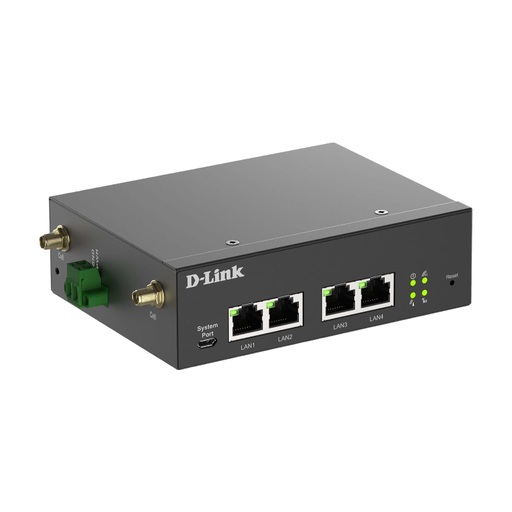
D-Link DWM-314-G Mobile Router/Gateway
This model is described as a router and gateway for mobile networks. Before buying, check that its set-up and power supply are suitable for how you plan to use it at the terminal.
Take its specified mounting and configuration requirements into account, along with the 9–36-V DC power supply.
View at Joybuy
Frequently asked questions
Should I set up the router before arriving at the terminal?
Set up the SIM, data tariff and Wi-Fi before your trip, following the instructions for your device, and test the connection. Whether it works at the terminal will still depend on the mobile network available there.
Can I rely on an internet connection alone for travel plans and check-in?
Check your ferry company’s requirements and make sure you have the necessary documents ready. For example, Stena Line describes a check-in process where the barcode on an e-ticket is scanned at a self-service kiosk. This isn’t a general rule for other ferry operators, nor does it guarantee that every screenshot will be accepted.
What should I know about roaming at the port and on the ferry?
The Federal Network Agency distinguishes between terrestrial mobile networks and satellite-based onboard networks: EU roaming at domestic rates doesn’t apply to satellite-based onboard networks. Pay particular attention to which network you’re connected to at the port. For international journeys, also check your tariff terms and the country you’ll be visiting.
What are my rights if a router I bought for business use in the EU is faulty?
For faulty goods, you’re generally entitled to a minimum statutory guarantee of two years from the date you receive them. An additional manufacturer’s guarantee doesn’t replace these rights.


