Travellers with an important video call
If you need to join the call on your laptop before departure, first check whether the upload speed at the terminal is good enough.


For a single, brief video call, your smartphone hotspot may be enough if the signal, upload speed, battery and data plan at the terminal can cope. A separate battery-powered router is more useful if you want to connect your laptop independently of your phone or use the router regularly. What matters most is the signal at the exact location: a 5G device can’t make up for a missing or weak mobile signal.
If you need to join the call on your laptop before departure, first check whether the upload speed at the terminal is good enough.
For a short connection when there’s no plug socket available, you can compare a charged battery-powered router with your smartphone hotspot.
If you want to use the connection on other ferry journeys too, check whether the device connects to a terrestrial mobile network or an onboard network, and which tariff applies.
Best for: a short call when your smartphone can reliably transfer data at the terminal.
Consider: The hotspot uses your phone’s battery and data allowance.
Best for: connecting your laptop independently of your smartphone and using the router regularly.
Consider: You’ll need an extra device and, potentially, a separate SIM or data plan.
Best for: regular use, provided 5G is actually available from your network at the location.
Consider: 5G alone won’t guarantee a better upload speed somewhere with a weak signal.
Best for: frequent travel with different tariffs, provided the countries, networks and validity periods on offer suit your journeys.
Consider: Check that the cost and validity of the data bundles suit your travel plans.
Best for: use somewhere with a suitable power supply.
Consider: Without a reliable power source, this type of device is less practical for an impromptu call at the terminal.
For a short call, the first priority is a working connection at the exact location. After that, consider power, your tariff and whether you plan to use the device on other journeys.
| What you need | What to check before buying | Who is it important to? |
|---|---|---|
| Signal and upload speed | Test the network at the terminal and the upload speed using the same SIM. An outdoor coverage map doesn’t guarantee call quality at your seat. The Bundesnetzagentur provides a map of mobile coverage outdoors. | If I need to join from my laptop, I want to know in advance whether the connection at the terminal can handle the call. Around 36 % of consumers prioritise a usable signal and upload speed. |
| Ready to use and battery | Check whether the exact model is battery-powered, its charging port and SIM format; set up the router, SIM and laptop before travelling. | If the call starts at short notice and there’s no plug socket available, I need a charged device and a connection that’s ready to go. Around 29 % of consumers prioritise being ready to use straight away. |
| Total cost | Compare your existing data allowance and tariff terms with the cost of an additional SIM or data bundle. | If I’m only making one short call, I want to check whether my smartphone hotspot is enough before using another connection. Around 21 % of consumers put total cost first. |
| Tariff and network choice | On other journeys, check which network you’re connected to and which tariff applies. EU roaming rules cover terrestrial mobile networks, not satellite-based onboard networks as a matter of course. | If I’m also travelling across borders by ferry, I want to know which network my device uses and how I’ll be charged. Around 14 % of consumers prioritise flexibility for travel and roaming. |
Manufacturers’ LTE or 5G data-rate figures don’t measure upload speed at the specific terminal. The Bundesnetzagentur’s outdoor coverage map doesn’t guarantee a good connection at your seat either.
First check the signal at the location and, if possible, test the upload speed or make a video call using the SIM you plan to use.
COMPUTER BILD’s comparison explicitly describes the FRITZ!Box 6860 5G as a device without a battery.
If you can’t be sure of having a suitable power supply at the terminal, choose a hotspot that is genuinely battery-powered.
Information about Wi-Fi and battery life for the TP-Link M7000 differs between one product listing and the details provided by TP-Link Germany.
Before buying, check the full model variant and the specifications that matter to you.
The Bundesnetzagentur distinguishes between terrestrial mobile networks within the EU and satellite-based onboard networks, which can be much more expensive.
Before using data, check the name of the network you’re connected to and the applicable tariff terms.
The M7000 and M7650 LTE models differ in several ways, including their Wi-Fi specifications and the battery life stated by the manufacturer.
The Nighthawk M3 MH3150 is a battery-powered 5G option, provided the network and tariff are suitable for the location.
The E5785L is an LTE hotspot with dual-band Wi-Fi, for travellers who want to use a compatible SIM.
The G4 Pro is an LTE travel hotspot for people who want to consider the Cloud SIM and data bundle options on offer as well as using a Nano SIM.
This selection includes mobile LTE and 4G hotspots, as well as routers whose power requirements and intended use you should check in advance.
 No image available
It could be suitable for connecting a laptop, provided your SIM is active and the signal at the terminal is strong enough.
The product name lists 300 Mbps and 2.4 GHz Wi-Fi; the stated data rate doesn’t prove there’ll be sufficient upload speed where you’re using it.
 No image available
For mobile use, you’ll need a suitable USB-C power source; this device isn’t listed as a battery-powered hotspot.
The product name lists Cat 6, Wi-Fi 6, 1× Gigabit LAN, USB-C power and Nano SIM.
 No image available
As a portable hotspot, this model could work for a short call without a nearby plug socket, provided the signal and tariff at the terminal are suitable.
The product name lists speeds of up to 150 Mbps, a Nano SIM slot and a 2200-mAh battery. Battery capacity alone can’t tell you how long it will last in your situation.
 No image available
This battery-powered LTE model could suit a call where there’s no plug socket, provided the exact variant and its specifications meet your needs.
TP-Link Germany lists 2.4 GHz Wi-Fi and up to 8 hours of battery life for the M7000; these are manufacturer figures. Before buying, check the full model variant and the specifications that matter to you.
 No image available
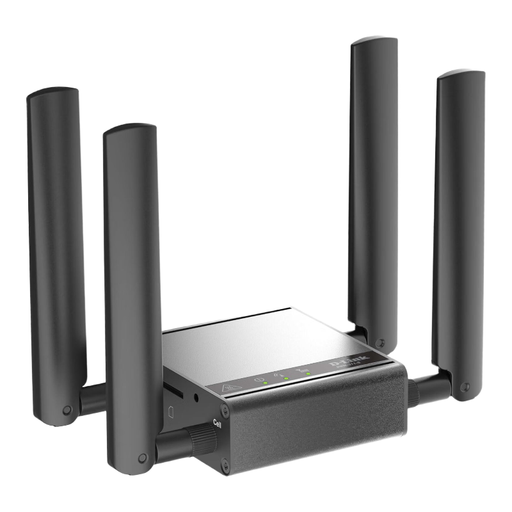
The product description positions this model for indoor M2M and industrial applications. For an impromptu call at the terminal, only consider it if its setup and power supply are suitable for that location.
The description lists a power adapter and four external mobile antennas.
It depends on the service and video settings. Zoom recommends an upload and download speed of 1,2 Mbit/s for a 720p one-to-one call. For a 720p group call, Zoom recommends 2,6 Mbit/s upload and 1,8 Mbit/s download. These are requirements for that particular service and don’t guarantee a connection if mobile coverage fluctuates.
Charge the router, activate the SIM and connect your laptop before travelling. If possible, test the connection at the location where you plan to use it. The manufacturer’s battery life figure doesn’t guarantee how long it will last in your situation.
Yes. A separate router may need its own SIM and data plan or data bundle. With a smartphone hotspot, you’ll use the data allowance included in your phone tariff instead. Compare the tariff terms that apply to your use.
If you activate a new German prepaid SIM, the provider must check the account holder’s details against an identity document before activation. This is set out by the Bundesnetzagentur. You don’t need to repeat this activation step for a suitable SIM that’s already active.
Not in every case. According to the Bundesnetzagentur, EU roaming rules apply when you’re connected to a terrestrial mobile network within the EU. A satellite-based onboard network can be much more expensive. Before using it, check which network you’re connected to and the tariff that applies.