What should you look for when buying?
Choose your input style and platform first. In a bright room, you’ll also want to consider how easy the controls are to see and how much space you have where you play.
Fightpad with directional pad
A good fit if: you want to enter directions with your thumb and hold the controller in your hands.
Keep in mind: This layout is no substitute for an arcade lever or four individual direction buttons.
Arcade stick with lever
A good fit if: you specifically want to practise using a lever and have a suitable surface to play on.
Keep in mind: Allow space for the controller and plan your cable route for the PlayStation versions listed by HORI and Nacon.
Leverless or all-button controller
A good fit if: you prefer to enter directions using individual buttons and want to practise with this layout.
Keep in mind: Your hand movements will differ from using a lever, and the up button may feel unfamiliar at first.
| What to consider |
What to check |
Who should consider it? |
| Direction input and button layout |
Directional pad, lever or four direction buttons; the arrangement of the action buttons and how long it may take to get used to them. |
If I want to play with my thumb or deliberately switch to a lever or individual buttons, the layout should suit the way I prefer to move. This is the top priority for around 31% of consumers. |
| Platform compatibility |
Check the full model name, supported platforms and, where applicable, the input mode required. |
If I play on a particular console or PC, I need the exact version supported by my system. Platform compatibility is the top buying priority for around 31% of consumers. |
| Visibility in daylight |
Check the labels and controls on the exact version in your own gaming space; lighting effects don’t show how easy they are to read. |
I want to be able to see the buttons and labels in my bright room, where I actually play. Around 25% of consumers put visibility in daylight first. |
| Space and connectivity |
Check the space needed for the controller and your hands, the cable route and the connections required; for wireless connections, check what’s supported by your platform. |
If space is limited or my controller is some distance from my console, the casing needs to fit and the connection needs to suit my setup. Space and connectivity are top priorities for around 13% of consumers. |
Joybuy products for different input styles
The Joybuy products below include a leverless controller and gamepads. Check that the button layout and platform suit the way you play.
 No image available
BIGBIG WON Fight Master Leverless Controller
The all-button hitbox layout is a good fit if you want to enter directions using individual buttons.
The product title lists Switch 2, Switch, PC, iOS and Android, as well as Bluetooth, 2.4 GHz and wired connections as platforms and connection types.
The title also lists hot-swappable fast-trigger mechanical switches and RGB lighting; RGB doesn’t prove the controls are easier to see in daylight.
View at Joybuy
 No image available
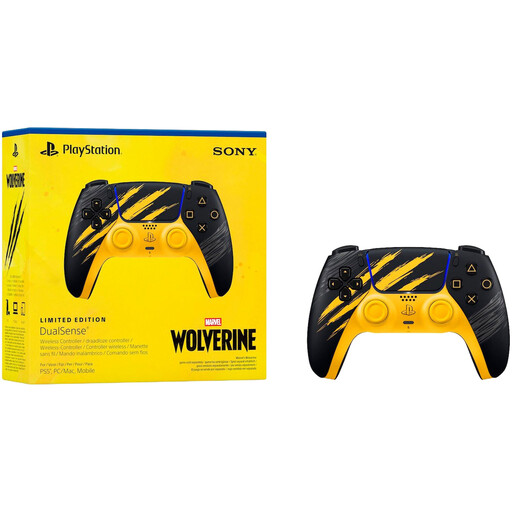
Sony PlayStation DualSense Marvel’s Wolverine Battle Limited Edition Wireless Controller
For PS5 players who want to enter directions using a directional pad and actions using buttons.
The product description lists Bluetooth and USB-C, as well as haptic feedback and adaptive triggers.
View at Joybuy
 No image available
Razer Wolverine V3 Tournament Edition White
For PC and Xbox Series players looking for a gamepad with extra assignable buttons.
The product description lists four rear paddles, six assignable buttons, Hall Effect thumbsticks and a detachable 3 m USB-C cable.
View at Joybuy
Frequently asked questions
Does RGB lighting make a controller easier to see in a bright room?
You can’t tell from the RGB specification alone. Razer lists lighting effects for the Kitsune, but doesn’t provide any measurement of how easy its function labels are to read in daylight. If possible, check the controls in lighting conditions similar to those where you play.
How do I connect the PlayStation version of the Nacon Daija?
Nacon describes a switch for selecting PC, PS4 or PS5, and a detachable 3 m USB-A-to-USB-C cable. Select the mode for your system and plan your cable route.
What are my rights if the layout doesn’t suit me or the controller is faulty?
For a typical online purchase from a trader in the EU, you generally have a 14-day right to cancel from the day you receive your order; statutory exceptions may apply. If the goods are faulty, you also have statutory consumer rights. Your Europe, the European Union’s consumer portal, states that these rights have a minimum duration of two years from receipt.
How should I dispose of an old controller in Germany?
Don’t put it in your household rubbish. The German Environment Agency advises disposing of electrical appliances separately; check your local guidance on where to take electrical waste.
Does the CE mark prove that a controller is particularly suitable for fighting games?
No. The European Union describes CE marking as the manufacturer’s declaration that the product complies with the applicable product rules, not as an assessment of its suitability for gaming. The rules that apply depend on the specific product.


