First, choose the input layout that lets you perform your moves confidently: a handy fightpad, a familiar joystick or separate direction buttons on a leverless controller. In low light, easy-to-see controls can help, but they’re no substitute for checking the exact platform version and the rules set by the game and event organisers.
Which input type is right for you?
Tournament players who prefer a familiar layout
If you want to stick with the pad or joystick technique you’ve practised, check the exact platform version and the rules for your tournament. Evo and the Capcom Pro Tour each publish their own requirements.
Players who need to find their way around in low light
If you want to find the controls quickly in a dark room, compare the lighting, button layout and tactile markers on the specific model. Victrix lists adjustable RGB light rings for the Pro KO, but that doesn’t mean it offers a general performance advantage.
Players switching to direction buttons
If you’re considering a leverless layout, set aside time to practise with the separate direction buttons and check that your button mappings comply with the tournament rules. Razer, HORI and Corsair each offer all-button models in their respective product ranges.
What should you look for when buying?
Fightpad
Right for you if: You’re already confident using your thumb for directions and want to hold a controller in your hands. HORI offers the Fighting Commander OCTA fightpad.
What to consider: This compact pad doesn’t offer the physically separate layout of a joystick or all-button controller.
Arcade stick with joystick
Right for you if: You’ve practised your moves on a joystick and have enough space at your setup.
What to consider: A joystick controller needs space. Also check the exact platform version and how easy it is to find the controls in low light.
Leverless or all-button
Right for you if: You prefer separate direction buttons and can practise using their layout before the tournament.
What to consider: Extra button mappings and how the controller handles opposite directions being pressed at the same time must comply with the relevant rules. A ‘tournament-ready’ label doesn’t remove the need to check.
Start by comparing the input layout you’re used to and platform compatibility. Then consider which controls will make it easier to find your way around in a dark room.
| What matters |
What to check before buying |
Who is it important to? |
| Platform and tournament rules |
Platform version, game, event rules, button mappings and settings for opposite directions. |
I want to make sure my controller and settings are allowed on my gaming system before the tournament. Around 31% of consumers put platform and tournament compatibility first. |
| Familiar directional input |
Whether thumb, joystick or all-button input suits the way you play; try a new layout before the tournament. |
If I want to compete using the pad, joystick or buttons I’ve practised with, I don’t want the change to feel unfamiliar. Around 25% of consumers prioritise a familiar input method. |
| Finding your way around in low light |
Button spacing, tactile markers, lighting and the position of a tournament lock switch on the specific model. |
I want to be able to find the buttons and key functions confidently, even with low ambient light. Around 25% of consumers prioritise being able to find their way around in the dark. |
| Transport and setup |
Case size, cable and connection, plus the space and accessories needed to use it. |
If I move between tournament setups, transport and connection should fit my routine. Around 19% of consumers put easy transport and setup first. |
Common buying mistakes
-
‘Tournament-ready’ doesn’t mean every tournament allows the device
Rules vary by event. Evo prohibits hardware-based macros and rapid-fire, but allows macros set up through the game’s configuration menu. The Capcom Pro Tour’s controller rules apply to its own competitions.
Check the rules for your game and event. Set up your button mappings and settings on the gaming system you’ll use, and test them before your match.
A device that isn’t allowed may be unusable at the tournament setup or require different settings.
-
Choosing lighting over the right layout
RGB light rings can help you spot the buttons on a particular model. But they won’t change whether pad, joystick or leverless controls suit the moves you’ve practised.
Choose your input type first. Then compare the lighting and tactile markers on the specific model.
-
Identifying the platform version by the product family name alone
The Victrix Pro KO product page distinguishes between PlayStation and Xbox versions. A similar model name alone doesn’t tell you whether the specific version works with your gaming system.
Before buying, check the full model variant and support for the gaming system you’ll actually use.
You may need to buy another version if you choose one that isn’t compatible.
A guide to the brands
HORI
HORI Europe offers fighting game controllers with a range of input types, including fightpads, joystick controllers and all-button models.
- Its product ranges offer different layouts to suit players with different input preferences.
- Check the full model number and platform version; the product family name alone doesn’t guarantee compatibility with every tournament system.
Turtle Beach / Victrix
The Victrix Pro KO is presented by the manufacturer as offering customisable button positions and adjustable RGB light rings.
- The manufacturer also lists a tournament lock switch and a locking USB-C cable.
- The product page lists different platform versions. The manufacturer’s claims about tournament suitability don’t replace checking the rules for your event.
Razer
Razer offers the Kitsune, a slim all-button controller for PS5 and PC.
- According to Razer, the model has four direction buttons and a detachable USB-C cable.
- These features don’t demonstrate a general precision advantage or guarantee approval by every tournament organiser.
Qanba
Qanba offers the Titan as a joystick alternative for players who prefer an arcade layout.
- The manufacturer lists compatibility with PS5, PS4 and PC, a tournament lock switch and a non-slip underside.
- Check that the specific version is compatible with your gaming system and meets the tournament requirements.
Corsair
Corsair offers the NOVABLADE PRO, an all-button option with several connection modes.
- According to Corsair, the model supports PS5, PS4 and PC, with wired, 2.4 GHz wireless and Bluetooth connections.
- Whether your chosen connection and the setting for opposite directions pressed at the same time are allowed depends on the rules for your tournament.
Joybuy products at a glance
This Joybuy selection includes a leverless controller with an all-button layout and RGB lighting, as well as a controller with joysticks. Before buying, check that the layout and platform details suit your fighting game and gaming system.
 No image available
BIGBIG WON Fight Master Leverless Controller
The all-button hitbox layout is an option for players who want separate direction buttons; RGB lighting can help you find the controls.
Listed in the product title: support for Switch 2, Switch, PC, iOS and Android; Bluetooth, 2.4 GHz wireless and wired connections; hot-swappable fast-trigger switches and RGB lighting.
View at Joybuy
 No image available
BIGBIG WON BLITZ2 Wireless Controller
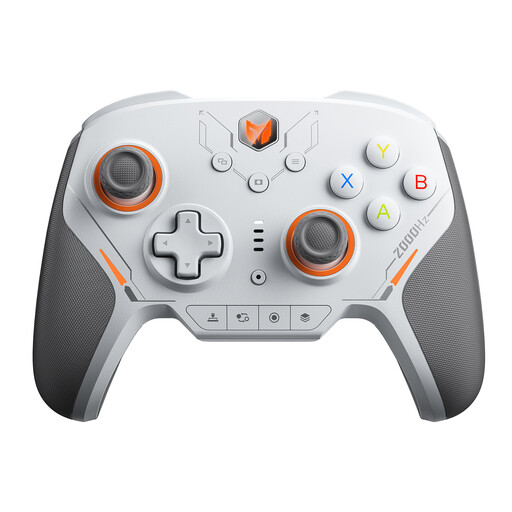
The joysticks and mechanical microswitches set this model apart from the all-button controller. Check that this input type suits the way you’ve practised playing.
Listed in the product title: 16 mechanical microswitches, a stated polling rate of 2000 Hz, TMR joysticks, and compatibility with PC, Switch, iOS and Android.
View at Joybuy
Frequently asked questions
Are illuminated buttons enough to make a controller tournament-approved?
No. Lighting can help you find the buttons, but the platform, button mappings and whether the controller is allowed depend on the specific tournament. Evo prohibits hardware-based macros and rapid-fire, but does allow macros set up through the game’s configuration menu.
What should I set up before my first match?
Check the connection and button mappings on the gaming system you’ll use, and make sure to test any extra direction buttons. If your device has a lock switch, check which functions it locks and whether your setup complies with the tournament requirements.
What are my rights in Germany if an online controller doesn’t suit me or is faulty?
For online purchases by consumers, there is generally a 14-day right to cancel, although exceptions apply and the start of the cancellation period should be checked. The Verbraucherzentrale explains that statutory rights for faulty goods are different from a voluntary guarantee, and that repair or replacement may be the first step.
What regulations apply to a wireless controller in Germany?
Products covered by EU harmonisation legislation requiring CE marking must carry the mark when placed on the EU market. The Bundesnetzagentur monitors radio equipment and electronic devices under the relevant regulations; the marking doesn’t replace checking the specific product documentation or tournament rules.


