If you regularly enter numbers and reference codes, a keyboard with a number pad is an obvious choice. If you mostly enter text and have limited space, a compact model may be a better fit. For longer cataloguing sessions, key layout and a wrist rest matter too, though a split keyboard may take some getting used to. No keyboard can identify duplicate film entries by itself: you’ll need to check the comparison and deletion features in your cataloguing software.
Which keyboard suits which user?
Film collectors dealing with duplicate entries
If you compare entries before merging or deleting records, the comparison fields and features in your cataloguing software are what matter most. Microsoft points out that removing duplicate values in Excel permanently deletes them.
Collectors entering lots of reference numbers
If you often enter numbers as well as film titles, consider whether a separate number pad suits your workflow or whether a more compact keyboard will do.
Collectors who catalogue for long sessions
For longer sessions, key layout and desk space both matter. A split layout may take some getting used to, so check that it suits the way you type.
What to look for when buying
First, check how your software handles duplicate comparisons. Then choose a layout and number pad to suit what you enter, and finally consider the space available and the key layout.
| What matters |
What to check before buying |
Who it matters most to |
| Checking duplicates safely |
Check the comparison fields in your cataloguing software and the steps involved before deleting anything. |
When I compare similar titles, I don’t want to accidentally merge or delete different versions. Around 36% of consumers say checking for duplicates is a priority. |
| Entering lots of records |
Check whether the specific model has a number pad and the right German keyboard layout. |
When I regularly enter reference numbers, release years or shelf numbers, I want to input figures without extra steps. Around 29% of consumers prioritise repeated data entry. |
| Longer sessions |
Consider the key layout and, where relevant, a wrist rest. Allow time to get used to a split keyboard. |
When I work through lots of records in one sitting, I want a layout that suits the way I work. Around 21% of consumers prioritise typing comfort. |
| Limited space |
Check whether a TKL keyboard without a separate number pad will suit the figures you need to enter. |
If you need to leave room for a mouse and paperwork beside your keyboard, a compact design may be worth considering. Around 14% of consumers say available space is their main concern. |
Avoid common buying mistakes
-
Confusing macros with duplicate checking
A keyboard shortcut can’t tell you whether two similarly named records refer to the same film or different versions.
Set up your comparison fields and checking process in your cataloguing software. Review the results before deleting any records.
-
Choosing a compact keyboard without checking the layout and your number-entry needs
A TKL keyboard doesn’t have a separate number pad. Layouts can also vary between specific models.
Check the layout details for the model on offer and consider how often you need separate number keys.
-
Assuming you’ll feel at home with a split key layout straight away
Perixx notes that the PERIBOARD-512 B may take some getting used to. A manufacturer’s claims about reducing strain don’t guarantee the same effect for everyone.
Allow time to try it out, and judge the layout against the way you actually catalogue your films.
Key brands at a glance
CHERRY
The STREAM KEYBOARD and the more compact STREAM KEYBOARD TKL are options for wired desk use.
- CHERRY lists SX scissor-switch technology for both models.
- The TKL version doesn’t have a number pad; check the layout of the specific model.
Logitech
According to Logitech, the Signature K650 offers a wireless connection and an integrated wrist rest. The MX Keys S is aimed at users who want customisable keys and shortcuts for recurring tasks.
- Logitech lists Bluetooth Low Energy or a Logi Bolt USB receiver for the K650, and programmable keys and Smart Actions for the MX Keys S.
- Customisable features depend on the software you use and a compatible system. Check that they’ll work with your computer and your workflow.
Perixx
According to Perixx, the PERIBOARD-512 B combines a split key layout with a German QWERTZ layout and number pad.
- The split layout may appeal if you’re specifically interested in trying this style of keyboard.
- Perixx notes that it may take time to get used to, so factor that into your choice.
Keyboards at Joybuy
The keyboards below include compact and wireless options, as well as models with customisable keys for film cataloguing.
 No image available
Inateck KB01003G Bluetooth Keyboard, QWERTZ
The QWERTZ layout suits German film titles and reference codes. The description says you can switch between up to three connected devices.
Bluetooth connection; according to the description, you can switch between up to three devices.
View at Joybuy
 No image available
Akko 5087S V1 TKL, ISO-DE
The compact TKL design may suit you if you want to save space and don’t need a separate number pad.
ISO-DE QWERTZ layout; mechanical keyboard with Akko V3 Pro Cream Yellow switches, hot-swap functionality and RGB lighting. The description lists macros and customisable key assignments.
View at Joybuy
 No image available
Wireless Keyboard with LCD Display and Rotary Dial, QWERTZ
This wireless keyboard is an option if you enter German text and, according to the description, want to work across multiple devices.
QWERTZ layout, LCD display and rotary dial; Bluetooth, 2.4 GHz connection and USB-C. The description lists connections to up to four devices, as well as a 2,000-mAh battery and backlighting.
View at Joybuy
 No image available
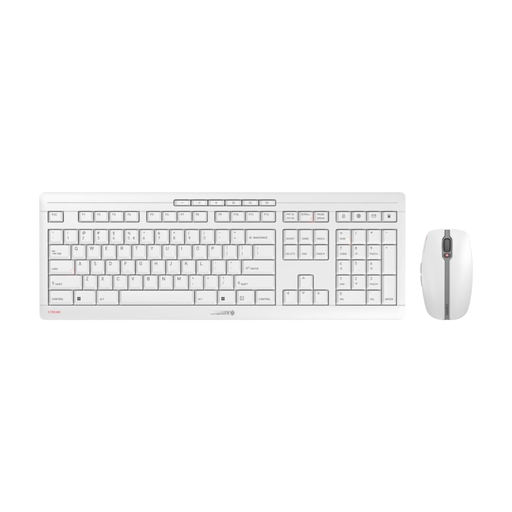
CHERRY Stream Desktop Recharge, Keyboard and Mouse Set, EU Layout (QWERTY)
This set may suit you if you need a mouse as well as a keyboard. Check that the stated QWERTY layout matches the way you type.
2.4 GHz wireless connection; according to the description, it has rechargeable NiMH batteries and charges via USB-C.
View at Joybuy
 No image available
Ticktype EVO75 Custom Tri-Mode, ISO-DE
The ISO-DE layout is listed as suitable for typing German text. Customisable keys may be useful for recurring tasks supported by your software.
Mechanical keyboard; Bluetooth, 2.4 GHz wireless and wired use. The description lists macros, customisable key assignments and VIA compatibility.
View at Joybuy
Frequently asked questions
Can a keyboard identify duplicate film entries by itself?
No. Keyboard features can’t replace duplicate checking in your cataloguing software. If you use Excel, you can highlight duplicates or filter for unique values first. Microsoft warns that ‘Remove Duplicates’ permanently deletes the affected values. Before deleting anything, check which columns identify different versions of a film.
What should I check when setting up a wireless keyboard?
Check that your computer supports the connection method used by the specific model. Logitech lists Bluetooth Low Energy or the supplied Logi Bolt USB receiver for the Signature K650; the manufacturer says it runs on batteries.
Who can help if the keyboard develops a fault after purchase?
If a product is faulty, your statutory rights generally apply against the seller. A guarantee is separate and voluntary. The Verbraucherzentrale explains the difference. Keep your proof of purchase and the details of the specific model.
What should I know about wireless devices and disposal in Germany?
For certain electrical and radio products, the Bundesnetzagentur checks matters including CE marking and manufacturer information. A product listing alone doesn’t confirm that an individual device complies with the rules. Don’t put an old keyboard in household waste. The Umweltbundesamt’s disposal guidance says that removable batteries should be handed in separately.


