Start by choosing your film collection software and checking whether it supports your custom fields, operating system, and import and export needs. Data Crow documents customisable fields, while LibreOffice Base supports databases and forms. If space is limited, consider a mini PC with a monitor you already own; an all-in-one combines the computer and screen, while the expansion options on separate slim or tower PCs depend on the specific configuration. Also check the connections, what’s included, and whether you can back up and restore catalogue data and images separately.
Which option is right for you?
Collectors who want custom catalogue fields
You might want to record details such as where an item is stored or edition information using your own system, then find them again later. Data Crow describes customisable fields and modules, while LibreOffice Base supports databases, forms and reports.
Collectors with lots of existing entries
You want to transfer existing film data, add lots of titles efficiently and keep the option of switching software later. Data Crow documents import and export options for catalogue data.
Collectors with limited desk space
Decide whether a small computer connected to a monitor you already own, or an all-in-one with a built-in screen, would work better in your workspace. Lenovo states that the monitor and input devices for the ThinkCentre Tiny are sold separately; the described IdeaCentre AIO configuration includes a 27-inch screen.
What should you look for when buying?
First, check the film collection software and its data features. Then choose a form factor, connections and storage to suit your workspace.
| Buying priority |
What to check before buying |
Who should pay particular attention? |
| Custom fields and suitable software |
Check that you can create fields, search entries and export your data. Also make sure the software runs on your chosen operating system. |
If I want to record collection details using my own system, the software matters more than having a particularly powerful graphics card. Around 36% of consumers prioritise custom fields and suitable film collection software. |
| Transferring data and adding lots of films |
Test import and export with sample entries. Data Crow documents CSV and XML import, and notes that exporting to text does not preserve relationships between entries. |
If you want to transfer an existing list or add lots of films, test the process with your own data first. Around 29% of consumers prioritise data transfer and entry management. |
| Workspace and future adjustments |
Compare the screen, video outputs and input devices with what’s included and the equipment you already own. Check expansion slots for the exact configuration only. |
If desk space is limited or I want to keep using my existing equipment, the right form factor matters. Around 21% of consumers pay particular attention to workspace setup, screens and possible upgrades. |
| Backing up your catalogue and images |
Check whether the database and images it uses can be stored and restored separately; internal storage is no substitute for an additional backup. |
If you want to restore your catalogue after a fault or accidental deletion, plan to keep a separate backup. Around 14% of consumers prioritise preserving and backing up their catalogue. |
Common buying pitfalls
-
Buying a PC before testing your custom fields
A model name or a large amount of memory won’t tell you whether your chosen film collection software supports the way you organise your catalogue.
Start by creating a few sample entries with your fields, then check search and export.
Switching software or operating systems later can mean extra setup work.
-
Assuming compact means fully equipped
The screen, keyboard and mouse are sold separately for the Lenovo ThinkCentre Tiny described here; the IdeaCentre AIO mentioned includes a screen in the configuration shown.
Before you buy, check the connections and what’s included against the equipment in your workspace.
-
Assuming a text export or internal SSD is a complete backup
Data Crow notes that exporting to text does not include relationships between entries; images may require a separate export option. The German Federal Office for Information Security recommends keeping backup copies to help prevent data loss.
Back up the database and images separately from your PC, and test the restore process with sample entries.
You’ll need to allow for an additional storage device to keep a separate backup.
Key brands at a glance
Lenovo
Options range from the separate ThinkCentre M70q Gen 5 Tiny to the IdeaCentre AIO Gen 9 with its integrated screen.
- Lenovo describes the storage components in the Tiny model as accessible.
- The screen and input devices for the Tiny are sold separately; specification details apply only to the relevant model and configuration.
HP
The Pro 400 G9 SFF is one example of a separate desktop with documented expansion slots.
- For the configuration described, HP lists PCIe x16 and PCIe x1 slots, along with 16 GB RAM and a 512 GB SSD.
- These specifications apply to the configuration mentioned and are not a performance test for film collection software.
Dell
The Pro Slim Plus QBS1250 is one example of a separate slim desktop.
- The product page lists configurable specification options.
- Check the connections and specifications of the exact model you choose; product images may differ from the configuration.
Apple
The Mac mini is worth considering if your chosen film collection software actually runs on macOS.
- Apple lists Mac mini configurations with displays sold separately.
- A Windows application does not automatically become compatible with macOS just because you can export its data.
Joybuy products for a compact workspace
These mini PCs are an option if you want to use a small computer with a separate screen.
 No image available
ACEMAGIC AK1PLUS Mini PC
The mini PC form factor could suit you if you’re looking for a small computer to use with a separate screen.
Intel Celeron N5095, 16 GB LPDDR4X, 256 GB M.2 2280 SATA SSD, HDMI 2.0, 4K/60Hz, WiFi 5 and Windows 11 Pro.
View at Joybuy
 No image available
MaxMini B3 Mini PC
This compact form factor is an option if you want to use your computer with a separate screen.
Intel N4100 (up to 2.4 GHz), 8 GB LPDDR4, 256 GB SSD, dual HDMI, 1000M LAN, 2.4G/5G WiFi and BT 5.0.
View at Joybuy
 No image available
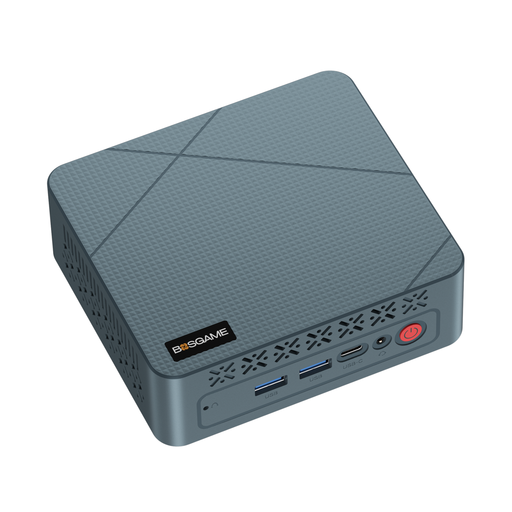
BOSGAME E2 neo Mini PC
This mini PC could suit you if you want to use a separate screen and prefer a compact computer case.
AMD Ryzen 5 3500U, 16 GB RAM and 256 GB SSD; the description lists HDMI, DisplayPort and USB 3.0.
View at Joybuy
Frequently asked questions
Do I need a particularly powerful PC to use custom film fields?
Custom fields are a feature of your film collection software, not your PC’s form factor. Data Crow documents customisable fields and modules, while LibreOffice Base supports database tables and forms. Check the specific software and the setup you want before choosing your hardware.
How do I back up my film catalogue before switching devices?
Back up your catalogue data and images separately, then test restoring them using a few sample entries. Data Crow documents CSV and XML import, XML export and a separate option for images; the German Federal Office for Information Security recommends backup copies to help prevent data loss.
Can I use Data Crow on a Mac?
Data Crow lists macOS as a supported option and describes installation methods for Mac users via the Linux or portable package. Before you buy, check that the specific software setup is compatible with your operating system.


