For fine lettering filmed from a fixed position, a mirrorless camera with a carefully chosen lens could be a good option, but your working distance and framing matter too. For live teaching on a computer, a webcam that can be aimed at your desk may be easier to set up. Test the camera under your actual lights and, for longer recordings, plan for audio, power and recording time as well.
Which cameras may suit different needs
Teachers filming close-ups
If you’re filming pen strokes and fine lettering from a fixed position, plan your lens, working distance and camera height together. The range of lenses available from Sony Germany and Canon Germany shows why choosing a camera body alone won’t determine the framing you want.
Teachers recording longer lessons
For longer explanations, you’ll need a practical frame and a plan for audio and power. Panasonic Germany describes the HC-VX3 as having a grip for longer recordings, while Canon Academy explains the relationship between frame rate and shutter speed.
Teachers delivering live lessons
If you want to show your writing surface during a live video call, you’ll need a camera that’s easy to position without a major rearrangement. Logitech describes the MX Brio’s Show Mode as a way to show sketches and objects on your desk.
What to consider when choosing
Mirrorless camera with interchangeable lens
Suitable if: You want to switch between the whole page and small lettering details from a fixed position, and can choose a suitable lens.
Consider: Camera body specifications alone don’t guarantee the right framing for close-ups; the lens, working distance and mount all need to suit your desk setup.
Camcorder with built-in zoom
Suitable if: You want to record longer explanations with changing framing without changing lenses.
Consider: Panasonic states that the HC-VX3 has 24x optical zoom; this alone doesn’t confirm that it can capture fine lettering in close-up.
USB webcam
Suitable if: Your lesson takes place mainly live on a computer and you want to point the camera at your writing surface.
Consider: You’ll need a suitable computer, compatible software and a mounting position that captures the framing you want.
Compact gimbal camera
Suitable if: You need more than a view of your desk, such as handheld angles or the option to switch between portrait and landscape formats.
Consider: The stabilisation for movement described by DJI doesn’t replace a secure position for a continuous overhead view.
For a calligraphy lesson under artificial light, the camera type and framing aren’t the only things that matter. Check whether you can adjust the exposure to work with your lights, and whether the audio and power supply suit the lesson you have planned.
| Requirement |
What to check before buying |
Who it matters most to |
| Flicker under artificial light |
Check whether you can adjust the video shutter speed, then make a test recording under your lights. Sony Germany recommends 1/50 or 1/100 of a second as a starting point with a 50 Hz power supply; the setting that helps will also depend on the light source. |
If I want to avoid bands or changes in brightness, I test the camera and lighting together; around 31% of consumers prioritise a picture that’s as flicker-free as possible. |
| Fine lettering in frame |
Decide on the camera height and how much of the page you want in shot, then check the lens, close-focusing ability and actual test image from your chosen setup. |
If you want to show pen strokes and small lettering, you’ll need framing that works with the height of your desk; around 25% of consumers prioritise clearly visible lettering details. |
| Long lesson with clear speech |
Check the recording time, power supply, storage and audio connections for the specific model, and test the speech audio at your workstation. |
If I want to record a complete explanation, I look for good audio and a reliable power supply; around 19% of consumers prioritise uninterrupted lessons with clear speech. |
| Writing surface in the live picture |
Check the mount, cable routing and software, then confirm the framing that actually appears in the video call. |
If you want to show your writing surface during a live online lesson, a straightforward setup matters; around 13% prioritise live streaming. |
| Easy setup |
Check what’s included and whether the lens and mount are supplied or otherwise suitable for the angle you have planned. |
If I want to get started without missing parts, I check the kit and mounting options; around 12% of consumers prioritise an easy, complete setup. |
Common selection mistakes
-
Choosing on the basis of 4K resolution alone
High resolution doesn’t determine the framing or how large fine lettering will appear in the finished picture.
Use the specific lens or zoom to check how much of the page you can capture from your planned camera height.
-
Assuming artificial light won’t be a problem without testing it
Flickering lights can cause visible bands or colour shifts. The right shutter speed won’t necessarily solve the problem with every LED light.
Test your lighting with the camera and available video shutter speeds before recording a full lesson.
-
Confusing image stabilisation for movement with a fixed desk view
DJI describes the Osmo Pocket 3’s stabilisation for moving shots; you’ll still need a suitable camera position for a longer overhead view.
Decide in advance whether you’ll mainly be filming the page or also want to capture handheld shots.
-
Assuming the standard model and Combo include the same items
DJI lists the Osmo Pocket 3 and the Creator Combo as different options.
Check what’s included with the specific version against the accessories your setup actually needs.
Camera brands to consider
Sony
The ZV-E10 II is an E-mount mirrorless camera for a fixed setup that you can build on over time.
- Sony Germany lists the E PZ 16–50 mm F3.5–5.6 OSS II zoom lens as part of a kit.
- CHIP notes that the camera body has no in-body stabilisation. These features don’t confirm that the kit will show small lettering clearly enough from your planned distance.
Canon
The EOS R50 V is another mirrorless camera option, provided the lens choice and video settings suit your desk setup.
- Canon Germany lists RF and RF-S compatibility for the EOS R50 V.
- Canon states that EF-M lenses aren’t compatible. Whether small lettering appears at the right size in frame also depends on the lens you choose and your distance from the subject.
Panasonic
The HC-VX3 is a camcorder with built-in zoom, so you can record without changing lenses.
- Panasonic Germany lists 24x optical zoom and a grip for longer recordings.
- Panasonic’s German product page lists the HC-VX3 as unavailable. The zoom range also doesn’t confirm that fine pen or ink strokes will appear at the right size in frame.
Logitech
The MX Brio is a webcam option for computer-based lessons where you want to show your desk.
- Logitech describes a Show Mode for showing sketches and objects on your desk, along with manually adjustable image settings.
- Logitech’s claims about face image quality aren’t independent proof that fine calligraphy will be clearly visible from every desk height.
DJI
The Osmo Pocket 3 is a compact option if you want to capture moving angles as well as a view of your desk.
- DJI lists a 3-axis gimbal and a rotating screen.
- You’ll still need a suitable position for a fixed overhead view. The standard model and Creator Combo have different items included.
Joybuy products for your camera setup
The following Joybuy listings include webcams for computer-based live lessons and compact cameras for recording video. Check that each model’s framing and mounting options suit your desk setup.
 No image available
Osmo Pocket 4P Vlog Combo, Black
Described as a vlog combo; you’ll need to position the camera securely and appropriately for a view of your desk.
The description lists a 20 mm wide-angle lens and 4K recording. According to the description, 4K/240 fps is only supported in slow-motion mode.
View on Joybuy
 No image available
Full HD 1080P Webcam with Microphone
For live lessons on a PC or laptop; check beforehand that you can position the webcam to include your writing surface in the image being streamed.
The description lists 1080p at 30 fps, a 120° wide-angle lens, a 360° rotating lens and automatic light correction. The built-in microphone is described as having noise cancellation.
View on Joybuy
 No image available
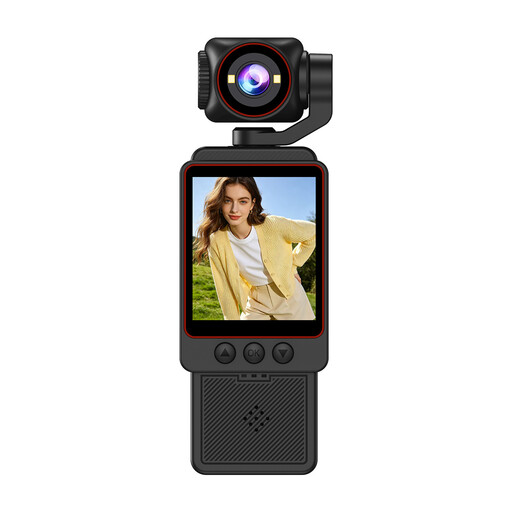
Small Video Camera, 1080P HD Video
A compact camera for recording video; check that you can get the framing you want from your planned position.
The description lists Wi-Fi transfer, fast focus and an SD card included. It also states that the camera isn’t waterproof, so avoid rain and damp conditions.
View on Joybuy
 No image available
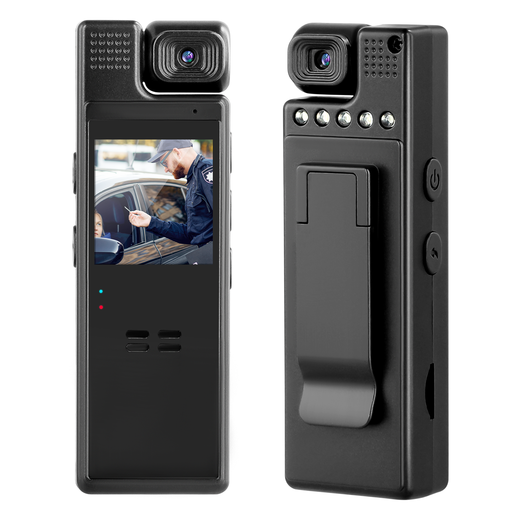
Compact Camera with Audio, 1080P and 180° Rotating Lens
Described for indoor video recording; check whether the manually rotating lens gives you the view of the page and your hands that you want.
The description lists 1080p video, a 1.3-inch display and loop recording.
View on Joybuy
 No image available
AOC Webcam with Microphone, 4K, 99° Field of View
Described for computer-based video calls; check whether the mount shows your writing surface in the actual call image.
The product description lists 4K video, HDR, automatic light correction, a 99° field of view and a built-in microphone. The mount can be tilted and rotated, according to the description.
View on Joybuy
Frequently asked questions
How can I prevent bands appearing under my light?
Test the camera under that exact light. Sony Germany recommends 1/50 or 1/100 of a second as a starting point with a 50 Hz power supply; the setting that helps, and the functions available, depend on the model and light source.
Can I use my EF-M lens with the Canon EOS R50 V?
No, Canon says EF-M isn’t compatible. Canon lists RF and RF-S as native lenses, and EF and EF-S lenses as compatible with a suitable adapter.
Is a “4K” specification enough for a long lesson?
No. Resolution doesn’t tell you how long your specific model can record for. Check the recording time, power supply, storage and audio for the lesson you have planned; Panasonic’s information about the HC-VX3 doesn’t guarantee a recording time suitable for every lesson length.
Can I record people taking part in a calligraphy lesson and publish the video?
There’s no general answer without knowing what’s being recorded and how the footage will be used. According to the Federal Commissioner for Data Protection and Freedom of Information, processing personal data requires an applicable legal basis; consent is one possible basis, but not the only one. Section 22 of the German Artistic Copyright Act (KunstUrhG) generally requires consent to distribute or publicly display identifiable images; specific circumstances and exceptions must be considered on a case-by-case basis. If you don’t want participants to feature in the teaching video, try to film only your own work surface.


