Which type of camera suits you?

Calligraphy teacher giving live demonstrations

If you want to show your writing area directly on your computer, a webcam with a downward-facing presentation mode could be a good fit. Logitech describes this feature for the MX Brio. You’ll still need a suitable mount and a field of view that works for your setup and the page on your desk.

Lettering artist filming solo

For standalone recordings, check the framing, focus on the paper and camera position first. DJI specifies a focus range starting at 0.2 m for the Osmo Pocket 3. Sony describes the ZV-1 II as having an integrated wide-angle zoom, but that doesn’t determine the right framing for your desk.

Creative looking for flexible filming options

If you want to film subjects beyond desk videos, an interchangeable-lens system can give you more choice. You’ll need to make sure the lens, close-focus distance and mounting setup all work for your filming space.

What to look for when buying

USB webcam connected to a computer

A good fit if: you mainly give live demonstrations or record directly on your computer, and can position the camera suitably above the page.

The trade-off: A presentation mode doesn’t guarantee a straight-down view or sharp pen nibs at your mounting distance.

Compact camera

A good fit if: you want to film without relying on a computer and use the camera for other recordings too.

The trade-off: Focus range, stand or mount, and recording options vary by model, so you’ll need to check each one.

Mirrorless camera with interchangeable lens

A good fit if: you want to tailor your framing by choosing a lens and cover a range of filming situations.

The trade-off: You’ll need to plan for the lens, close-focus performance and mounting setup.

What you need What to look for when buying Who it matters most to
Capture the area of the page you need Check the page size and planned mounting position against the field of view. A wider view shows more of your work area, but makes the writing look smaller in the finished video. If I want to show the whole page on a small desk, I check the framing from the camera position I can actually use; around 36% of consumers say capturing the entire page is their top priority.
Keep the writing in focus Measure the distance between the camera and the paper, then check focus on the writing surface. DJI specifies a focus range of 0.2 m to infinity for the Osmo Pocket 3. If I want to show fine strokes and the pen nib clearly, focus on the paper matters more than a general autofocus claim; around 29% of consumers say sharp writing details are their main concern.
Show the paper and ink accurately Check whether you can adjust exposure and white balance, and assess the image under your own desk lighting. Logitech lists these adjustment options for the MX Brio. If I want the paper and ink to look distinct under my lighting, I look for adjustable image settings; around 21% of consumers say consistent image quality is their top priority.
Make recording practical Decide in advance whether you’ll be streaming from a computer or recording independently. Depending on the model and how you work, check the power supply, storage media, camera controls and mounting options for the length of your planned sessions. If I want to give live demonstrations or record without a computer permanently connected, a suitable setup is essential; around 14% of consumers prioritise straightforward recording or live use.

Common misconceptions

  • Assuming 4K means you’ll get the right close-up

    A high resolution doesn’t guarantee that the whole page will fit in frame from your camera position, or that the writing surface will be in focus at the distance you need. DJI specifies a minimum focus distance of 0.2 m for the Osmo Pocket 3.

    Decide on your page size and camera position before comparing resolution figures.

    Depending on your setup, you may need a different mount or camera position.

  • Assuming a built-in table stand is an overhead mount

    Canon describes the PowerShot V10 as having a built-in stand, but doesn’t specify overhead mounting.

    Check the required angle and mounting method separately from the camera body.

  • Taking face-tracking autofocus as proof that writing will be sharp

    Canon’s description of face tracking for the PowerShot V10 doesn’t confirm that the camera will focus on the paper and pen nib.

    Check focus on the writing surface from your planned recording distance.

Key brands at a glance

Logitech

The MX Brio is a webcam for demonstrations on a computer. Logitech describes its Show Mode as a way to show notes and sketches on your desk.

  • Logitech lists software settings for white balance and exposure.
  • You’ll need to check with your own setup whether the mount and distance show a large enough writing area in sharp focus.

DJI

The Osmo Pocket 3 is a compact, standalone camera with a documented focus range.

  • DJI specifies a focus range of 0.2 m to infinity for the Osmo Pocket 3.
  • If you’re positioning the camera low down, check that the distance to the paper falls within this range.

Sony

The ZV-1 II is a compact camera with an integrated wide-angle zoom, so you can change the framing without changing lenses.

  • Sony lists a 35 mm equivalent range of 18–50 mm for stills and a 1-inch sensor.
  • These specifications don’t determine the video framing at your desk or whether the pen nib will be in focus.

Canon

The PowerShot V10 is a compact camera for standalone video recording and webcam use.

  • Canon lists 4K UHD video, microSD cards and UVC/UAC.
  • The built-in stand isn’t specified as an overhead mount, and face tracking doesn’t answer the question of focus on the paper.

Panasonic

The DC-G100DK kit pairs the LUMIX G100D with the interchangeable H-FS12032 lens.

  • Panasonic lists 4K/30p and the 12–32 mm lens for the kit.
  • Choosing a lens and arranging a mount require extra planning. Panasonic Germany marks this specific kit as unavailable; that doesn’t tell you whether it’s available from other retailers.

Joybuy product selection

This selection includes compact cameras for standalone recording and webcams for computers that could work for filming at your desk.

Osmo Pocket 4P Standard Combo in black

Osmo Pocket 4P, Standard Combo, Black

As a compact pocket camera, it’s an option for standalone recording. Before you buy, check whether you can capture the whole page from your intended camera position.

Joybuy
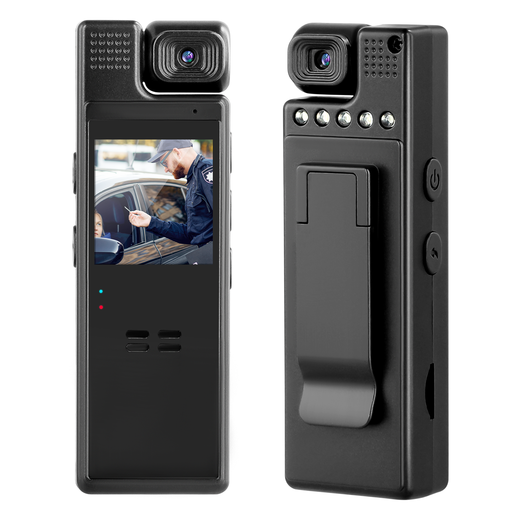
Compact camera with 1080p and a 180° rotating lens

Compact camera with 1080p and 180° rotating lens

For standalone video recording. The lens rotation mentioned in the product name doesn’t confirm that the camera can be mounted above your desk.

Listed in the product name: 1080p and a 180° rotating lens.

Joybuy

Philips SPL6308S/00 QHD webcam in silver

Philips SPL6308S/00 QHD webcam, Silver

As a webcam for your computer, it could work if you’re using a screen mount at your desk; check whether you can position it above the page.

Listed in the product name: QHD, noise-reducing microphone and clip for laptop or desktop.

Joybuy

Philips SPL6408BT/00 4K UHD webcam in black

Philips SPL6408BT/00 4K UHD webcam, Black

It could be an option as a webcam for recording on your computer; the autofocus specification alone doesn’t confirm that the writing surface will be sharp from your chosen distance.

Listed in the product name: autofocus, two microphones and a cover.

Joybuy

DJI Osmo Pocket 3 with 1-inch CMOS sensor and rotating touchscreen

DJI Osmo Pocket 3, 1-inch CMOS, 4K/120fps

For standalone recording; measure the distance to the paper before deciding whether you can position the camera suitably at your desk.

Listed in the product name: 3-axis stabilisation and rotating touchscreen. DJI specifies a focus range of 0.2 m to infinity for the Osmo Pocket 3; positions closer than 0.2 m are outside this stated range.

Joybuy

Frequently asked questions

Is 4K enough to show the pen nib clearly?

No. First check that your page fits in frame from the camera position available to you, and that the writing surface will be in focus at the intended distance. DJI’s stated 0.2 m is a focus limit for the Osmo Pocket 3, not a general rule for cameras.

How do I set up a camera on a small desk?

Plan the camera position above the area of the page you want to show, then check the preview to make sure your hand and pen nib stay visible as you write. Logitech describes the MX Brio’s Show Mode for desk notes; you’ll still need to position the camera suitably for a straight-down view.

What should I check for longer sessions?

Make sure the power supply, storage media and mount suit the way you plan to record. Canon lists microSD compatibility for the PowerShot V10, and DJI does too for the Pocket 3; this doesn’t tell you how long you’ll be able to record with your setup.

What returns period applies to online purchases in Germany?

For a qualifying distance purchase, the European Union’s consumer portal generally states a 14-day withdrawal period from delivery of the goods. Exceptions and conditions, such as return postage costs, may apply. This is separate from any voluntary returns period offered by a retailer.

Can I film other people and publish the video?

This doesn’t establish blanket permission to record identifiable people. Germany’s Federal Commissioner for Data Protection and Freedom of Information highlights personality rights in relation to video recordings. Where possible, keep other people out of shot and off-mic, and check the legal basis for your specific situation before publishing.