Overhead filming
If you mainly want to show your hands and the steps involved in arranging flowers, you’ll need a clear view of the scene and a camera position that doesn’t get in the way of working at the table.


For a fixed overhead view with a computer connected, a USB document camera could be a good fit; according to IPEVO, the V4K PRO has a maximum capture area of 34.2 × 25.5 cm. If you want to film without a computer or switch between angles, a standalone camera with a suitable mount may be a better option. For detailed close-ups of blooms, check the magnification ratio of the specific lens as well as its focusing distance: a short minimum focusing distance alone does not prove that a lens is suitable for macro photography.
If you mainly want to show your hands and the steps involved in arranging flowers, you’ll need a clear view of the scene and a camera position that doesn’t get in the way of working at the table.
For individual blooms, stems or hand movements, consider the focusing distance, magnification ratio and space needed for the camera and mount together.
If you switch between working at the table and moving shots of the finished arrangement, a standalone camera and practical ways to change angles are important.
A good fit if: you’ll mostly film from above and can use a compatible computer while recording.
Things to consider: The IPEVO V4K PRO needs a computer; IPEVO lists a maximum capture area of 34.2 × 25.5 cm.
A good fit if: you want to switch between wide shots and close-ups without having a computer connected at all times.
Things to consider: According to Sony, the ZV-1 II has a fixed 18–50 mm lens and can focus from around 5 cm; you’ll still need a suitable mount for overhead shots.
A good fit if: you want to tailor the lens and framing to the shots you plan to take.
Things to consider: According to Sony, the supplied 16–50 mm lens in the Sony ZV-E10 II kit offers a maximum magnification of 0.215×; check the close-up capabilities of the specific lens.
A good fit if: you also want to capture moving shots around the finished arrangement.
Things to consider: DJI states that the Osmo Pocket 3 has a three-axis gimbal and can focus from 0.2 m; neither feature proves it’s suitable for very close-ups of blooms or a fixed overhead position.
| What you need | What to check before buying | Who it matters to |
|---|---|---|
| Clear overhead view | Measure your table and arrangement, and check the framing, mounting height and room to move your hands. For the IPEVO V4K PRO, IPEVO lists a maximum capture area of 34.2 × 25.5 cm and a USB-A connection. | If I want to show the vase, my hands and each step at the same time, the mount mustn’t block my access to the table. Around 36% of consumers prioritise a clear overhead view. |
| Close-ups of blooms | Compare the focusing distance and magnification ratio of the specific model or lens. Sony lists a focusing distance of around 5 cm for the ZV-1 II; according to Sony, the SELP16502 offers a maximum magnification of 0.215×. | If I want an individual bloom to be clearly visible in the frame, the camera needs to focus close enough and fill the frame sufficiently. Around 29% of consumers prioritise close-ups of blooms. |
| Standalone recording and changing angles | Check whether you want to use a computer while recording and where an arm or tripod could go. Canon lists a built-in stand for the PowerShot V10; DJI specifies a three-axis gimbal and a focusing distance from 0.2 m for the Osmo Pocket 3. | If I want to film the finished arrangement from different angles as well as show it on the table, a flexible setup matters. Around 21% of consumers prioritise standalone filming and changing angles. |
| Lighting and colour | Try recording with your own lights and check the colours, shadows and any banding. Sony lists an adjustable colour temperature range of 2,500 to 9,900 K for the ZV-1 II; this doesn’t provide a comparative colour measurement. | If I want the flower colours to look true to life under my existing lighting, I’ll want to assess the results with my own setup. Around 14% of consumers prioritise assessing light and colour. |
Focusing distance and magnification are different things. Sony lists a focusing distance from around 5 cm for the ZV-1 II; for the separate SELP16502 lens, Sony gives a maximum magnification of 0.215×.
Decide how large you want a bloom to appear in your video, then check the full camera model or the specific camera-and-lens combination.
You may need a different, carefully chosen lens to achieve the magnification you want.
The built-in stand on the Canon PowerShot V10 makes it easier to set up, but that doesn’t prove it can give you a clear overhead view above the vase and your hands.
Plan where the camera will actually sit and how you’ll access the arrangement before relying on the stand.
Depending on your table and the framing you want, you may also need a suitable arm or tripod.
According to IPEVO, the V4K PRO uses a USB-A connection and is designed to work with a computer.
Check that your computer and planned recording software will work with your setup.
If you don’t have a compatible computer, you’ll need a different recording setup or a standalone camera.
Canon explicitly states that the PowerShot V10 Essential Kit doesn’t include a USB-C charger. This applies to the named kit, not necessarily to other versions.
Before buying, compare what’s included with the specific version against what you’ll need for your setup.
In particular, check whether you’ll also need a charger, memory card or mount.
The V4K PRO is a USB document camera designed to show a tabletop when connected to a computer.
The ZV-1 II is a compact camera with a fixed lens; close-up performance on the ZV-E10 II depends on the lens you choose.
The PowerShot V10 is a compact camera designed to stand on a table without a separate stand.
The Osmo Pocket 3 is a small gimbal camera for filming, including moving shots of your arrangement.
The Joybuy products below include compact video and vlogging cameras for different ways of filming. Before choosing, check that the angle, focusing distance and mounting options suit your small table.
 No image available
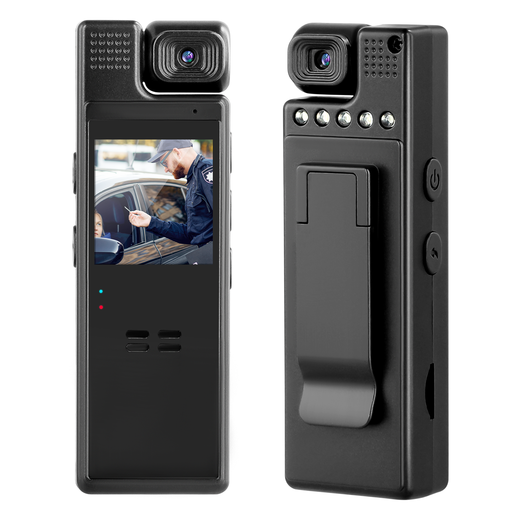
Could be a good fit if you’re looking for a portable camera for a POV view; the product description mentions hands-free recording.
The description lists 2K video and audio recording, as well as a 360° rotating lens.
 No image available
Could work for a mounted view if the clip is suitable for your planned filming position.
The title and description list 1080P video, a manually adjustable 180° rotating lens and a rear clip.
 No image available
Could be an option if you want to adjust the framing using the zoom; check how it can be set up on your table.
The product title lists 12× optical zoom, 4K video, Wi-Fi and 64 MP.
 No image available
Could be worth considering if you’re looking for a portable digital camera with autofocus; check whether it suits close-ups of blooms with your specific setup.
The product title lists 4K video, 64 MP, autofocus, 18× zoom, anti-shake and flash.
 No image available
Could be a good fit if you want to film moving shots of the finished arrangement as well as your work at the table.
The product title lists 4K/120fps video, a 1-inch CMOS sensor and three-axis stabilisation. DJI gives a focusing distance from 0.2 m; this doesn’t mean it’s suitable for closer shots.
No. Focusing distance tells you how close a camera can focus; the size of the subject in the frame also depends on the framing and, where relevant, the lens’s magnification ratio. Sony lists a focusing distance of around 5 cm for the ZV-1 II, but a maximum magnification of just 0.215× for the separate SELP16502 kit lens.
Measure the table and arrangement, including the space you need for your hands. With the intended mounting height, check the actual framing, access to the vase, cables and computer connection; according to IPEVO, the V4K PRO uses USB-A.
Check what’s included with the specific version, especially the mount, memory card and power supply: according to Canon, the PowerShot V10 Essential Kit doesn’t include a USB-C charger. In Germany, statutory rights are distinct from a voluntary guarantee; any guarantee is subject to its own terms and conditions.
If other people are recognisable in a photo or video, § 22 KunstUrhG generally requires their consent before it is distributed or shown publicly; § 23 sets out exceptions, subject to further limits. Whether an exception applies in a particular case can’t be determined from the fact that the video is about flowers alone. Consider filming and publication separately; choosing a camera doesn’t give you permission to publish.