For a fixed overhead view of your hands and work, a mirrorless camera with a carefully chosen lens is a good option, provided you check the framing and focus at your actual working distance. For live lessons on a computer, a webcam may be a better fit; choose a camcorder with built-in zoom if you want to switch between views without changing lenses, or a gimbal camera if you want to move the camera as you explain. None of these camera types alone guarantees the right focus in changing window light or clear audio, so test your complete set-up at your workspace.
Which camera set-up suits you?
Teachers who need a fixed overhead view
If you want to show both hands and your work through longer stages of a project, check the framing and focus from the camera’s planned position. Canon Deutschland, Sony Deutschland and DJI describe different lenses and focusing conditions; the key is to test the set-up at your own table.
Modellers teaching live
If you teach on a computer and switch between talking and demonstrating, your camera position, connection and audio all need to work with your live set-up. Logitech describes a mode on the MX Brio for showing your desk; OBS Project also explains how to use a smartphone as a webcam.
Teachers who switch between views
If you move between a wide view and close-ups, you can weigh up different lenses, built-in zoom or a movable camera. Canon Deutschland lists a 20x zoom for the LEGRIA HF G70; DJI describes the Osmo Pocket 3 as having a fixed lens with a focus range starting at 0.2 m.
What should you look for when buying?
Mirrorless camera with interchangeable lens
A good fit if: you’re planning a fixed overhead view as well as extra close-ups or side views, and can choose a lens to suit your working distance.
Consider: the lens and set-up need to suit your table; resolution alone won’t guarantee the framing you want or sharp focus.
USB webcam connected to your teaching computer
A good fit if: you mainly teach live on a computer and can mount the camera so it shows your modelling area.
Consider: the preview, audio and recording depend on your specific computer and software set-up.
Camcorder
A good fit if: you record without a computer and want to zoom between wide views and close-ups.
Consider: zoom and memory card options won’t guarantee suitable close-up focus or uninterrupted recording with your power supply.
Compact gimbal camera
A good fit if: you often switch between your table, your work and side views as you explain.
Consider: even for a fixed overhead view, you’ll still need to check the mounting, framing and focus distance.
Smartphone you already own
A good fit if: you want to start by testing how well an existing camera shows each step of your work.
Consider: whether the mount, audio, power supply and connection will last for a full lesson depends on your device and set-up.
| Requirement |
What to check before buying |
Who is this important to? |
| Hands and work in focus |
Test your work surface, hands and pieces of different heights from the planned camera position; check the focus distance you’ll need. |
If I want to show every hand movement and the work at the same time, the right framing and focus matter. Around 36% of consumers put sharp, clear demonstrations first. |
| Footage in window light |
Test with the modelling material you use, at the times you plan to film; check whether you can adjust the exposure and white balance. |
If the window light changes during my lesson, I want to be able to control how the surface and colour of my work appear. Around 29% of consumers prioritise footage in changing window light. |
| Audio and complete recordings |
Test your voice from your actual position, and check recording time, power supply, storage and the finished file. |
If my explanation needs to stay clear and the whole lesson needs to be saved, I test the audio and recording process together. Around 21% of consumers put this process first. |
| Live lessons on a computer |
Check in advance that the connection, mount, preview and software work with your computer and the overhead view you want. |
If I teach live on a computer, the image of my work surface needs to appear in the programme I’m using. Around 14% of consumers prioritise fitting a camera into their live set-up. |
Avoid common assumptions
-
Assuming 4K or autofocus means you’ll get a usable overhead view
Specifications for resolution and focus won’t tell you how the shot will look at your workspace. Your hands or work could be out of frame, or remain out of focus at the planned camera height.
Film a test shot from the position you plan to use, including pieces of different heights.
Depending on your camera set-up, you may also need a suitable lens or a secure mount.
-
Assuming a desk-view feature will work for permanent overhead filming
Logitech describes the MX Brio as tilting to show notes and sketches, not as covering every modelling area.
Check the live preview in your actual set-up to make sure your hands and work stay visible as you work.
You may need a different mount or camera position to get the right view.
-
Thinking of the camera alone as a complete recording set-up
With a mirrorless camera, the lens needs to suit the distance. Ports and memory card options are only useful with the right components.
Make a list of the parts you need for your set-up, then test the audio and a complete recording and playback.
Depending on your set-up, you may need a lens, mount, storage media, power supply or external microphone.
Key brands at a glance
Canon
The product ranges covered here include a video-focused interchangeable-lens camera and a camcorder with built-in zoom.
- Canon Deutschland lists microphone and headphone sockets for the EOS R50 V. For the LEGRIA HF G70, Canon lists a 20x zoom and two SD card slots.
- These specifications don’t confirm that the framing and focus will suit the distance to your work. With the EOS R50 V, you’ll also need to choose a lens.
Sony
The ZV-E10 II is an interchangeable-lens camera for filmmakers who want to choose their own lens and framing.
- Sony Deutschland lists an APS-C sensor, 4K-60p recording and E-mount lenses.
- These specifications don’t confirm that close-up focus will suit your needs or show how the camera will perform in your window light.
Logitech
The MX Brio is a webcam option for live lessons on a computer and occasional views of your desk.
- Logitech describes Show Mode, built-in microphones, and exposure and white balance controls.
- You’ll need to check the exact mounting and whether your modelling area stays in view at your own table.
DJI
The Osmo Pocket 3 is a compact camera for filmmakers who want to change their view as they explain.
- DJI lists a fixed lens, a mechanical gimbal and a focus range starting at 0.2 m.
- For a fixed overhead view, you’ll need to check the mounting, framing and distance to your work separately.
Nikon
The Z 30 is another interchangeable-lens camera for recorded or streamed lessons.
- Nikon lists 4K UHD at 30p and up to 125 minutes of continuous footage under the specified conditions.
- The recording time isn’t guaranteed with every power supply or at every temperature. The lens and focus distance need to suit your set-up.
Joybuy products for modelling lessons
The Joybuy products below include compact cameras and webcams for recording modelling lessons or teaching live on a computer.
 No image available
Osmo Pocket 4P Vlog Combo – Black
A vlog camera for a compact recording set-up; check whether you can securely arrange the fixed overhead view you want.
View at Joybuy
 No image available
AOC 4K Webcam with Microphone
For live lessons on a computer, if you can position the webcam to show your hands and work.
Features listed in the product name: 4K, 99° field of view, microphone and noise cancellation. Check the framing at your table.
View at Joybuy
 No image available
Logitech C922 Pro Stream Webcam (USB)
For recording on a computer or a live set-up, provided the camera view and software suit your overhead shot.
The product name identifies it as a USB webcam. Before your lesson, check the connection, preview and audio in your planned set-up.
View at Joybuy
 No image available
DJI Osmo Pocket 3 Creator Kit
A compact camera option if you want to change the view as you explain.
Features listed in the product name: 4K/120fps and 1-inch sensor. DJI lists the Osmo Pocket 3 as having a focus range starting at 0.2 m; check the distance to your work.
View at Joybuy
 No image available
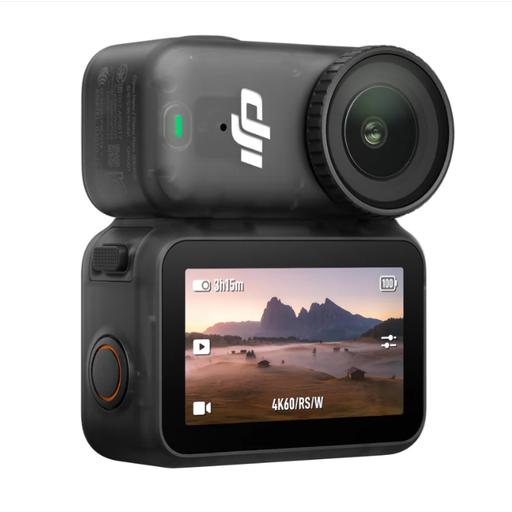
DJI Osmo Nano Standard Combo (64GB)
A compact vlog camera for recording, but check the framing you want before you start.
Features listed in the product name: 4K/60fps, 1/1.3-inch sensor and 143° field of view. Test whether the wide angle gives you the framing you want at your table.
View at Joybuy
Frequently asked questions
Is a 4K specification enough to make modelling steps easy to see?
No. Test the actual framing and focus with your work from the camera position you plan to use. Cameras differ in whether you choose a lens, use built-in zoom or film with a fixed lens.
What should I set up and test before recording a full lesson?
Mount the camera so you can work with your hands free, then do a complete test run, checking your voice, power supply, storage and the resulting file. For live lessons, also test the preview and audio in the programme you’ll actually use.
Is a manufacturer’s guarantee the same as your statutory rights?
No. For consumer purchases in Germany, statutory claims relating to defects are generally made against the seller; a guarantee is an additional voluntary service with its own terms. The Verbraucherzentrale states that online purchases generally come with a 14-day right of withdrawal; the specific contract and any exceptions should be taken into account.
Can I simply publish a lesson featuring identifiable participants?
Not in every case. In general, § 22 KunstUrhG requires consent to distribute or publicly display a person’s image; § 23 sets out statutory exceptions. If personal data is processed, you also need an appropriate legal basis under data protection law. Which rules apply in a particular case depends, among other things, on who is identifiable and how the recording is used.


