Start by choosing a secure camera position, then check in a test recording that the whole puzzle and the smallest important details are visible. A webcam suits a fixed setup with a computer, a camcorder records independently, and an interchangeable-lens camera gives you flexibility when choosing a lens. None of these camera types alone guarantees that details will remain clear from your actual mounting height.
Which setup is right for you?
Puzzle film-makers with a fixed table
If you want to show the entire solving process from a consistent angle, check the framing and how the camera will be secured. Logitech lists an adjustable field of view and a tripod thread for the Brio 4K. Neither tells you whether the whole puzzle will fit in the frame.
Explainers recording longer sessions
If you want to record the steps and commentary over a longer period, decide whether you want the computer running during the recording. OBS Project says a webcam can be added as a video source; with a standalone camcorder, check the power supply, recording mode and storage for the session you have planned.
Detail-focused film-makers in a spare room
If you need small pieces or lettering to remain visible, consider the lens, distance and lighting together. Sony offers the ZV-E10 II as a kit with a 16–50 mm lens; the final look also depends on the mounting height and the subject itself.
What should you look for when buying?
Webcam with a computer
A good fit if: your computer is already running beside your fixed puzzle table and you want to control the recording and framing there.
Bear in mind: recording depends on your computer and software. You’ll need to test whether small pieces are clear from your actual mounting height.
Camcorder with optical zoom
A good fit if: you want to record without a computer running and adjust the framing optically. Panasonic lists 24x optical zoom for the HC-VX3 and HC-V900.
Bear in mind: the HC-VX3 records in 4K, while the HC-V900 records in Full HD. Zoom alone won’t take care of secure mounting, power or storage.
Interchangeable-lens camera
A good fit if: you want to shape the framing with a lens chosen for the job.
Bear in mind: check the kit lens itself from your intended mounting height. The camera body’s specifications won’t confirm whether it can capture the details you need or record for an uninterrupted session.
Compact camera
A good fit if: you want to use the camera in different positions too. The Canon PowerShot V10 records in 4K and has a built-in stand.
Bear in mind: the stand isn’t a confirmed overhead mount. Check whether the wide-angle lens captures the framing you want from your chosen distance.
| Priority |
What to check when buying |
Who is it most important to? |
| Full view and details |
Decide on the table area and possible mounting height; use a test recording to check the puzzle edges and the smallest important pieces. |
If I want to show the whole solution as well as small pieces, both need to be clear in the frame. Around 36 % of consumers put framing and detail first. |
| Longer recording |
Check the recording mode, power supply and storage medium for the specific model; test it for the length of session you have planned. |
If recording a full, longer session matters, I want to plan for power and storage in advance. About 29 % of consumers prioritise this. |
| Artificial lighting |
Record test clips in the intended video mode using your existing lights; check whether the model has exposure or anti-flicker settings. |
If I’m filming in a spare room under the lights I already have, I want to spot distracting flicker or colour changes before recording the whole solution. This is the top priority for around 21 % of consumers. |
| Recording on a computer |
Check the connections, mounting, cable length and whether the camera is recognised by your intended recording software. |
If I want to control the recording directly on my computer, I need a setup that works with both the camera and the software. Around 14 % of consumers put this computer-based workflow first. |
Common misconceptions
-
4K doesn’t automatically mean puzzle details will be clear
Whether small pieces are visible also depends on the framing, distance and how large the pieces appear in the overall image. Resolution alone won’t tell you.
Record a short clip from the planned height and check both the whole puzzle and one important small detail.
-
A stand or monitor clip isn’t automatically a secure overhead mount
A built-in stand or tripod thread doesn’t, by itself, prove that the camera can be positioned securely above the table. Depending on your setup, you may need an additional suitable mount.
Check the fixing, load capacity, cable routing and clear workspace together before settling on the camera position.
-
“Camcorder” doesn’t guarantee you can record for as long as you like
The name doesn’t tell you how long a particular model can record continuously in your chosen mode. Storage and power need to suit the session you have planned.
Check the recording mode, storage and power arrangement in advance, and test a longer recording. Depending on your setup, you may also need a suitable storage medium or power supply.
Brands and camera ranges to consider
Logitech
Webcam options for a table setup with a computer; the Brio 4K and MX Brio are different models.
- Logitech lists an adjustable field of view and a tripod thread for the Brio 4K.
- The MX Brio’s Show Mode is described as being for notes and sketches on a desk. That doesn’t confirm a secure vertical overhead view or clear, fine puzzle details.
Panasonic
Camcorders with a built-in zoom: the HC-VX3 records in 4K and the HC-V900 in Full HD.
- Panasonic lists 24x optical zoom for both models.
- Bear the different recording resolutions in mind when cropping footage later. They don’t confirm whether puzzle details will be clear on your own table.
Canon
Two different camera options: the interchangeable-lens EOS R50 V for a planned setup, and the compact PowerShot V10 for more flexible positioning.
- The EOS R50 V kit mentioned includes an RF-S 14–30 mm F4-6.3 IS STM PZ lens; according to Canon, the PowerShot V10 records in 4K and has a built-in stand.
- The PowerShot V10’s stand doesn’t confirm that it can be mounted securely overhead; the suitability of the kit lens depends on your actual setup.
Sony
An interchangeable-lens camera option with the ZV-E10 II, also available as a kit with a 16–50 mm lens.
- An interchangeable lens lets you plan the framing to suit your setup.
- You’ll need to check separately whether the kit lens can capture small details from your mounting height.
Joybuy products for filming at a table
The Joybuy products below are for recording video at a table, mainly with webcams connected to a computer. For the camera models, check the framing, mounting and recording time against your setup.
 No image available
AOC 4K webcam with 99° field of view
For recording a puzzle with a computer when you use your PC beside the table.
The product name lists 4K, a 99° field of view, a built-in microphone and a cover. Check the framing from your intended mounting height.
View at Joybuy
 No image available
Philips 4K UHD Webcam 4000 Series SPL6408BT/00
For recording at a table with a computer; check beforehand that the webcam is recognised by your chosen recording software.
The product name lists 4K, 8 MP, autofocus, two microphones, a cover and compatibility with Zoom and Teams. The view of your puzzle will still depend on distance and positioning.
View at Joybuy
 No image available
Komery W6 digital camera
For recording at a table when you want to adjust the framing using the camera; check the overall view from your recording distance.
The product name lists 12x optical zoom, 4K, 64 MP and Wi-Fi. These specifications don’t confirm that small puzzle pieces will be clear from your mounting height.
View at Joybuy
 No image available
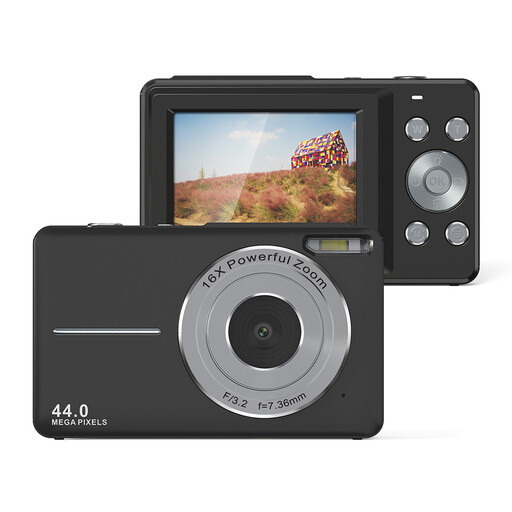
Songdian Pocket Camera 4K 64 MP, black
For recording video at a table; before a longer recording, test whether the framing and mounting suit your setup.
The product name lists 4K, 64 MP and 16x zoom. It doesn’t tell you whether the whole puzzle will fit in the frame from your recording distance.
View at Joybuy
 No image available
Insta360 Link 2C Standard Bundle, Graphite Black
For recording at a table with a computer; position the camera as planned and check the view before filming.
The product name lists 4K, PC and Mac compatibility, a 1/2" sensor, auto-framing, HDR and a microphone. Check that the view of your puzzle on the table is what you need.
View at Joybuy
Frequently asked questions
Can I use a webcam to record myself solving a puzzle, rather than just for a livestream?
Yes, provided the camera, computer and software work together: OBS Project describes webcams as video sources. Check that your specific device is recognised, and make a test recording before your actual session.
How should I prepare for a longer recording on a computer?
Choose your recording format in advance and check a finished file. OBS Project recommends MKV for many local recordings and explains how to convert it afterwards to a more compatible format; you should still check that you have enough storage and that the recording completes in full.
What are the rules on cancellations and faulty goods when buying online in Germany?
According to the Verbraucherzentrale, online purchases generally come with a 14-day right to cancel. For newly purchased faulty goods, consumers can exercise their statutory rights against the seller within two years of delivery; these rights are separate from a voluntary guarantee.
Can I publish a video in which other people are identifiable?
There’s no blanket yes or no: under § 22 KunstUrhG, consent is generally required to distribute or publicly display an image of someone; any possible exceptions and the specific content need to be considered separately. The Datenschutzkonferenz also notes that GDPR obligations may apply when personal data is recorded for purposes beyond purely personal or family activities.


