
Lieferung heute & morgen

Qualitätsgarantie

Willkommens-Angebote freischalten: KOSTENLOSE Lieferung | Bis zu 80 % RABATT | Kostenlose 30-Tage-JoyPlus-Testphase
App herunterladen
A mechanical keyboard promises a more precise typing experience, superior durability, and a high degree of customisation. However, the market is saturated with marketing buzzwords and technical specs that often confuse more than they clarify. Many buyers invest in a model that fails to meet their needs. This guide illuminates the crucial criteria for making an informed decision and avoiding common purchasing traps.
As a Joybuy Product Recommendation Officer, I analyse market data to provide you with objective and practical advice. Below, we'll break down the most common pitfalls and the key features you should look for before making a purchase.
To avoid these traps, it's essential to understand the core features of a mechanical keyboard. Three parameters are decisive in your selection.
The mechanical switches beneath each key define the typing feel and sound level. The three primary types are:
The layout is a non-negotiable criterion for most users. Always check for the correct regional specification, such as QWERTZ keyboard for Germany. Furthermore, the size of the keyboard impacts functionality and desk space:
The connection type affects latency, flexibility, and compatibility:
Based on the criteria above, we have identified some models that are well-suited for specific user groups.
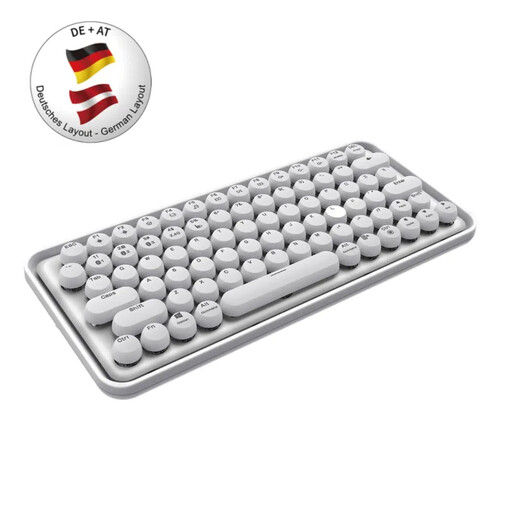
Why This Fits Their Persona: Ideal for users who switch seamlessly between a work PC, tablet, and smartphone. The stylish design and quiet keys blend well into modern home and office environments.
This model is a true multi-device keyboard with a German QWERTZ layout. The "silent" description is accurate here, as the switches are designed for a quiet typing experience and cannot be confused with loud "clicky" switches.
Intelligent switching between Bluetooth 3.0, 5.0, and 2.4 GHz for up to 3 devices. An integrated rechargeable battery eliminates the need for battery changes.

Why This Fits Their Persona: Designed for gamers who value performance, customisation, and a clean setup. The compact 75% format leaves more room for the mouse, while the volume knob allows for quick in-game adjustments.
This is a true gaming keyboard with the correct QWERTZ layout. It avoids the "gaming label" trap by offering tangible features like a gasket-mount structure for a superior typing feel and hot-swap capability, rather than relying solely on its RGB keyboard lighting.
Full-key hot-swap design allows for changing switches without soldering. The gasket structure with five layers of sound-dampening material ensures a muted and pleasant sound profile.
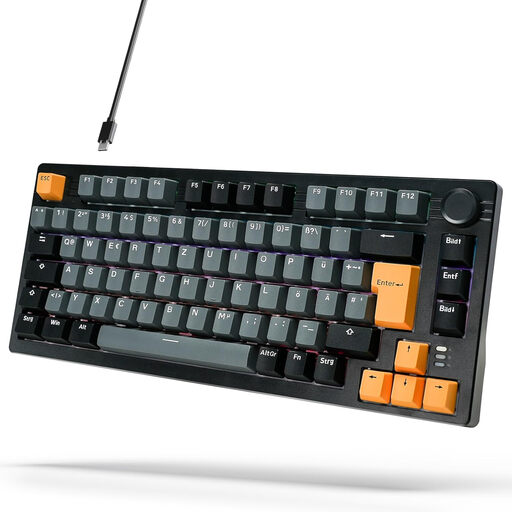
Why This Fits Their Persona: Offers an affordable entry point into the world of mechanical keyboards without compromising on key features. The compact 75% format is modern and space-saving.
This model avoids the QWERTY trap by explicitly offering a German layout. It delivers a genuine mechanical experience and advanced features like a gasket structure, which are often missing from budget imports.
Features a gasket-mount structure and an aluminium volume knob—features normally reserved for more expensive keyboards. Linear red switches provide a smooth typing experience.
We have compiled a complete, real-time updated list of products that fully meet these strict selection criteria and German regulations.
Red switches are linear and quiet, ideal for fast-paced gaming. Brown switches provide tactile feedback without a click sound and are great all-rounders. Blue switches are tactile and produce a loud click, which is appreciated by many typists but can be disruptive in quiet environments.
Yes, as long as the right switch type is chosen. A silent keyboard with linear (red) or tactile (brown) switches is an excellent choice for the office. Models with clicky (blue) switches should be avoided due to their noise level to prevent disturbing colleagues.
The QWERTZ keyboard layout is the standard in Germany and other parts of Central Europe. Its key arrangement is optimised for the German language, including the position of Z and Y, as well as dedicated keys for umlauts (?, ?, ü) and special characters (€, §, °). Using a different layout, such as the common QWERTY standard, inevitably leads to inefficiency and frustration in daily use.