
Lieferung heute & morgen

Qualitätsgarantie

Willkommens-Angebote freischalten: KOSTENLOSE Lieferung | Bis zu 80 % RABATT | Kostenlose 30-Tage-JoyPlus-Testphase
App herunterladen
A flexible mini tripod with selfie stick should perform several tasks when you are out and about: support your smartphone, hold a camera, trigger selfies from a distance and, when needed, hang from a railing or branch. In practice, however, these models can differ significantly in terms of stability, compatibility and ease of use. If you focus only on maximum height or a long list of accessories, you may easily end up with a product that quickly becomes impractical.
This buying guide from the Joybuy Product Recommendation Officer explains which technical specifications really matter and which product features suit different usage scenarios.
The word “flexible” alone says little about load-bearing capacity. Legs that are too soft may deform under the weight of a camera. If the legs are too short or smooth, attaching the tripod to a railing, branch or fence can also be unsafe. The key factors are therefore the material, leg length, joint design and a clearly stated maximum load capacity.
When attaching the tripod, the legs must be wrapped tightly around the chosen structure. Only release the recording device once the tripod is securely in place.
Not every selfie stick automatically makes a practical tabletop tripod for a phone and camera. Check whether a smartphone holder is included, whether it can be removed and which connection is used for cameras. A 1/4-inch standard thread is relevant for many compact cameras and accessories, but it does not replace a suitable action camera adapter.
The maximum load must also be suitable for the combined weight of your smartphone, holder, microphone and light. For the MonkeyPod model described here, it is up to 2 kg.
A selfie stick remote control with Bluetooth is useful for group photos, vlogs and recording without a camera operator. Before buying, however, you should check the Bluetooth version, stated range and power supply. A remote will not trigger every camera app equally reliably. Smartphones may require one-time pairing, so check device compatibility before use.
For a flexible phone tripod, legs made from TPE, or thermoplastic elastomer, are worth considering, as this material can be designed to be both flexible and shape-retaining. Aluminium components can reduce weight and provide the head with additional rigidity. Also check that the legs are long enough and that the joints do not feel too loose.
A GorillaPod tripod follows a similar basic principle: its legs can be wrapped around objects or positioned on uneven surfaces. However, the actual stability always depends on the design, surface, attachment and load.
A 360° ball head makes it easier to switch between portrait and landscape orientation, as well as to shoot from lower or higher angles. A lockable mechanism is important so that the framing does not change unintentionally after positioning.
A cold shoe is useful for vlogging. For example, microphones or LED lights can be attached there, provided their accessory connection is compatible. A smartphone tripod with cold shoe can therefore eliminate the need for several separate mounts.
A good travel tripod should not only be compact, but also suitable for your equipment. The Rollei Easy Creator MonkeyPod weighs 369 g, measures 34 cm when packed and reaches a height of 25 to 46 cm. These figures help you assess whether the model will fit in your rucksack or camera bag.
For a mini tripod for smartphones and cameras, you should also check the following:
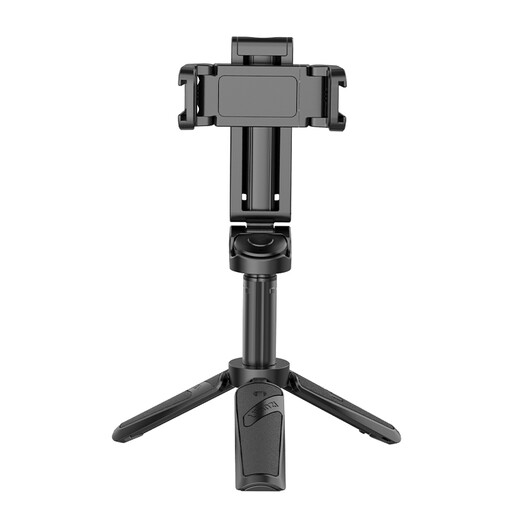
Why this product suits this profile: Its 3-in-1 design combines a phone grip, selfie stick and mini tabletop tripod. This makes it suitable for first vlogs, video calls and smartphone recording without a large amount of extra equipment.
The two cold shoes and integrated remote reduce the need for additional mounts. Nevertheless, the smartphone should still be secured firmly before use.
3-in-1 use, extendable design and Bluetooth remote for compatible smartphones.
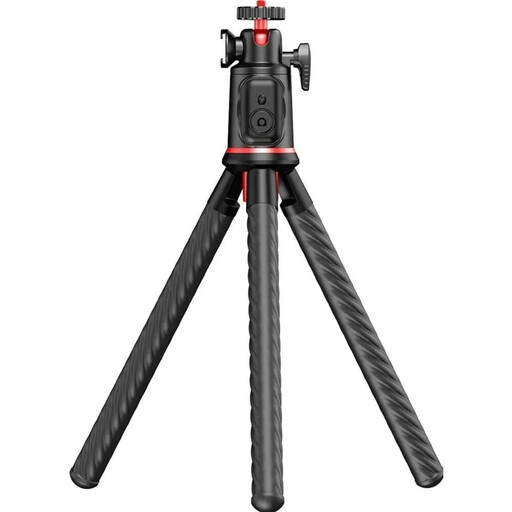
Why this product suits this profile: This model combines three flexible legs, a 360° ball head, an integrated telescopic pole and a detachable smartphone holder. Content creators can switch between tabletop tripod, mounted setup and selfie stick use.
The technical specifications state the material, packed size, height range and a load capacity of up to 2 kg. This makes it easier to check the product before buying and helps prevent incorrect use caused by overloading.
TPE legs, 1/4-inch thread, cold shoe for a microphone or light, plus Bluetooth 5.4 with a stated range of up to 10 m.
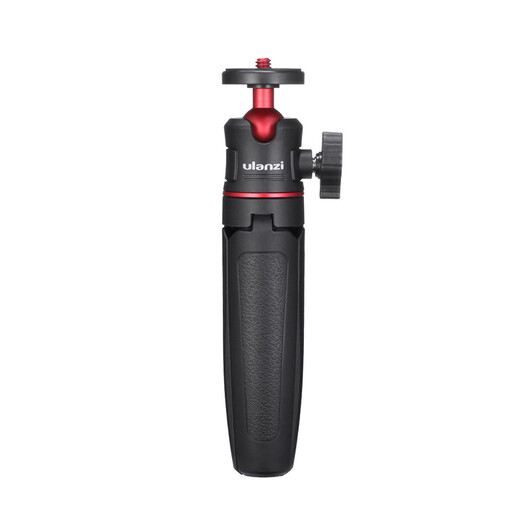
Why this product suits this profile: This compact travel tripod is designed for users of DJI Pocket, Sony ZV1, Canon G7X, Fujifilm X100V and similar devices with a 1/4-inch connection. It is designed for stable recording on level surfaces.
The usage instructions require the legs to be fully locked into place, the screw to be tightened securely and the tripod to be placed on a level, stable surface. It is expressly not intended for strong winds or moving surfaces.
Compact design, 1/4-inch screw and compatibility with several compact cameras and Pocket systems.
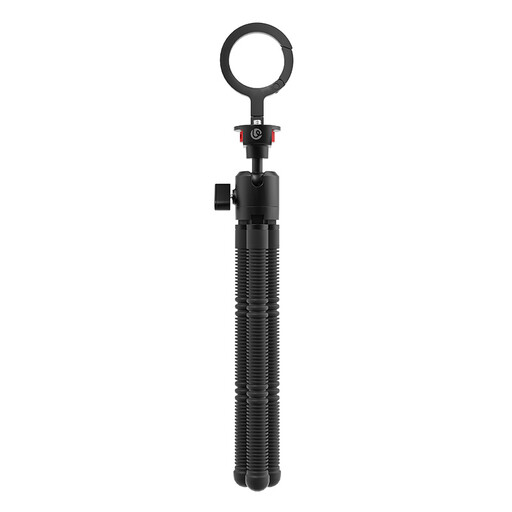
Why this product suits this profile: This flexible mini tripod uses magnetic mounting and a 1/4-inch thread. It is suitable for users who want to film flexibly with MagSafe-compatible smartphones or cameras.
The magnetic base must be fully attached before you let go. When using magnetic accessories, keep them away from sensitive cards and medical devices, and follow the manufacturer's instructions.
Flexible design, magnetic mounting and standard thread for selected accessories.
We have put together a complete, regularly updated list of products that fully meet these strict selection criteria and the safety regulations applicable in the EU.
The three legs should be wrapped tightly and as evenly as possible around a stable structure. Before letting go, check that the tripod does not slip, tip over or deform under the load. Additional securing is advisable in windy conditions, on moving surfaces or when using heavy cameras.
This depends on the thread, holder and load capacity. A 1/4-inch thread is common on many compact cameras. Smartphones usually require a separate holder. Action cameras may also need a suitable adapter. The permitted total load must not be exceeded.
It is not possible to give a general lifespan. This depends on how often it is used, the loads placed on it, exposure to UV radiation and moisture, and the strain placed on the flexible joints. Check the legs, thread, clamps and remote regularly. Loose or damaged components should be replaced before the next recording or no longer used.