If you want to use several compatible reading apps or other media as well as read novels, a tablet is the obvious place to start. If you mainly read continuous text and want to keep the device as light as possible, compare e-readers too. The key is whether your specific books and apps work offline and are compatible with the relevant copy protection. Download the titles you want before you fly, then check that you can access them without an internet connection.
Who are the different devices suitable for?
Readers with several downloaded novels
If you want to keep reading on a long flight without reliable internet, first check which shop or library your books come from and whether you can open them offline in the relevant app or on your e-reader. The Onleihe help pages explain that access requirements differ between apps and e-readers.
Readers who hold their device for long periods
If a light, easy-to-hold format matters more to you than extra features, it’s worth comparing e-readers. tolino and PocketBook list compact 6-inch models in their product specifications. The right size also depends on your preferred font size.
Readers who want other apps and media
If you want to use other reading apps or media as well as read novels, you’ll need a device that’s compatible with those apps and your titles. The Onleihe help pages say its app can be used on smartphones and tablets; check that it supports the specific books and services you need.
What should you consider when choosing?
Compact Android tablet
A good fit if: You want to read novels in several compatible apps and keep your device handy. Samsung and Lenovo list 8.7-inch models in their product specifications.
Bear in mind: A tablet gives you access to more apps, but it doesn’t have an E Ink display. Download the app and titles in advance, then test them offline.
Larger all-purpose tablet
A good fit if: You want a larger screen for other apps or media as well as novels.
Bear in mind: Apple lists the 11-inch iPad (A16) Wi-Fi model at 477 g. Consider whether it’ll be comfortable to hold during longer reading sessions.
Black-and-white e-reader
A good fit if: You mainly read continuous text and want a lightweight, dedicated reading device. tolino’s specification sheet lists the 5th-generation shine at 173 g and 6 inches.
Bear in mind: An e-reader won’t replace a tablet’s versatile app support. For Onleihe 3, direct access and e-book compatibility depend on the device model, software version and copy protection.
Kindle e-reader
A good fit if: Your novels are from the Kindle store and you’d rather use a dedicated reading device than a tablet.
Bear in mind: According to Onleihe, copy-protected Onleihe e-books can’t be read on Kindle e-readers. Download Kindle titles before your flight, as you can’t make purchases or sync in aeroplane mode.
| Buying criterion |
What to check before buying |
Who is it especially important to? |
| Offline access to books |
Check the source of the book, the app or e-reader, copy protection and that the download is complete; then open the title offline. |
If I want to read several books in a series on the flight, I don’t want to rely on an internet connection. Around 33% of consumers say offline access is their top priority. |
| Text display for long reading sessions |
Compare E Ink and tablet displays, lighting and adjustable text, using your preferred font size. |
When I’m reading a novel for a long time, it matters that I can adjust the text display and font size to suit me. Around 27% of consumers put comfortable reading first. |
| Size and weight |
Consider the weight of the specific model, plus its case if applicable; check the screen size against your preferred font size. |
If I want to hold the device at my seat for a while and then put it away, a handy size is important. Around 20% of consumers prioritise portability. |
| Other apps and media |
Check the apps you need and their offline features. An e-reader’s audio player doesn’t automatically mean it’s compatible with Onleihe e-audio titles. |
If I want to use other apps or media as well as read novels, I need the right features on the same device. Around 20% of consumers make versatility their top priority. |
Which assumptions should you avoid?
-
A book in the cloud is automatically available offline
Unless the download is complete, you won’t be able to open a title on a flight without an internet connection. Copy protection or the app you use may also restrict access.
Download the specific title before your trip and open it once in offline mode.
-
An e-reader’s audio player can also play Onleihe audiobooks
The Onleihe help pages explain that its e-audio titles can’t be used on e-readers, even if the device can play audio in general.
If you want to listen to Onleihe audiobooks, plan to use the Onleihe app on a compatible tablet or smartphone and download the titles in advance.
-
Manufacturers’ battery-life figures can be compared directly
Figures given in weeks and hours aren’t necessarily based on the same usage conditions, so they don’t directly compare reading time on board.
Use manufacturers’ figures as a guide, then test your charged device with your own reading settings.
Which brands are worth considering?
Samsung
Samsung offers compact Android tablets for reading with compatible apps and enjoying other entertainment.
- Samsung lists an 8.7-inch display for the Galaxy Tab A11.
- The 64 GB and 128 GB specifications each apply to a particular model. Check which storage capacity and apps you need.
Lenovo
The Tab One is a compact Android tablet alternative for readers who want to use tablet apps as well as read text.
- Lenovo lists an 8.7-inch IPS display, 4 GB RAM and 64 GB storage for one configuration.
- These specifications apply to the configuration shown; this device isn’t an E Ink e-reader.
Apple
The 11-inch iPad (A16) is a larger all-purpose option for readers who want to use other iPad apps as well as read novels.
- Apple lists 128 GB as the starting storage capacity and a weight of 477 g for the Wi-Fi model.
- Weigh up the larger screen against the device’s weight, and check that your reading apps and titles will work.
tolino
The 5th-generation shine is a compact black-and-white e-reader for mainly reading continuous text.
- tolino’s specification sheet lists a 6-inch display, a weight of 173 g, adjustable lighting and 16 GB storage.
- For direct Onleihe 3 access on the 5th-generation shine, the Onleihe help pages specify software version 5.15.253009 or later. E-audio titles can’t be used on e-readers.
PocketBook
The Verse Pro Azure is a 6-inch E Ink reader with documented file formats and an Onleihe feature.
- PocketBook lists 16 GB storage, a weight of 186 g and an audio player.
- For direct Onleihe 3 access, the Onleihe help pages specify software version 6.3 or later. An audio player doesn’t mean Onleihe audiobooks are supported.
Tablets for reading while travelling
This product selection includes Android tablets and iPads for readers who want to combine novels with other tablet features.
 No image available
ALLDOCUBE iPlay 70 mini Ultra, 8.8 inches, 12 GB + 256 GB
This compact tablet is worth considering if you want to store novels locally and use other Android apps.
8.8-inch display; 256 GB storage; Android 14; power adapter not included. The product description recommends using a compatible PD power adapter for charging.
Joybuy
 No image available
Samsung Galaxy Tab A11+ X230, 11 inches, Wi-Fi, 6 GB RAM, 128 GB
A larger Android tablet option if you want to use other apps as well as read.
11-inch display; 128 GB storage; Wi-Fi.
Joybuy
 No image available
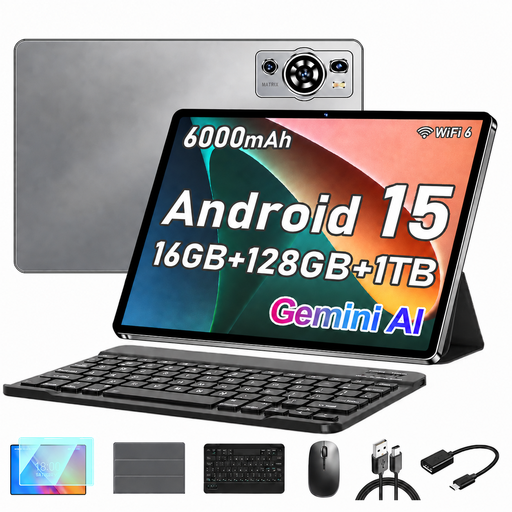
UXD A5, 10.1 inches, Android 15, 16 GB RAM, 128 GB
This tablet could suit you if you want to read novels and use other Android apps on a larger screen.
10.1-inch HD IPS display; 128 GB storage; listed in the title as 16 GB RAM (8 GB + 8 GB). The product description mentions a keyboard and protective case.
Joybuy
 No image available
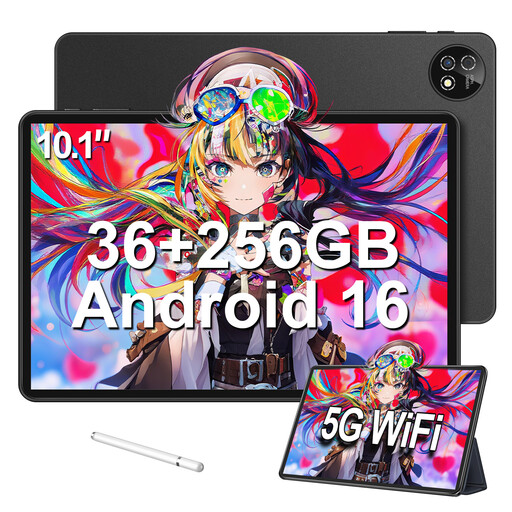
10.1-inch touchscreen tablet, Android 16, 36 GB RAM, 256 GB
A tablet option for readers who want to use a keyboard and other accessories as well as read.
10.1-inch display; 256 GB storage; listed in the title as 36 GB RAM (6 GB + 30 GB). The title lists a keyboard, mouse and protective case.
Joybuy
 No image available
Apple 11-inch iPad Air (M4, 2026), Wi-Fi, 128 GB
This iPad is for readers who want to use other iPad apps as well as read novels.
11 inches; 128 GB storage; Wi-Fi; Starlight.
Joybuy
Frequently asked questions
What should I set up before my flight?
Install the app you need, download each title you want to read and open it once without an internet connection. The Kindle help pages point out that you can’t make purchases, sync or download in aeroplane mode.
Can I use an Onleihe novel and an Onleihe audiobook on the same e-reader?
Not necessarily. For direct Onleihe 3 access, the Onleihe help pages specify version 5.15.253009 or later for certain tolino devices and version 6.3 or later for PocketBook models. The device and copy protection can also make a difference. According to the Onleihe help pages, Onleihe e-audio titles don’t work on e-readers. On a compatible tablet, you can listen offline through the Onleihe app after downloading the titles.
Can I use a tablet or e-reader on a plane, and where should I keep it?
Follow the crew’s instructions and your airline’s rules for using devices on board. EASA recommends carrying portable electronic devices in your hand luggage rather than your checked baggage. Check your airline’s current rules for spare batteries and power banks too.
What rights apply when buying a device online in Germany?
For a distance purchase from a business seller, you generally have a 14-day cancellation period from the day you receive the goods; exceptions and conditions apply. Your Europe states that goods purchased from a seller come with a minimum two-year legal guarantee. This is different from a voluntary manufacturer’s warranty.


