Choose a throttle quadrant based first on the virtual aircraft you fly and the controls you already have. For Airbus-style flying on PC, the right detents and reverse-thrust controls matter; if you switch between aircraft types, look for levers you can assign freely. If you still need a joystick or yoke, compare a set with the extra space it requires, and check the platform, simulator assignments and mounting options for your setup.
Who are the different options for?
Practising Airbus approaches
If you mainly want to control thrust settings and reverse thrust during Airbus-style virtual approaches on PC, look for suitable detents and check the assignments for the aircraft you’re flying. Thrustmaster lists these features for the TCA Quadrant Airbus Edition; cockpit styling alone doesn’t tell you whether the controls will suit your setup.
Flying different aircraft types
If you fly a range of virtual aircraft, compare the lever layout and the space required for a configurable quadrant. Logitech G and Honeycomb Aeronautical describe models with multiple levers for different functions.
Setting up a gaming-room cockpit
Consider whether you already have your main flight controls or whether a set with a joystick or yoke would suit you better. Mounting, clearance and platform compatibility are all important checks; Thrustmaster and Turtle Beach offer both standalone devices and combined setups.
What should you look for when choosing?
The key is to consider which controls you’ll actually use when landing, and whether the rest of your controls are already compatible with your simulator and platform. The percentages refer to consumers shopping for this type of product, with each person’s top priority counted.
| Priority |
What to check before buying |
Who is this important to? |
| Aircraft-specific thrust settings |
Check which thrust axes and detents you need, and how to assign reverse thrust in your simulator. The detents on the TCA Quadrant Airbus Edition can be disabled. |
When I practise Airbus-style approaches, I want to operate the throttles in a way that suits the aircraft I’m flying. Around 36% of consumers rank these aircraft-specific controls as their top buying priority. |
| Flexible lever assignments |
Compare the number of levers with the axis assignments you need for your aircraft. Logitech G lists three levers, while Honeycomb’s Bravo has six. |
When I switch between aircraft types, I want to assign thrust and other functions to suit each one. Around 29% of consumers put this flexibility first. |
| Mounting and clearance |
Measure the space available, desk edge, clamps and cables, and allow for the full range of lever movement. Honeycomb lists the Bravo’s dimensions as 273 × 382 × 198 mm, excluding the mounting plate and metal clamp. |
For a permanent cockpit setup, it matters whether the device will be within reach and can be mounted with enough clearance. Around 21% of consumers prioritise mounting and space requirements. |
| Existing controls and platform |
Check whether you already have a joystick or yoke, and confirm the compatibility requirements for the exact model. |
If I still need my primary flight controls or I’m tied to a particular platform, the whole setup needs to work together. Around 14% of consumers put this first. |
Which buying mistakes can you avoid?
-
Confusing an Airbus add-on with a complete throttle quadrant
The TCA Quadrant Add-On Airbus Edition adds to a TCA Quadrant Airbus Edition; it doesn’t replace it.
Check the exact model name and what’s included before choosing an add-on for extra flap or landing-gear controls.
-
Assuming an Xbox mention means it works on its own with a console
Honeycomb says you also need the Alpha XPC and Xbox Hub to use the Bravo with Xbox. For its standalone Dual Throttle, Turtle Beach requires a compatible VelocityOne Flightstick II.
Check the complete connection setup for the specific model rather than relying on the platform logo alone.
-
Allowing for the device alone, not the assembled cockpit
Honeycomb notes that the Bravo’s dimensions don’t include the mounting plate and metal clamp.
Measure the available space with the clamp and cables in place, and allow for the full range of lever movement before deciding how to mount it.
Depending on your desk, you may need a different mounting option or to rearrange your setup.
-
Assuming older programming software will still be available
Logitech Support announced that LGS installation files and support documents would be removed from its official website on 31 October 2026. An older support page still lists a software version, but that doesn’t tell you whether it will install on your particular system.
Before buying, check which functions your simulator can assign directly and whether you’ll need supported software for additional programming.
Which manufacturers are worth considering?
Thrustmaster
The range covers everything from a standalone Airbus-style quadrant to sets with a joystick or yoke.
- Thrustmaster says the TCA Quadrant Airbus Edition has two levers, detents that can be disabled and a reverse-thrust mechanism.
- The add-on for extra flap and landing-gear levers is sold separately; the standalone quadrant doesn’t include a joystick.
Logitech G
The Flight Sim Throttle Quadrant is a separately mounted add-on with multiple levers for a PC flight-simulator setup.
- Logitech G says the lever knobs are removable, and the quadrant can be mounted on a desk or secured with a clamp.
- Logitech Support announced that LGS downloads would be removed on 31 October 2026. Check what programming your particular setup requires.
Honeycomb Aeronautical
The Bravo Throttle Quadrant is designed for a larger setup, with configurable controls for different GA and airliner aircraft.
- Honeycomb lists six levers, GA and airliner grips, and an integrated autopilot control panel.
- The listed dimensions exclude the mounting plate and clamp. For Xbox use, Honeycomb also requires the Alpha XPC and Xbox Hub.
Turtle Beach
The range includes a yoke-and-quadrant set and a standalone dual throttle.
- Turtle Beach says the VelocityOne Flight combines a yoke with a modular quadrant; the Dual Throttle’s two levers can be linked and its detents swapped.
- For Xbox use of the standalone Dual Throttle, Turtle Beach requires a compatible VelocityOne Flightstick II.
VIRPIL Controls
The VPC VMAX Prime Throttle is a configurable option for a permanent PC setup.
- VIRPIL lists adjustable lever tension and interchangeable or adjustable detent plates.
- For simple civilian landing practice, its extensive range of inputs may be more than you need; there’s no evidence that it offers greater landing precision than other devices.
Joybuy flight control products
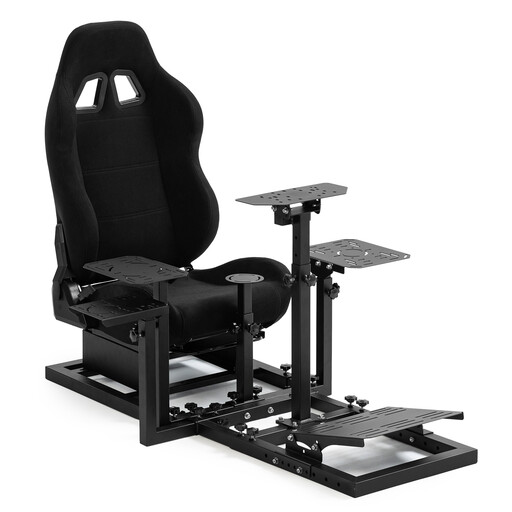
This selection includes flight controls with an integrated throttle lever, as well as a seat described as a racing simulator cockpit. For each model, check whether it complements your existing controls or is designed to replace them.
 No image available
Dardoo Flight Racing Simulator Cockpit with racing seat
The title describes this item as a cockpit with a racing seat, not a flight throttle; it explicitly says that a joystick isn’t included.
View at Joybuy
 No image available
Thrustmaster TCA SKY YOKE Flight Yoke, PS5 and PC
If you want to use a yoke and throttle controls together, the product description lists an integrated throttle lever, as well as trim and rudder controls.
The title lists 7 axes, 24 action buttons and up to 180 degrees of rotation; the stated platforms are PS5 and PC.
The product description mentions a dual-control function for connecting a second TCA SKY YOKE.
View at Joybuy
 No image available
Thrustmaster TCA SKY YOKE Flight Yoke, PC and Xbox Series X
If you want to combine a yoke and throttle controls in one device, the product description lists an integrated throttle lever, as well as trim and rudder controls.
The title lists 7 axes, 24 action buttons and up to 180 degrees of rotation; the stated platforms are PC and Xbox Series X.
The product description lists a clamp for attaching the device to a desk or suitable surface.
View at Joybuy
 No image available
Thrustmaster T.Flight Hotas One
If you still need a joystick, this HOTAS system combines one with a detachable throttle, according to the product description.
The description lists compatibility with PC and Xbox Series X|S, as well as adjustable joystick resistance.
View at Joybuy
Frequently asked questions about throttle quadrants
Can I buy a throttle quadrant without a joystick?
Yes, if you already have your other flight controls or plan to buy them separately. The TCA Quadrant Airbus Edition and Logitech G Flight Sim Throttle Quadrant are standalone devices; according to Thrustmaster, the T.Flight Hotas One combines a joystick with a detachable throttle.
How do I set up the levers for flaps, thrust and reverse thrust?
Assign the available axes and buttons to the functions of the virtual aircraft you’re flying. Logitech G lists freely assignable levers; on the TCA Quadrant Airbus Edition, you can mechanically disable the detents and reverse-thrust mechanism to use a linear axis mode. This doesn’t automatically guarantee the right assignments in your simulator.
How much space should I allow for mounting?
As well as the device itself, allow room for lever movement, cables and a possible clamp. Logitech G lists desk and clamp mounting options; Honeycomb gives the Bravo’s dimensions as 273 × 382 × 198 mm, excluding the mounting plate and metal clamp.
Is a manufacturer’s warranty the same as your statutory rights?
No. For consumer purchases in Germany, the seller is generally responsible for statutory rights when goods are faulty; a manufacturer’s warranty is an additional voluntary benefit. The Verbraucherzentrale says that, for sales contracts from 31 July 2026, choosing a repair when a fault occurs extends the statutory limitation period once by twelve months. This doesn’t give you a blanket right to a repair from the manufacturer of every throttle quadrant.


