Key brands to consider
The features listed relate to the relevant product ranges and manufacturer information; they are not a general ranking of the brands.
Logitech G
The Flight Throttle Quadrant is a separate add-on for an existing flight control setup.
- Logitech G lists three assignable levers and adjustable mounting clamps.
- The levers complement your other flight controls; this model alone is not a joystick, yoke or dedicated rudder control.
Thrustmaster
The T.Flight HOTAS and TCA Quadrant product ranges cater to different control setups.
- Thrustmaster says the T.Flight Hotas One’s throttle can be detached; rudder control is provided by twisting the joystick or using the rocker. The detents on the TCA Quadrant Airbus Edition can be switched off.
- The TCA Quadrant Airbus Edition is not a complete control set; the HOTAS rudder controls are operated by hand, not with foot pedals.
Honeycomb Aeronautical
According to the manufacturer, the Bravo Throttle Quadrant can be configured for different types of aircraft.
- Honeycomb Aeronautical lists included levers for general aviation and airliners, as well as PC compatibility.
- The stated footprint is 273 × 382 mm without the mounting hardware; a dedicated rudder control is not listed as part of the product.
Turtle Beach
The VelocityOne Flight combines a yoke and throttle quadrant in a larger control system.
- Turtle Beach lists a modular quadrant, hand-operated rudder controls and POV or HAT switches for views.
- The system replaces more of your existing hardware than a standalone throttle quadrant; foot pedals are a separate option.
Joybuy products for this setup
This selection includes a HOTAS, a yoke with integrated flight functions and a racing simulator cockpit. According to its product name, the cockpit does not include a joystick or pedals, so it won’t replace a throttle quadrant.
 No image available
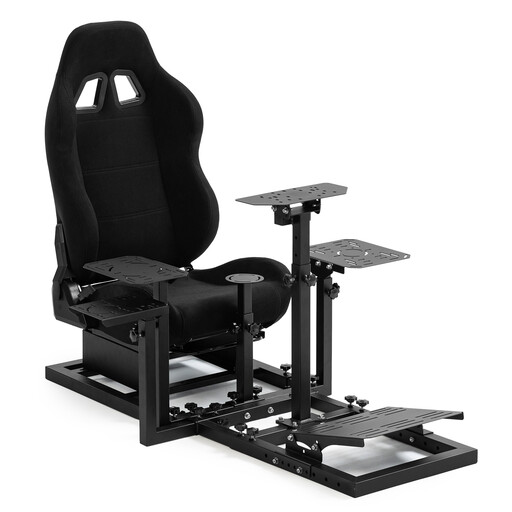
Dardoo Flight Racing Simulator Cockpit with Racing Seat
This cockpit is not a standalone throttle quadrant and is only worth considering if you’re also looking for a cockpit with a seat.
The product name explicitly states that a joystick and pedals are not included.
View at Joybuy
 No image available
Thrustmaster TCA SKY YOKE Flight Yoke
The yoke, with an integrated throttle lever and rudder controls, is an option if you’re looking for several flight functions in one setup.
The product name lists 7 axes, 24 action buttons and 180° rotation, as well as PC and Xbox Series X compatibility.
View at Joybuy
 No image available
Thrustmaster T.Flight Hotas One
This HOTAS combines a joystick and throttle lever, making it a good starting point if you’re looking for both in one setup.
Thrustmaster describes rudder control via joystick twist or rocker; the throttle lever can be detached. Rudder control is operated by hand, not with foot pedals.
View at Joybuy
Frequently asked questions
Is a standalone throttle quadrant enough for practising virtual crosswind landings?
Only if you already have aileron control and usable rudder input elsewhere. The Microsoft Flight Simulator team treats the throttle quadrant, joystick or yoke, and rudder as separate control functions, so check your specific bindings in the simulator too.
How do you set up your controls with just one monitor?
Start by assigning the throttle and the flight controls you already have, then check which views you’ll need during the approach. If you want to switch views using your hardware, look for assignable POV or HAT switches; Turtle Beach lists these switches for the VelocityOne Flight. The exact bindings depend on your simulator.
Can you switch off the detents on the TCA Quadrant Airbus Edition?
Yes. Thrustmaster’s instruction manual describes mechanical switches that let you disable the detents for smooth axes. Check the manufacturer’s instructions for the setup and drivers that suit your PC system.
Who should you contact if something develops a fault, and how long do you have to cancel an online purchase?
The seller is generally responsible for statutory rights relating to faulty goods; a voluntary warranty is separate, as the Verbraucherzentrale explains. Under § 438 BGB, the limitation period for claims relating to defects is generally two years from delivery. For a distance contract with a consumer, there is generally a 14-day right to cancel; under §§ 312g and 355 BGB, exceptions and the applicable start date for the period must be taken into account.


