What to look for when buying
Graphics tablet without a display
A good fit if: You want to draw on your existing monitor and put the input device away afterwards.
Bear in mind: You look at a different screen from the tablet surface while drawing. Your computer, software and drivers all need to suit your workflow.
Connected pen display
A good fit if: You want to draw walls and notes directly on the plan you can see.
Bear in mind: Your computer, video signal, cables and power supply all need to be compatible. The display and its positioning also take up desk space.
Standalone tablet with a pen
A good fit if: You want to sketch floor plan ideas without a connected computer or take your device between workspaces.
Bear in mind: A mobile sketching app won’t necessarily replace your desktop CAD workflow. Check the app, pen and file formats.
When sketching floor plans at a standing desk, pen input is only one part of the picture. Software, file transfer, desk space and connections can all influence your choice.
| What you need |
What to look for |
Who it matters most to |
| Measurements and file sharing |
Choose your planning software, required measurements and file formats; check that the app, operating system and export options suit your workflow. |
If I want to edit or share a design with precise measurements later, I check the software and file format first. Around 26% of consumers put planning and file requirements first. |
| Drawing directly beneath the pen |
Check whether you want to draw on the device’s screen and whether there’s room for your plan and toolbars on the chosen surface. |
I want to see lines directly beneath the pen tip and assess the plan on the same surface. Around 26% of consumers prioritise this direct drawing experience. |
| Desk space and positioning |
Measure the available space and allow for the device, stand, cables and room to move your arm. |
If I want to keep my keyboard and other work equipment on the standing desk, there also needs to be enough room for the device and movement. Around 21% of consumers prioritise desk space. |
| Connections and power supply |
Compare the instructions for the exact model with your computer’s video signal, data transfer and power supply requirements. |
I want to know before buying whether I can connect the device to my existing computer and power it. Around 16% of consumers prioritise compatibility. |
| Sketching without a computer |
Check the specific tablet’s compatible pen, what’s included and the app you need, along with its file-sharing options. |
If I want to capture ideas without a connected computer, the tablet, pen and file transfer options need to work together. For around 11% of consumers, sketching without a computer is the main priority. |
Joybuy products
This selection includes an LCD drawing tablet for simple freehand sketches and standalone Android tablets with pens. For plans with precise measurements, check the software and export features separately.
 No image available
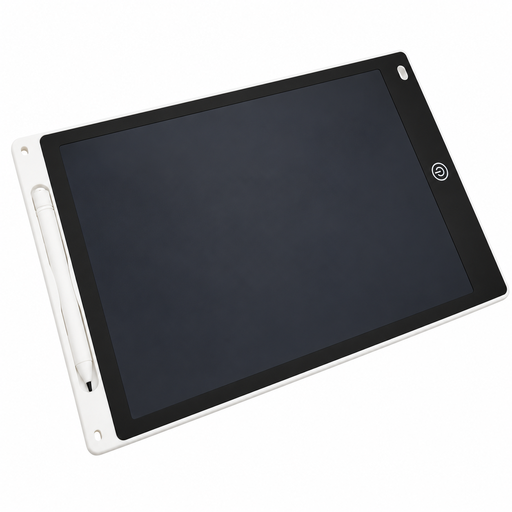
LCD drawing tablet, 12 inches, with stylus and erase function
A simple drawing surface for freehand sketches. Check whether your planning workflow includes the storage and export features you need.
12 inches; stylus; erase function.
View at Joybuy
 No image available
TECLAST ArtPad Pro 2025, 13.4 inches, 2K, T-Pen
A standalone Android tablet with a pen for sketching on the go. Check whether your planning app supports the measurements and file formats you need.
Android 15; 13.4-inch 2K display; T-Pen with 4,096 pressure levels; 256 GB storage.
View at Joybuy
 No image available
TECLAST ArtPad Pro, 12.7 inches, 2K, 2025 Edition
A standalone tablet with a pen for sketching without a connected computer. Check that your planning app is compatible and supports the file transfer you need.
Android 15; 12.7-inch 2K display; T-Pen with 4,096 pressure levels; 256 GB storage. The product title also lists a stylus pen, protective case and English Bluetooth keyboard.
View at Joybuy
Frequently asked questions
Can a drawing tablet automatically turn a hand-drawn sketch into a floor plan with accurate measurements?
No. Pen input alone doesn’t determine measurements. Check your software’s features and the file formats it supports. SketchUp Help describes DWG and DXF import and export for eligible subscriptions.
What should I check before connecting a Huion Kamvas 13 (Gen 3)?
Check that the connection method suits your computer. Huion describes an included 3-in-1 cable for HDMI connections, as well as a USB-C option that requires compatible video signal support and cables and may need an additional power supply.
What should I consider when setting up and using a device at a standing desk?
As well as the device, allow space for the stand, cables and arm movement. Huion lists the ST300 as a compatible stand for the Kamvas 13 (Gen 3), sold separately. The Federal Institute for Occupational Safety and Health recommends properly adjusted equipment and changing posture when working at a screen.
Who should I contact if a product develops a fault after purchase in Germany?
For consumer purchases, statutory rights relating to defects generally need to be exercised against the seller. The Consumer Advice Centre explains the two-year statutory warranty and how it differs from a voluntary guarantee. The specific claim depends on the purchase and the fault.
Which German regulation applies to the sale of this kind of electrical equipment?
Section 6 of the German Electrical and Electronic Equipment Act (ElektroG) requires manufacturers or their authorised representatives to register before placing products on the market. If a product has not been properly registered, the provision prohibits, among other things, distributors from offering it for sale and online marketplaces from allowing such an offer. This is not a personal registration requirement for buyers, nor does it confirm that an individual listing complies with the law. Source: Laws on the Internet, the Federal Ministry of Justice and the Federal Office of Justice.


