Teachers with a fixed table setup
You want to show your hands, the table and your arrangement taking shape from a repeatable position. The camera angle and mounting method need to suit your work surface.


Choose a camera based on where you can position it above the table and the framing you need for both an overall view and individual steps. A camera with interchangeable lenses gives you more flexibility when choosing a lens, while compact and gimbal cameras can make your setup simpler. A webcam is best suited to computer-based lessons. Before you start recording, also check the focus distance, lighting, sound, storage and power supply for the planned duration.
You want to show your hands, the table and your arrangement taking shape from a repeatable position. The camera angle and mounting method need to suit your work surface.
You also show tying points or individual flowers. Check that you can get the close-up you want from your planned working distance; the stated focus range alone won’t tell you how large the subject will appear in the frame.
You explain each step during a longer recording or on a computer, so you’ll also need to plan for sound, storage, power and, if relevant, the software you’ll use for live lessons.
A good fit if: You want to switch between an overall table view and close-ups without moving the camera, and can choose a lens to suit your mount and working distance.
The trade-off: The camera body alone won’t guarantee the right framing or close-ups; you’ll need to plan for both the lens and the mount.
A good fit if: You want to film without changing lenses and adjust the framing using built-in zoom. The Canon PowerShot V1 is an example of this type of camera.
The trade-off: You can’t replace the built-in lens later, so test the close-up framing with your own setup.
A good fit if: You want to capture moving cutaways as well as table shots, and prefer a compact device.
The trade-off: The DJI Osmo Pocket 3 has a fixed 20 mm full-frame equivalent field of view and a focus range from 0.2 m; neither spec replaces testing it on your own table.
A good fit if: Standalone video recording, optical zoom and an external microphone input matter more to you than 4K. The Panasonic HC-V900 is a Full HD example.
The trade-off: A wide zoom range doesn’t guarantee the close-up framing you need at short distances.
A good fit if: You already teach live from a computer and can mount a webcam above your work area.
The trade-off: Your setup will also need a computer, software and a suitable mount. A presentation mode doesn’t prove that your whole work surface will fit in frame from the camera’s position.
| What you need | What to check before buying | Who is this important to? |
|---|---|---|
| Show the table and your hands | Measure your work surface and test the framing from the height where you can actually mount the camera. Assess the specific lens or field of view, not just the camera name. | If I want to show the table and my hands in one fixed shot, the framing needs to suit the table size and camera height. Around 28% of consumers prioritise a full view of the table. |
| Make tying points and flowers easy to see | Test the focus and subject size from the camera position you plan to use; with interchangeable-lens cameras, check the specific lens. DJI lists a focus range from 0.2 m for the Osmo Pocket 3, but doesn’t guarantee the magnification you’ll get on your tying points. | I want to show small movements and flower details without losing the work area from the frame. Around 22% of consumers prioritise close-up views. |
| Make speech and colours easy to assess | Record a speech test from where you’ll be working, then make a test clip under the lighting you plan to use. Check the white balance and look for any flicker or banding. | If I want my explanations to be clear and the flower colours to look true to life, I’ll test the sound and lighting before recording the full lesson. Around 22% of consumers prioritise speech and colour reproduction. |
| Record a full lesson in one go | Make sure the recording mode, memory card and power supply will support the planned duration, and do a trial run. Panasonic says the HC-V900 can be charged using a power bank while switched off. | I want to record the planned part of the lesson without unexpected interruptions, so I need to check storage and power together. Around 17% of consumers prioritise uninterrupted recording. |
| Teach live from a computer | Decide whether you want to record video files independently or teach live through your computer. Then test the camera position and sound in the application you’ll use. | If I want to teach directly from my computer, compatible software and a secure position above the table are essential. Around 11% of consumers prefer this computer-based live setup. |
A wide field of view can capture your work surface, but small tying points may not stand out in the same shot. With interchangeable-lens cameras, the result also depends on the lens you actually use.
Before buying, work out your table size, possible camera height and the close-up you need, then test that exact combination.
Depending on your setup, you may also need a suitable lens or a different mount.
A gimbal stabilises the camera, but it won’t confirm that you can position it safely and effectively above your table. A webcam in presentation mode also needs a suitable mount.
Plan the mount separately from the stabilisation, and check that your hands and tools have plenty of room while you work.
Panasonic says the HC-V900 can be charged using a portable battery while switched off. Your storage media must also be suitable for the recording mode you choose.
Check whether the specific model can operate while recording, then test storage and power for the length of lesson you have planned.
This selection from Canon includes both interchangeable-lens cameras and a compact camera with built-in zoom.
The Sony ZV-E10 II is an E-mount camera for teachers who want to tailor the framing by choosing a lens.
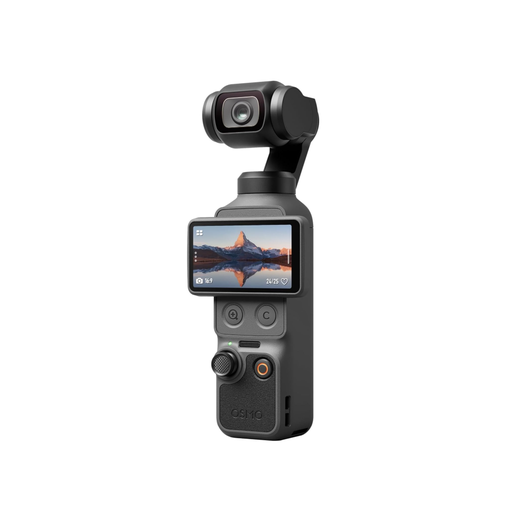
The Osmo Pocket 3 combines a compact camera body with a built-in gimbal, making it handy for moving cutaways, for example.
The HC-V900 is a camcorder with Full HD recording, optical zoom and an input for an external microphone.
The MX Brio is a USB webcam option for teaching from a computer.
This selection of Joybuy products includes webcams for computer-based lessons, as well as compact video and gimbal cameras. Check the framing and mounting options with your own table.
 No image available
A webcam for computer-based lessons; check that you can position it securely above your work surface.
 No image available
A compact gimbal camera for table shots and changing the framing; check that its field of view suits your camera position.
The product name lists 4K/240 fps, 3-axis stabilisation, 2× lossless zoom, 107 GB of built-in storage and a rotating 2-inch screen.
 No image available
To capture each step clearly, test the focus and subject size from the distance you plan to use.
The product name lists 4K video, autofocus and 18× zoom.
 No image available
A small gimbal camera for table-based lessons; whether the framing and level of detail work for you depends on the exact camera position.
The product name lists 4K/120 fps video, 3-axis stabilisation, fast focus and a rotating 2-inch touchscreen. DJI lists a 20 mm full-frame equivalent field of view and a focus range from 0.2 m for the Osmo Pocket 3.
 No image available
A webcam for computer-based lessons; test the framing and sound in the application you plan to use.
The product name lists 4K, HDR, auto-framing and a microphone with AI noise cancellation.
No. First check the framing and level of detail you can get from the camera position available to you. Different models have different lenses and fields of view; resolution alone won’t tell you whether the table, your hands and individual steps will be clear.
Record a short clip with real hand movements and a spoken explanation. Check the focus, visible work area, white balance and any flicker under your planned lighting. Also test that the storage and power supply will support your chosen recording mode.
A warranty is an optional extra with its own terms and conditions; your statutory rights are against the seller. The Verbraucherzentrale recommends treating them separately and checking the seller and warranty terms independently for the specific offer.
Not just because you made the recording yourself. If personal data is being processed, you need an appropriate legal basis under the General Data Protection Regulation; valid consent is one option. Check the rights for the specific recording and publication.
No, not as a general rule. Music may be protected by copyright, so before publishing, check that your specific use is covered by rights you hold or suitable permission. The EUIPO explains that copyright covers works including music and films.