
Lieferung heute & morgen

Qualitätsgarantie

Willkommens-Angebote freischalten: KOSTENLOSE Lieferung | Bis zu 80 % RABATT | Kostenlose 30-Tage-JoyPlus-Testphase
App herunterladen
For anyone who regularly works on the go—whether on business trips, during their commute, or from a mobile office—typing long texts on a tablet or smartphone touchscreen is a major efficiency bottleneck. A foldable Bluetooth keyboard set promises a solution: a full-featured, pocket-sized workspace. But the market is flooded with models whose real-world usability often falls short of their marketing promises.
Before making a purchase, it's crucial to understand the most common pitfalls that can lead to frustration and a useless product. This guide will show you what to look for to make an informed decision.
The temptation to opt for a cheap and compact solution is strong. However, the weaknesses of such models often only become apparent with daily use. Pay close attention to these three points:
To avoid the problems mentioned above, you should check three core technical features before buying. These define the real-world usability of a wireless keyboard and mouse set for mobile use.
The foundation for reliable performance is the wireless technology used. Look for models that support at least the Bluetooth 5.0 standard or higher. These versions offer a more stable connection, greater range, and lower energy consumption compared to older standards.
A key advantage is multi-device capability. Keyboards that can pair with multiple devices (e.g., three) simultaneously allow you to switch between your laptop, your Bluetooth keyboard for tablet, and your smartphone at the touch of a button. This is a significant efficiency gain for anyone working across multiple screens.
For users in English-speaking regions, a standard portable QWERTY keyboard layout is essential to avoid typos and frustration. Carefully check product images and descriptions for this specification.
Furthermore, the key arrangement is crucial. Weigh what is more important for your workflow:
The key travel—the distance a key moves when pressed—significantly affects the typing feel. A travel of around 1.5 mm is considered comfortable by many and is similar to that of laptops.
A foldable keyboard should be not only small but also sturdy and lightweight. Pay attention to the weight and dimensions when folded. A high-quality hinge is crucial for longevity.
Additional accessories can significantly increase its value. An included carrying case protects the keyboard during transport. An integrated or separate stand for your tablet and smartphone ensures an ergonomic viewing angle and a stable setup for your device.
Based on the criteria above, we have identified several models that are a suitable solution for specific user groups.
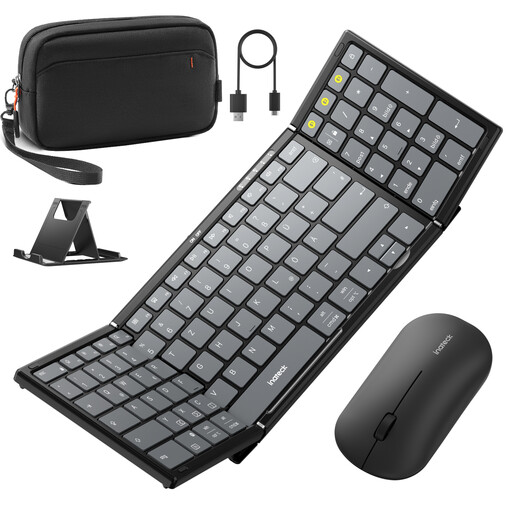
Why This Fits Their Persona: This set is aimed at business travellers and digital nomads who refuse to compromise on productivity while on the move. It provides a complete workstation for demanding tasks.
The full 99-key layout with a dedicated numpad bypasses the pitfall of an impractical, reduced layout. Bluetooth 5.3 ensures a stable, lag-free connection.
PC-like layout for maximum efficiency. The set includes a separate mouse, an adjustable stand, and a carrying case for an all-in-one solution.
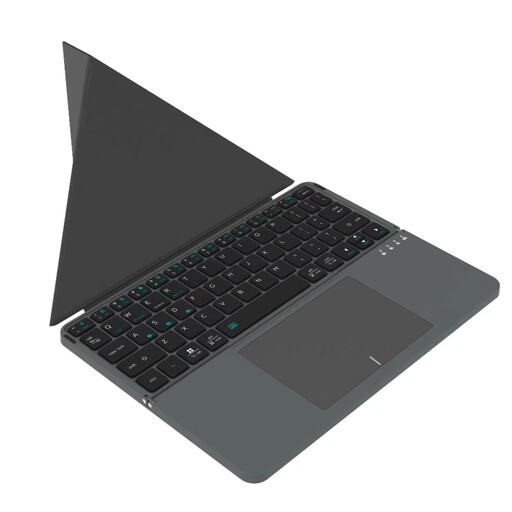
Why This Fits Their Persona: Ideal for students and commuters who value packing light. This keyboard is extremely compact and combines typing and navigation functions in one device.
The integrated touchpad eliminates the need for a separate mouse, reducing luggage. Its broad compatibility with iOS, Android, and Windows ensures flexible use.
Ultra-compact folded size (157.5 x 98 x 15.8 mm) and low weight. The integrated touchpad makes an external mouse redundant, maximizing portability.
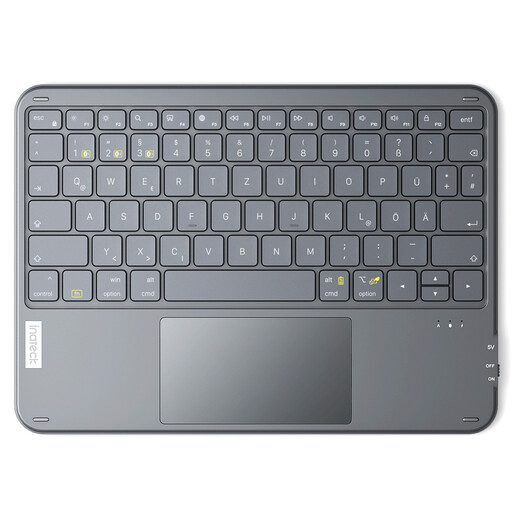
Why This Fits Their Persona: Perfect for users who use their tablet as their primary work device. This keyboard isn't foldable, but it's extremely thin and light, making it an excellent addition to any tablet bag.
It addresses the compatibility problem with full support for Windows and iPadOS. Non-slip feet provide a stable typing experience, which is lacking in many lightweight keyboards.
Extremely portable at just 5 mm thick and 228 g. The large, precise touchpad and dedicated shortcut keys are optimized for navigating tablet operating systems.
We have compiled a complete, up-to-date list of products that fully meet these strict selection criteria and relevant safety regulations.
Check the product specifications for the list of supported operating systems (e.g., iOS, iPadOS, Android, Windows). Manufacturers of multi-device keyboards usually list compatibility explicitly. Also, ensure that your tablet's Bluetooth version is compatible with the keyboard's.
Battery life varies greatly depending on the model and usage. Look for information on battery capacity (in mAh) and the estimated usage or standby time. Models with an automatic power-saving feature (auto-sleep) generally offer longer battery life. For example, Inateck states a standby time of up to 150 days for the KB01105 model.
This depends on your personal workflow. An integrated touchpad offers maximum portability and is convenient for on-the-go use. A separate mouse allows for a more ergonomic posture and higher precision, similar to a desktop setup. For longer work sessions or tasks requiring fine control, a set with a separate mouse is often the more comfortable solution.