
Lieferung heute & morgen

Qualitätsgarantie

Willkommens-Angebote freischalten: KOSTENLOSE Lieferung | Bis zu 80 % RABATT | Kostenlose 30-Tage-JoyPlus-Testphase
App herunterladen
For many who regularly commute, study, or travel, a tablet or smartphone has become their primary work device. However, typing long texts on a touchscreen remains tedious and error-prone. A foldable Bluetooth keyboard promises a solution, offering laptop-level productivity in a compact, on-the-go package.
However, the market is flooded with models whose marketing promises often fall short in practice. Before you make a decision, it's crucial to understand the most common pitfalls that can lead to a purchase you'll regret.
Many users invest in a mobile keyboard only to have it end up in a drawer, forgotten, after just a short period of frustration. This is often due to three fundamental flaws that are overlooked at the time of purchase.
To avoid these issues, you should carefully examine three technical features before making a purchase. These factors will largely determine the real-world usability of your new portable keyboard for on-the-go use.
The Bluetooth standard version directly impacts stability and power efficiency. Look for models with at least Bluetooth 5.0 or newer. These offer a more stable connection, greater range, and lower energy consumption compared to older standards like Bluetooth 3.0. If you plan to use the keyboard with multiple devices—such as a tablet and a smartphone—a multi-device function is a major advantage. It allows you to quickly switch between paired devices at the touch of a button.
For fluid typing, a Bluetooth keyboard with a standard QWERTY layout (or the correct layout for your language) is essential. Explicitly check the product images or description to confirm it has the layout you need. Also, pay attention to a near-standard key size and comfortable key travel. So-called "scissor-switch" keys, which are also used in many laptops, often provide a precise and quiet typing feel.
A portable keyboard with a touchpad can make a separate mouse redundant, transforming your tablet into a compact laptop alternative. This is especially useful for tasks that require precise cursor control. For users who frequently work with numbers, such as in spreadsheets, an integrated number pad can significantly boost efficiency. Consider which of these features are relevant to your daily workflow, as they also affect the keyboard's size and weight.
Based on the criteria above, we have identified several products that represent a suitable solution for different user groups.
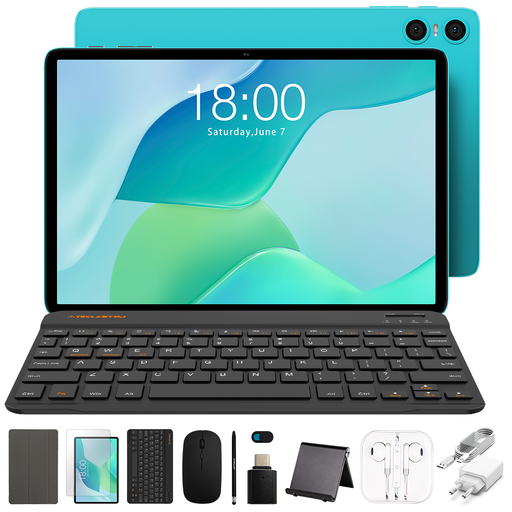
Why This Fits Their Persona: This set is a great choice for students and budget-conscious users looking for a ready-to-use, all-in-one solution. It includes not just a keyboard but a complete tablet with a keyboard and stylus, making it easy to get started with mobile productivity.
Since all components come from the same manufacturer and are designed as a set, compatibility and connection issues are minimized from the outset.
Complete package for immediate use; excellent value for an entire ecosystem.
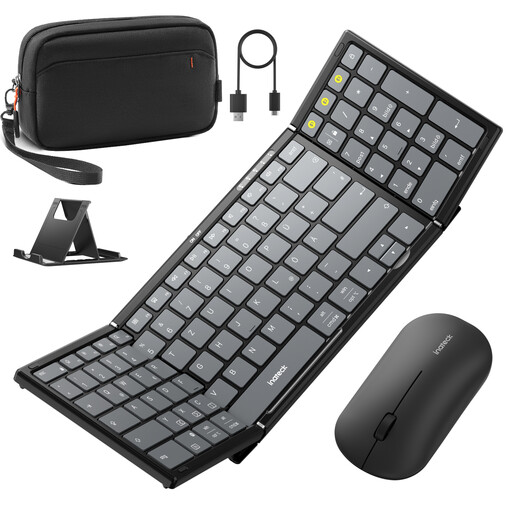
Why This Fits Their Persona: Ideal for commuters and mobile professionals who need a full-featured keyboard for demanding tasks. This keyboard and mouse set for tablets offers a comprehensive setup for maximum productivity on the go.
The explicit QWERTZ layout with 99 keys and a dedicated number pad prevents the frustration of an impractical layout. The stable Bluetooth 5.3 connection minimizes latency and dropouts.
Full-size key layout with number pad; stable Bluetooth 5.3 connection; multi-device capability for up to 3 devices.
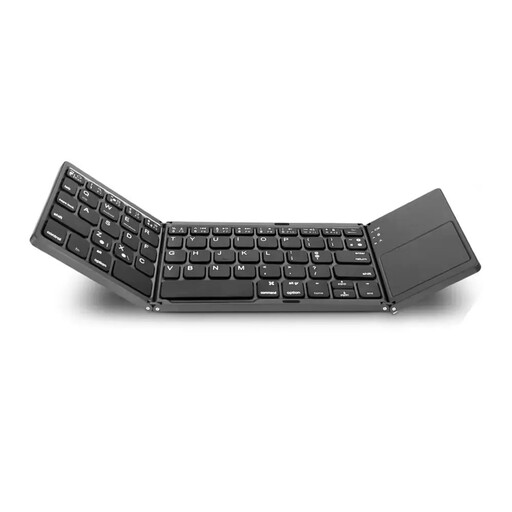
Why This Fits Their Persona: Perfect for frequent travellers and minimalists seeking an ultra-compact solution. The tri-fold design and integrated touchpad make a separate mouse redundant, saving valuable space in a carry-on or backpack.
The compact yet robust folding design is built for durability and withstands the rigours of frequent transport, countering the problem of flimsy hinges.
Integrated touchpad; extremely compact folded size; lightweight for maximum mobility.
We have compiled a complete, up-to-date list of products that fully meet these strict selection criteria and applicable regulations.
Battery life varies depending on the model, battery capacity (measured in mAh), and usage frequency. Most keyboards offer between 40 and 100 hours of active typing time per charge. Models with an integrated touchpad or backlit keys tend to have slightly higher power consumption. Recharging is typically done easily via a standard USB cable.
That largely depends on your use case. A portable keyboard with a touchpad provides a laptop-like experience and makes a separate mouse redundant, which is ideal for editing documents or navigating complex apps. However, if you primarily use the keyboard for your tablet to write emails or notes, a model without a touchpad may be more compact and lightweight.
Most modern foldable keyboards are designed to be compatible with the major operating systems—iOS, Android, and Windows. It is still advisable to check the product description for compatibility information before purchasing, especially if you own an older device. Many keyboards also support pairing with multiple devices, making it easy to switch between your tablet, smartphone, and laptop.