
Lieferung heute & morgen

Qualitätsgarantie

Willkommens-Angebote freischalten: KOSTENLOSE Lieferung | Bis zu 80 % RABATT | Kostenlose 30-Tage-JoyPlus-Testphase
App herunterladen
A foldable Bluetooth keyboard with QWERTZ layout and mouse should take up little space when you are on the move, while still making comfortable work possible. For professionals, students, digital nomads and frequent travellers, a wireless set with number pad, case and several connection options may initially seem straightforward. In practice, however, the differences often come down to layout, device compatibility and portability.
If you focus only on terms such as “compact”, “multi-device” or “fast Bluetooth”, you may overlook important details. The following criteria will help you choose a wireless keyboard with mouse that suits your everyday work routine.
A keyboard may look like a German model on the outside but actually have a QWERTY or differently printed layout. For German users, the positions of Y and Z, the labelling of umlauts and the special characters are particularly important.
Before buying, check the following:
A QWERTZ keyboard for Windows, iOS and Android can be particularly practical if you use several devices. Even so, the actual function of individual special keys may vary depending on the system.
With a foldable keyboard, it is not just the folded size that matters. Also consider the width when unfolded, the weight, the stability of the hinges and the protection provided during transport. A very slim keyboard may save space on the go, but it may also offer less space between the keys.
For frequent travellers, a keyboard and mouse set with case is a sensible choice if the charging accessories, cables and mouse can all be stored together. The Inateck model includes a magnetic protective cover, a separate carry case with handle and internal compartments. According to the product description, the case can also be used for chargers, cables or a power bank.
The term “multi-device” alone says little about how easy a product is to use. What matters is how many devices can be connected at the same time and whether switching is possible via an easily accessible button.
For a mouse, it should also be clear whether it supports Bluetooth only or additionally includes a 2.4 GHz receiver. A tri-mode mouse typically offers two Bluetooth channels as well as a 2.4 GHz connection. This can be useful if, for example, you use a tablet, smartphone and laptop at the same time.
For longer texts, spreadsheets or data entry, a full-size layout is more comfortable than a heavily stripped-down travel keyboard. A foldable keyboard with number pad, however, will inevitably be larger in design than models without a separate numeric keypad.
The Inateck model is described as having a 99-key layout, six rows of keys and a separate number pad. This makes it generally suitable for tasks involving frequent number entry. Nevertheless, check the product images and the details of the German layout before placing your order.
A Bluetooth keyboard for tablets and smartphones should not work with just one operating system. Relevant points include:
The Inateck N0158BK is stated to offer three Bluetooth channels for a PC, tablet and smartphone. According to the product description, the mouse supports tri-mode connections with 2.4 GHz and two Bluetooth channels.
An integrated or supplied stand can improve a tablet’s viewing angle. With the Inateck set, an adjustable multi-angle stand is included. This is practical when the keyboard is used on a desk in front of a tablet or smartphone.
Before travelling, you should also clarify the following:
Actual battery life depends on usage, charge level and connection type. Manufacturers’ battery-life claims should therefore be treated as a guide rather than a permanently guaranteed figure.
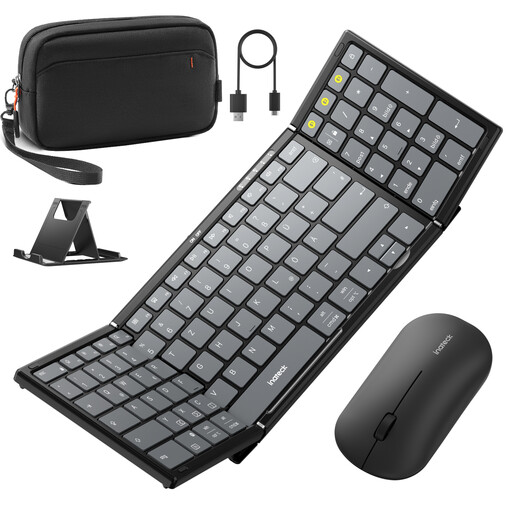
Why this product suits this profile: This set combines a foldable QWERTZ keyboard with mouse, number pad, stand and carry case in one solution for mobile workstations.
The product details explicitly state QWERTZ, Windows, iOS and Android, as well as three Bluetooth channels. This makes it possible to verify the key information before buying.
99 keys, separate number pad, Bluetooth 5.3, tri-mode mouse and separate case with internal compartments.
Why this product suits this profile: For users who place greater value on organisation, device protection and structured transport than on the smallest possible form factor.
The magnetic cover protects the keyboard during transport, while the separate case keeps the mouse, cables and charging accessories apart.
Adjustable stand, protective cover and storage solution with carry handle for mobile workstations.
Why this product suits this profile: The number pad supports data entry, while multiple connections can make it easier to switch between work and mobile devices.
Rather than a purely minimalist layout, this model includes a separate numeric keypad. The mouse also offers 2.4 GHz and two Bluetooth connections.
Separate number pad, PC-style layout and mouse with tri-mode connectivity.
We have compiled a complete, regularly updated list of products that fully meet these strict selection criteria and the safety regulations applicable in the EU.
Enable Bluetooth on your tablet, switch on the keyboard and open the Bluetooth settings. Select the device name shown. If there are several channels, you will then need to select the appropriate connection memory. A short code entry may be required during the initial setup.
Its service life depends on the folding mechanism, key usage, transport and care. Avoid putting excessive pressure on the hinges and store the device in a protective cover. If the keyboard has a rechargeable battery, you should also use the supplied or technically compatible charging cable. It is not possible to give a reliable specific usage period without individual usage data.
There are generally no monthly costs. However, you should take electricity or charging requirements into account, as well as the possible need to replace batteries. For a rechargeable set, check whether charging accessories are included. If you work on the go, you may also want to carry a power bank with a suitable USB output.