
Lieferung heute & morgen

Qualitätsgarantie

Willkommens-Angebote freischalten: KOSTENLOSE Lieferung | Bis zu 80 % RABATT | Kostenlose 30-Tage-JoyPlus-Testphase
App herunterladen
A foldable Bluetooth keyboard with mouse should take up little space on the go while still enabling productive work. For commuters, students, mobile professionals and frequent travellers, a compact keyboard and mouse set may initially seem straightforward. In practice, however, models differ significantly in terms of key layout, device switching, power supply and portability.
Anyone who focuses solely on the folding function or Bluetooth version can easily overlook important details. The following criteria will help you rule out unsuitable products and choose a portable keyboard that matches your tablet, smartphone, laptop or PC.
A keyboard can fold up and still be relatively wide or heavy. An integrated number pad, in particular, increases the usable surface area. Before buying, you should therefore check the dimensions when folded and unfolded, as well as the weight.
For a small bag, a model with a protective cover or carry case is generally more practical. A supplied stand can replace additional accessories, but it also requires storage space.
The term Bluetooth 5.3 keyboard describes the standard used, but on its own says nothing about range, operating system support or the quality of device switching. What matters is whether the model actually works with your devices and whether multiple Bluetooth channels are available.
The mouse should also be checked separately. A tri-mode mouse, for example, may support Bluetooth and 2.4 GHz wireless connectivity. Wireless operation often requires a USB receiver, which may only be connectable to a tablet via an adapter.
Anyone who regularly writes texts in Germany should specifically look for a QWERTZ Bluetooth keyboard. With a QWERTY layout, Y and Z are swapped, among other differences; special characters and umlauts may also be arranged differently.
The product description “QWERTZ” should be checked against the product images and technical specifications. You should also clarify whether function keys are available for Windows, iOS and Android. Not every keyboard for Windows iOS Android offers all special functions on every system.
A compact layout is often sufficient for longer texts. However, anyone who works with spreadsheets, enters invoices or types lots of numbers will benefit from a wireless keyboard with number pad. With foldable models, a number pad is not a given, as it requires additional width.
Look out for:
For working with a smartphone, tablet and laptop, a keyboard with multiple memory slots is a sensible choice. Ideally, it should have a clearly labelled switch key, so you do not have to pair it again every time.
The mouse should also specify how many devices can be stored simultaneously. “Multi-device” and “tri-mode” are not uniformly protected quality terms. You should therefore check whether the device genuinely supports connection via two Bluetooth channels as well as 2.4 GHz wireless.
An integrated battery reduces the need for disposable batteries, but it must be charged regularly. Important considerations include the charging port, the supplied cable and whether you can continue working while the device is charging. For longer journeys, a carry case with separate compartments for cables, the charger and a power bank is also recommended.
An adjustable stand can help you position your tablet. It should be stable enough to prevent the device from slipping while you type. The maximum device weight and supported dimensions are also details you should check before buying.
The following selection categorises the available products according to their practical use. The Inateck model is the actual keyboard and mouse set. The other products are suitable as additions for users who already own a portable keyboard or who need a separate mouse or mouse pad solution for specific workplace requirements.
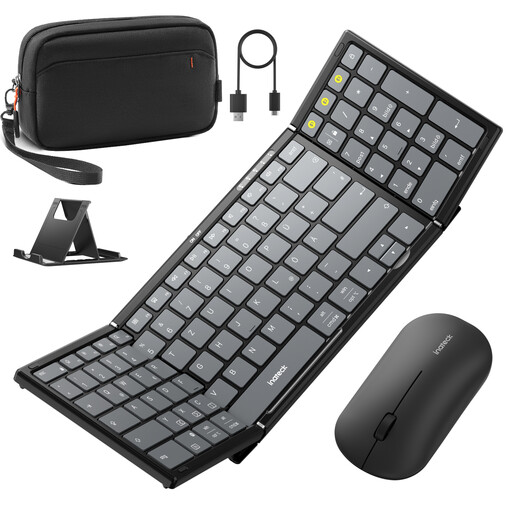
Why this product suits this profile: This set combines a foldable QWERTZ keyboard with number pad, mouse, adjustable stand and carry case. It is aimed at users who want to work with several devices while on the go.
The specifications state that the keyboard has three Bluetooth channels and that the tri-mode mouse supports 2.4 GHz as well as two Bluetooth connections. This makes device switching clearer than with basic single-channel models.
99-key layout with number pad, compatibility with Windows, iOS, iPadOS and Android, plus carry case and stand.
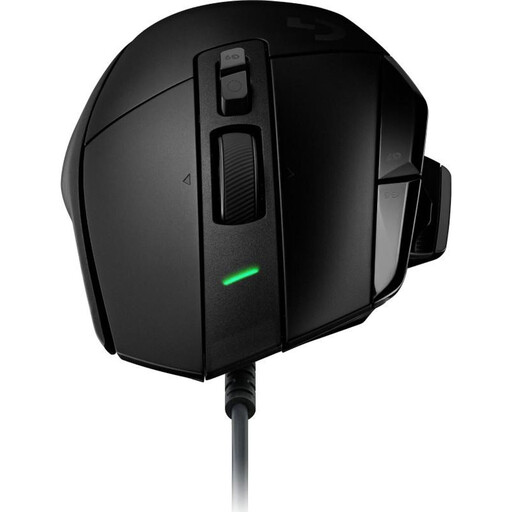
Why this product suits this profile: As an addition to a portable keyboard, this wired mouse is ideal for users who value numerous programmable buttons and a precisely adjustable sensor.
The connection is made via USB cable. This removes the reliance on a Bluetooth battery and wireless pairing when used with compatible PCs. A suitable adapter may be required for tablets.
13 programmable buttons, a HERO-25K sensor with 100 to 25,600 DPI and five onboard memory profiles, according to the product description.
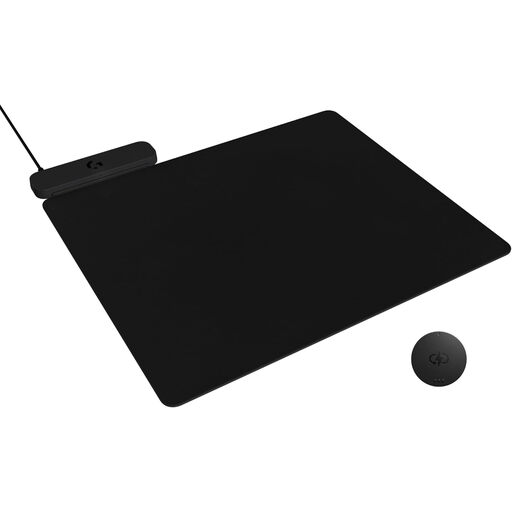
Why this product suits this profile: For users with a compatible wireless Logitech G mouse, this mouse pad can handle power supply at a fixed workstation. It is an addition, not part of a keyboard and mouse set.
The product description explicitly states that a compatible Logitech G mouse and its separate wireless receiver are required. This makes it easier to assess the accessories you will actually need before buying.
Wireless charging function, 3.5-millimetre profile and a stated surface area of 34.5 × 28.4 centimetres.
We have put together a complete, regularly updated list of products that fully meet these strict selection criteria and the safety regulations applicable in the EU.
Not every model is fully compatible with every tablet. Before buying, check support for iPadOS, Android or Windows, as well as the available function keys. Tablets without a USB-A port may require an adapter or docking station to use a 2.4 GHz mouse.
A number pad is practical for spreadsheets, data entry and accounting applications. For text-only work and short messages, a smaller layout may be sufficient. However, the number pad generally increases the keyboard’s width and packed dimensions.
Battery life depends on battery capacity, lighting, usage time and connection type. As specific figures vary from product to product, buyers should check the manufacturer’s stated battery life and charging time. Carrying a USB cable is sensible if you regularly use the devices while travelling.