
Lieferung heute & morgen

Qualitätsgarantie

Willkommens-Angebote freischalten: KOSTENLOSE Lieferung | Bis zu 80 % RABATT | Kostenlose 30-Tage-JoyPlus-Testphase
App herunterladen
For professionals, students, and digital nomads, working efficiently on the go is a constant challenge. Typing on a tablet or smartphone touchscreen is often cumbersome and error-prone. A foldable keyboard promises a solution, but the market is flooded with products whose weaknesses only become apparent in daily use.
As your Joybuy Product Recommendation Officer, I'm here to help you separate the wheat from the chaff. Instead of falling for marketing promises, we'll focus on the critical features that define a great travel keyboard. This guide will show you the three most common pitfalls to avoid and what to look for to make an informed decision.
Many users invest in a portable keyboard only to set it aside in frustration after a short time. The causes are often the same design and functional flaws.
To avoid the issues mentioned above, you should check three core technical parameters before buying. These define the real-world usability and longevity of your investment.
The quality of the wireless connection is the foundation of any good foldable Bluetooth keyboard. Look for models that support at least the Bluetooth 5.0 standard, or even better, Bluetooth 5.3. Newer standards offer a more stable connection, greater range, and lower latency, which minimises interference in busy environments like cafés or airports.
Equally important is the ability to pair multiple devices simultaneously and switch between them at the touch of a button. A good keyboard should offer at least three separate Bluetooth channels to ensure a smooth workflow between your PC, tablet, and smartphone.
A good travel keyboard should replicate the typing feel of a full-sized keyboard as closely as possible. A standard-sized layout with six rows of keys and sufficient key spacing is crucial for comfortable and fast typing.
For users who frequently work with numbers, a dedicated numeric keypad is indispensable. It eliminates the cumbersome process of using the number row and significantly boosts efficiency during data entry. Make sure the layout corresponds to the standard QWERTY format to avoid having to relearn your typing habits.
The ideal setup for mobile work goes beyond just the keyboard. A well-thought-out kit can be the difference between a disorganised backpack and a mobile office. A wireless keyboard and mouse set is often the most practical solution. Check if a sturdy carrying case for protection and an adjustable stand for your tablet or smartphone are included. Such mobile work accessories are what turn a product into a complete solution.
Based on the criteria above, we have identified a few products that are particularly well-suited for specific user profiles.
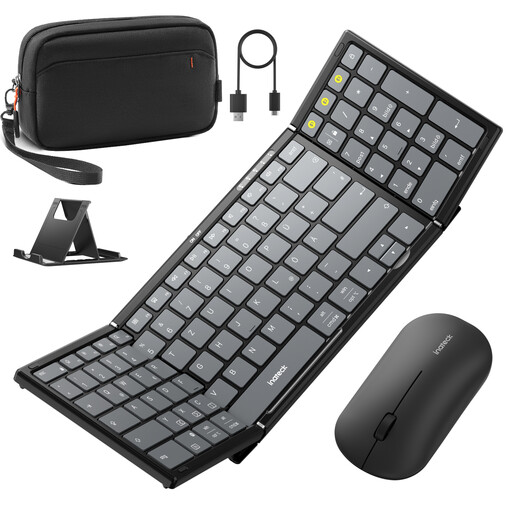
Why This Fits Their Persona: This set is designed for users who need a ready-to-use, all-in-one solution for working on the go. It includes a keyboard, mouse, stand, and a carrying case, which simplifies organisation and maximises productivity.
The keyboard uses Bluetooth 5.3 for a stable connection. The 99-key layout with a numeric keypad prevents any loss in productivity. Three Bluetooth channels allow for seamless switching between devices.
All-in-one package with keyboard, mouse, stand, and case. Tri-mode mouse (2.4G + Dual Bluetooth) for maximum flexibility.
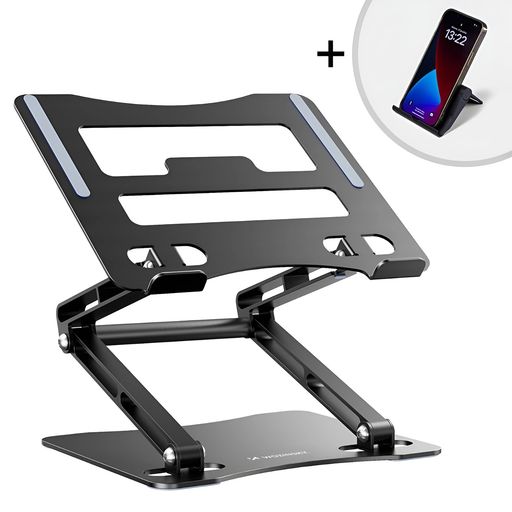
Why This Fits Their Persona: For users who prioritise ergonomics and healthy posture. This stand raises a laptop or tablet to eye level while being foldable and portable, ideal for a flexible home office or co-working spaces.
It directly addresses the pitfall of an unergonomic mobile setup. Instead of risking neck pain from a screen that's too low, the dual-axis adjustment allows for customised height and angle settings.
Robust aluminum alloy construction. Integrated fan for active laptop cooling. Foldable and compact for transport.

Why This Fits Their Persona: For users who find a single laptop screen insufficient. This extension provides a second display in an extremely lightweight and portable format, ideal for multitasking, data analysis, or presentations on the move.
Solves the problem of limited screen real estate, one of the biggest productivity killers in mobile work. Instead of switching between windows, it enables a true dual-screen workflow, just like in the office.
Extremely lightweight (600g) and thin (4.5mm). Plug & Play functionality via USB-C or HDMI. Compatible with laptops from 13 to 17 inches.
An ergonomic workspace is more than just a keyboard. Discover our selection of accessories that meet the criteria for stable and comfortable work.
Most multi-device keyboards have dedicated keys (often F1-F3 or marked with Bluetooth symbols) to switch between channels. Put the keyboard into pairing mode, select the keyboard on your first device (e.g., tablet) and pair it. Then, press the key for the second channel, put the keyboard into pairing mode again, and connect it to your second device (e.g., smartphone). After that, you can switch between devices simply by pressing the respective channel key.
Suitability heavily depends on the model. Look for keyboards with a near-standard-sized layout, noticeable key travel, and a stable, non-wobbling construction when unfolded. Models with an integrated, slightly angled design or those used in combination with an adjustable stand can improve ergonomics and are a good choice for extended writing sessions.
Check the product description for explicit compatibility with your tablet's operating system (e.g., iPadOS, Android). It's important that not only the letters but also the function keys (e.g., for volume, brightness, media player control) work correctly. A good keyboard for tablets will offer a layout that supports the specific shortcuts and functions of the respective operating system.