Football with friends in front of the TV
If you want to play with others on one device, check that the game has a local mode and that you have enough compatible controllers.


If you want to play local football matches and play your own media on a console, the PS5 and Xbox Series X|S are the obvious choices. Sony describes USB media playback on the PS5, while Microsoft supports playback through the Xbox Media Player app. You’ll also need to consider local game modes, compatible controllers and supported file formats. The Switch 2 is a better fit if you want to play in different locations and don’t need to play your own files from USB.
If you want to play with others on one device, check that the game has a local mode and that you have enough compatible controllers.
If you want to play videos or music from a USB drive, check how playback works and which file formats are supported.
If you want to play without a TV, tabletop and handheld modes are important. Check separately whether your specific console supports playback of your own media.
A good fit if: you want to play local football matches and USB media on the same console.
Bear in mind: USB files must be supported, and a Digital Edition won’t play discs directly.
A good fit if: you want to use the Xbox Media Player app to play your own files, as well as play local football matches.
Bear in mind: not every file or codec combination is supported. The Series S and digital Series X models don’t have a disc drive.
A good fit if: playing football in tabletop or handheld mode matters more than being able to play your own USB media.
Bear in mind: EA describes local play within the Switch family, but not cross-play with PlayStation or Xbox.
| Priority | What to check before buying | Who is it most important to? |
|---|---|---|
| Local football | Check the game version, local multiplayer mode, compatible controllers and what’s included separately. | If we want to play together on one device, I first check for the right mode and enough controllers. Around 36% of consumers put local multiplayer at the top of their list. |
| Your own media files | Check your files and codecs against the instructions for the console you’re considering. | If I want to play my videos or music from USB, I check the file formats in advance. Around 29% of consumers give playback of their own media top priority. |
| Where you play and portability | Decide whether you’ll mainly play on a TV or also in tabletop and handheld modes. | If we want to play without a TV too, being able to play in different places matters most to me. Around 21% of consumers put portability at the top of their list. |
| Discs and downloads | Check the console model, disc drive and, for Game-Key Cards, the initial download and storage required. | If I want to use discs I already own or avoid extra purchases, I compare the exact model. Around 14% of consumers make physical media and potential extra purchases their top priority. |
Playback depends on the media player and the file itself. A compatible file extension alone doesn’t guarantee that a video or codec will be supported.
Check your files against Sony’s PS5 guidance or Microsoft’s information about the Media Player app.
Depending on the file, you may need to spend extra time preparing or converting it.
Nintendo explains that a Switch 2 Game-Key Card doesn’t contain game data. The data is downloaded over the internet the first time you start the game.
Check the label on the specific game edition and allow for the required storage space and initial download.
You’ll need an internet connection for the initial download and enough free storage space.
The exact model determines whether you can play compatible game or film discs you already own. The Xbox Series S doesn’t have a disc drive, while the PS5 Pro is available as an all-digital console.
Before buying, compare the full model and variant name with your disc collection. Some compatible PS5 models may need a separately sold disc drive.
PS5 consoles for football on your TV and for playing your own videos and music from USB, as described by Sony. Depending on the model, they come with or without a disc drive.
Xbox Series X|S consoles for football at home and playing your own media through Microsoft’s Media Player app.
Switch 2 for playing football in different places, if TV, tabletop or handheld play is your priority.
A selection of Joybuy products for playing on a Switch, if you want to move between your TV and different places.
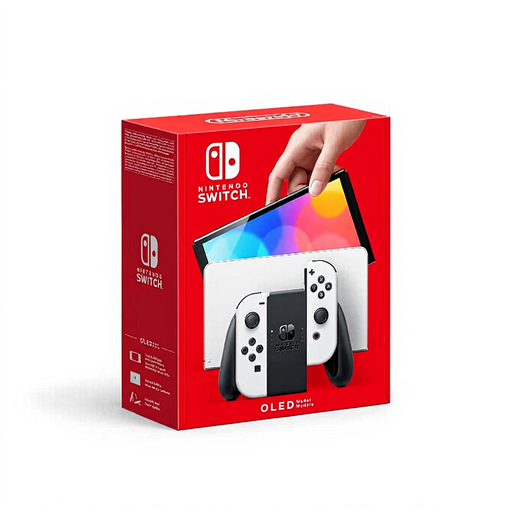 No image available
For playing together in different places. Before buying, check that the specific football game version supports the local mode you want.
7-inch OLED screen, 64 GB of internal storage, detachable Joy-Con controllers, and TV, tabletop and handheld modes.
If playing your own USB media is a deciding factor, check that this specific model supports it before buying.
No, not simply because the console has a USB port. Sony describes support for certain formats on the PS5, while Microsoft lists the file types supported by the Xbox Media Player app. Check your files and codecs against the instructions for the console you choose.
It depends on the specific game version and controls. For local multiplayer on one Switch, EA describes using a second connected Joy-Con or Pro Controller, or sharing the Joy-Con controllers. Check the controller requirements for your chosen platform and game mode.
Yes, for the initial start-up and download. Nintendo explains that the card doesn’t contain game data, which is downloaded over the internet the first time you start the game. According to Nintendo, once downloaded, the game can be started with the card inserted even without an internet connection. This doesn’t mean that every game mode works offline.
There’s no blanket subscription requirement for every local mode. EA describes playing together on the same Switch, while Sony explicitly requires PlayStation Plus for online multiplayer. Check the requirements for the specific game mode.
The USK lists EA SPORTS FC 27 for Nintendo Switch as rated for ages 12 and over under § 14 JuSchG, and notes chats and in-game purchases involving random items. Check the rating for the platform version you’re actually buying and use parental controls if needed. The rating mentioned here doesn’t automatically apply to every platform version.